USD ($)
$
United States Dollar
Euro Member Countries
India Rupee
د.إ
United Arab Emirates dirham
ر.س
Saudi Arabia Riyal

Data Parsing, Reporting & Workflow Automation

Lesson 36/44 | Study Time: 20 Min

In cybersecurity and IT operations, the efficient handling of large volumes of data is crucial for effective decision-making, incident response, and compliance.

Data parsing, reporting, and workflow automation streamline the transformation of raw outputs from tools and systems into structured, actionable information.

Parsing converts unstructured or semi-structured data into usable formats, while reporting communicates insights clearly to stakeholders.

Workflow automation ties together these processes, integrating multiple tools and tasks into seamless operations that reduce manual effort and human error. 

Data Parsing: Extracting Meaningful Information

Data parsing involves breaking down data streams or logs into structured components that enable further analysis.


Types of Data Parsed:


1. Logs from security devices (firewalls, IDS/IPS, endpoint protections).

2. Scan and vulnerability assessment outputs.

3. Network traffic captures and packet data.

4. API responses and raw application data.
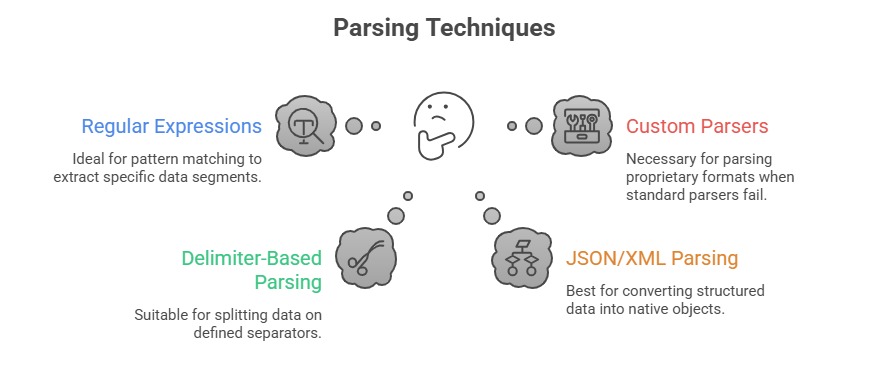


Tools & Libraries:


1. Python (re, json, xml.etree.ElementTree)

2. Bash (awk, sed, cut)

3. PowerShell (ConvertFrom-Json, Select-String)

4. Log parsing frameworks such as Logstash and Fluentd

Reporting: Summarizing and Presenting Insights

Reporting aggregates parsed data to generate clear, insightful outputs suitable for various audiences—from technical analysts to management.


Report Formats:


1. Tabular CSV or Excel sheets for detailed review.

2. Dashboards using BI tools (PowerBI, Grafana).

3. HTML or PDF documents with charts and summaries.

4. Alerts or notifications for critical findings.


Effective Reporting Elements:


1. Clarity: Clean layouts and understandable language.

2. Relevance: Focus on actionable and high-priority data.

3. Contextualization: Add metadata like timestamps, source information, and trend insights.

4. Automation: Regular, scheduled report generation without manual input.


Common Reporting Tools:


1. Scripting languages generating CSV/Excel (Pandas in Python).

2. Report generation libraries (ReportLab for PDFs, Jinja2 with HTML).

3. Cloud-native services (AWS QuickSight, Azure Monitor).

4. Specialized security platforms with built-in reporting.

Workflow Automation: Integrating and Orchestrating Processes

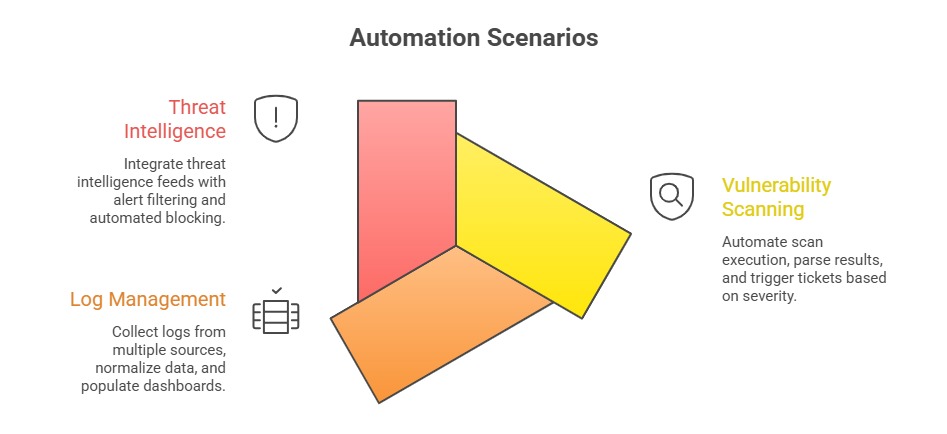
Workflow automation connects parsing, scanning, reporting, and alerting components to establish unified processes that operate with minimal human intervention.

Benefits: Increased operational speed and consistency, enabling tasks to be executed quickly and uniformly. It also reduces human errors and fatigue while improving reproducibility and scalability across processes.

As a result, organizations achieve faster incident detection and response, strengthening their overall security posture.

Automation Tools:


1. Orchestration platforms (Ansible, SaltStack).

2. Workflow engines (Apache Airflow, Jenkins pipelines).

3. Scripting languages with libraries for API integration (Python Requests, PowerShell Web Cmdlets).

4. Cloud-native automation (AWS Lambda, Azure Logic Apps).

Jake Carter

Jake Carter

Product Designer
Profile

Class Sessions

1- Deep Passive Reconnaissance 2- Active Reconnaissance Techniques 3- Traffic Analysis & Packet Crafting Fundamentals 4- Identifying Attack Surface Expansion Paths 5- Advanced Network Mapping & Host Discovery 6- Bypassing Firewalls & IDS/IPS 7- Man-in-the-Middle Attacks (ARP Spoofing, DNS Manipulation) 8- VLAN Hopping, Port Security Weaknesses, and Network Segmentation Testing 9- Windows & Linux Privilege Escalation: Advanced Enumeration & Kernel-Level Attack Paths 10- Exploiting Misconfigurations & File/Service Permission Abuse 11- Bypassing UAC, sudo, and Restricted Shells 12- Credential Dumping & Token/Key Abuse 13- Persistence Techniques (Registry, Scheduled Tasks, SSH Keys) 14- Tunneling & Port Forwarding (SOCKS Proxy, SSH Tunnels, Chisel Basics) 15- Pivoting in Multi-Layered Networks 16- Data Exfiltration Concepts & OPSEC Considerations 17- Server-Side Attacks (Advanced SQL Injection, Template Injection, Server-Side Template Injection - SSTI) 18- Authentication & Authorization Attacks (JWT Abuse, Session Misconfigurations) 19- SSRF, XXE, Deserialization & Logic Flaw Identification 20- Advanced API Security Testing (Token Handling, Rate-Limiting Bypass Concepts) 21- Wi-Fi Security Attacks (WPA3 Considerations, Enterprise Networks) 22- Rogue APs & Evil Twin Concepts 23- Mobile App Security Overview (Android & iOS Attack Surface, Static/Dynamic Testing) 24- IoT Device Weaknesses (Firmware Analysis Basics, Insecure Protocols, Hardcoded Credentials) 25- Cloud Service Models & Shared Responsibility (AWS, Azure, GCP basics) 26- Cloud Misconfigurations (IAM, Storage Buckets, Exposed Services) 27- Container & Kubernetes Security (Namespaces, Privilege Escalations, Misconfigurations) 28- Virtualization Weaknesses & Hypervisor Attack Concepts 29- Malware Behavior Analysis (Dynamic vs Static) 30- Exploit Development Concepts (Buffer Overflow Fundamentals, Shellcode Basics) 31- Reverse Engineering Essentials (Strings, Disassembly, Logic Flow Understanding) 32- Detection & Evasion Techniques (Sandbox Evasion Concepts) 33- Automating Recon & Scans (Python/Bash/PowerShell Basics) 34- Writing Custom Enumeration Scripts 35- Tool Customization (Modifying Payloads, Extending Existing Tools Ethically) 36- Data Parsing, Reporting & Workflow Automation 37- Threat Intelligence Integration & TTP Mapping 38- Attack Path Mapping (MITRE ATT&CK Alignment) 39- Social Engineering Campaign Planning (Ethical Boundaries & Simulations) 40- Blue Team Evasion Concepts (OPSEC, Log Evasion Principles) 41- Structuring Professional Penetration Test Reports 42- Mapping Findings to Risk Ratings (CVSS, Impact Assessment) 43- Presenting Findings to Executives and Technical Teams 44- Prioritizing Remediation and Security Hardening Guidance