User Account Control (UAC) in Windows, sudo in Linux, and restricted shells are critical security mechanisms designed to prevent unauthorized privilege escalation and restrict user actions.
These controls enforce access limitations, requiring explicit permission or elevated privileges to execute sensitive operations.
However, attackers and penetration testers may attempt to bypass these restrictions to gain administrative or root access, escalate privileges, or escape confined environments.
Bypassing User Account Control (UAC) in Windows
UAC is a Windows security feature that limits application privileges and prompts users for consent when administrative access is needed. It minimizes the risk of malware or unauthorized tools executing with full privileges silently.
Common UAC Bypass Techniques
Below are some of the most frequently observed techniques attackers use to circumvent UAC restrictions.
1. Auto-Elevated Trusted Binaries: Leveraging Windows binaries (e.g., fodhelper.exe, computerdefaults.exe) that auto-elevate without triggering prompts. Attackers exploit these to run malicious payloads with elevated rights.
2. Registry Hijacking: Altering registry keys related to application execution or UAC behavior to bypass confirmation dialogs.
3. DLL Hijacking: Placing malicious DLLs in paths loaded by elevated processes to execute code with elevated privileges.
4. COM Object Hijacking: Exploiting COM interfaces registered for auto-elevation to run arbitrary code.
5. Event Viewer Bypass: Using Event Viewer’s auto-elevation characteristics to launch elevated commands stealthily.
Mitigation Strategies
Regularly patching Windows systems to close known vulnerabilities and prevent attackers from leveraging outdated components.
Limiting access to auto-elevated binaries helps reduce unintended privilege escalation opportunities, while monitoring registry and COM object modifications allows early detection of suspicious changes.
Additionally, employing endpoint protection tools and implementing application whitelisting strengthens overall defense by blocking unauthorized executables and restricting malicious activity.
Bypassing sudo in Linux
sudo enables authorized users to execute commands with root privileges, typically requiring password authentication. It is a primary mechanism to control privilege escalation on Linux systems.
Common sudo Bypass Techniques
The following techniques highlight how adversaries frequently manipulate sudo to escalate privileges.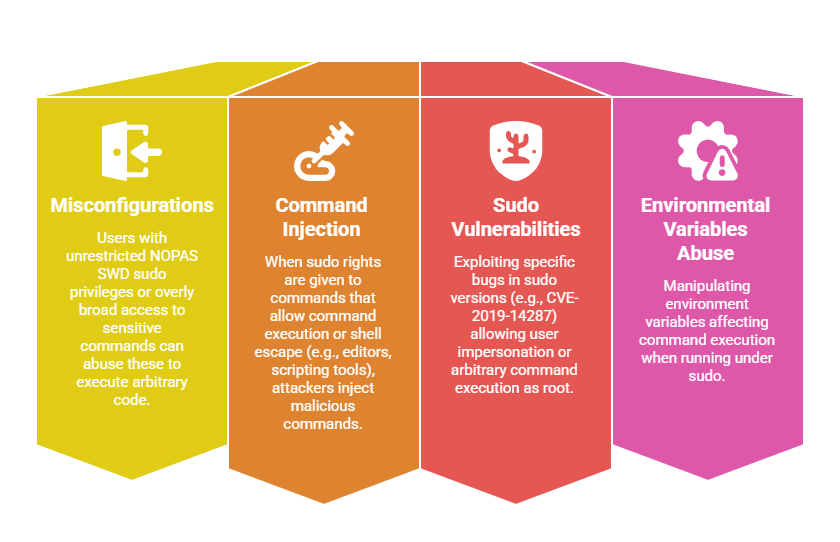
Mitigation Strategies
Limiting sudo privileges according to the principle of least privilege, ensuring users only have the exact access required for their tasks.
Avoiding the use of NOPASSWD entries unless absolutely necessary helps maintain accountability and prevents unauthorized elevated actions.
Regularly updating sudo and monitoring how privileges are used strengthens security and helps detect misuse early.
Additionally, auditing the sudoers configuration to ensure only safe and approved commands are allowed is essential for maintaining a controlled and secure environment.
Bypassing Restricted Shells
Restricted shells (e.g., rbash, rsh) limit user capabilities by disabling commands like cd, exec, or restricting access to certain commands to reduce risk from low-privilege or untrusted users.
Common Bypass Techniques
The techniques listed here demonstrate how restricted mode can be easily evaded when misconfigured. Attackers commonly rely on custom paths, shell built‑ins, or editor-based escapes.
1. Invoking Non-Restricted Shells: Using commands like bash, sh, python, or perl to spawn an unrestricted shell.
2. Editing Environment Variables or PATH: Adding directories with custom scripts or binaries to execute unrestricted commands.
3. Using Shell Built-ins: Accessing built-in commands or scripting to bypass restricted commands.
4. Exploiting Unrestricted File Editors or Processes: Launching shells or executing scripts from editors (vi, nano) or other allowed programs.
Mitigation Strategies
Creating carefully crafted shell profiles that restrict the ability to spawn other shells, reducing the risk of privilege escalation. Limiting executable paths and monitoring environment variables further helps prevent unauthorized command execution.
Implementing chroot jails or containerization provides stronger confinement by isolating user activities from critical system components.
Regularly auditing user access and reviewing shell configurations ensures that security policies are enforced and potential vulnerabilities are identified promptly.

Class Sessions
Sales Campaign

We have a sales campaign on our promoted courses and products. You can purchase 1 products at a discounted price up to 15% discount.