Every data analysis project begins with the same fundamental step, getting your data into Python so you can work with it. Before any cleaning, exploration, or visualization can happen, the dataset must first be successfully loaded into your working environment.
In the real world, data comes in many different formats and from many different sources — a CSV file exported from a database, an Excel report shared by a colleague, a table scraped from a website, or a dataset pulled directly from an online repository.
Knowing how to load data from these various sources confidently and correctly is the very first practical skill every data analyst must master, because even the most sophisticated analysis cannot begin until the data is properly in place.
Common Data Sources and Formats
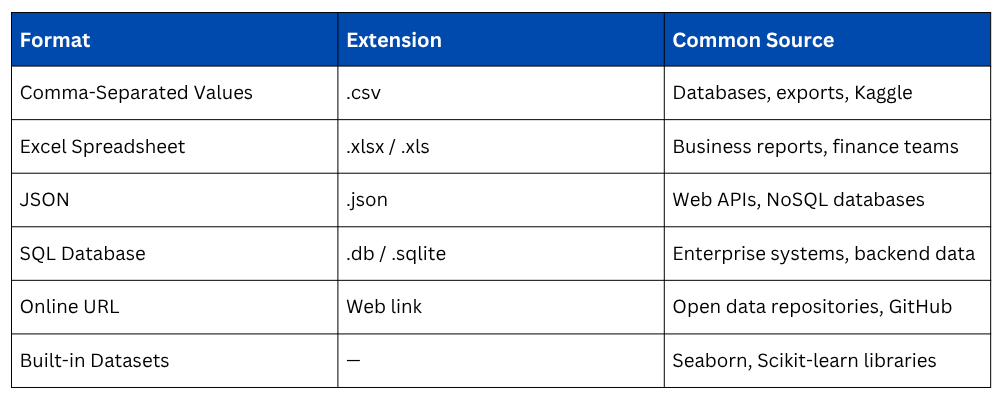
Real-world data arrives in a variety of formats depending on where it originates. Understanding the most common ones prepares you for the majority of situations you will encounter in practice.
Loading CSV Files
CSV is by far the most common data format in data analysis. Pandas makes loading a CSV file straightforward with a single line of code.

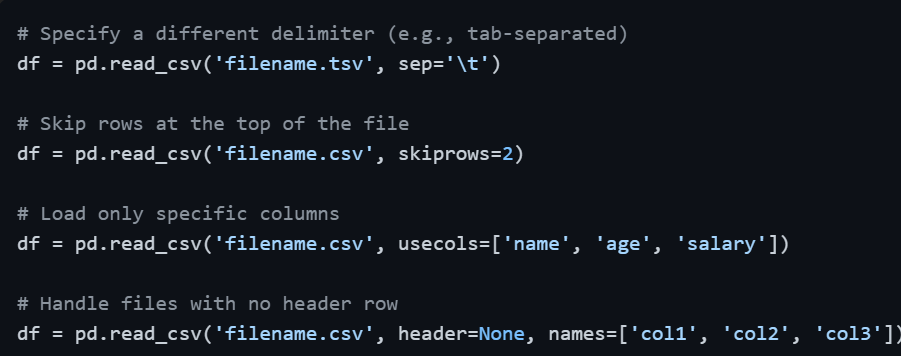
CSV files do not always come perfectly formatted. Pandas provides several useful parameters to handle real-world variations.
After loading, always immediately inspect the data to confirm it loaded correctly.

Loading Excel Files
Excel files are extremely common in business environments. Pandas handles both .xlsx and .xls formats using read_excel(). Note that loading Excel files requires the openpyxl library to be installed.

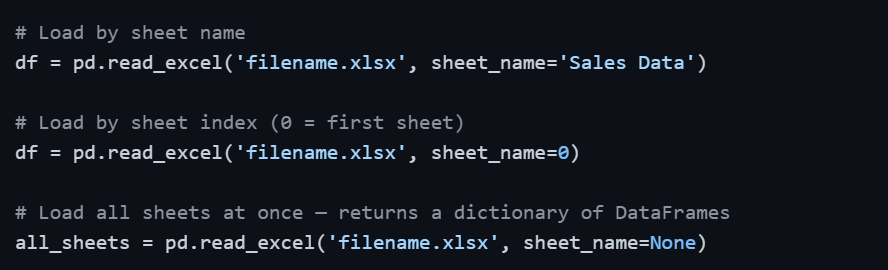
Excel workbooks often contain multiple sheets. You can target a specific sheet by name or index.
Loading JSON Files
JSON is the standard format for web APIs and many modern data pipelines. Pandas handles flat JSON structures directly.

For nested JSON structures — where data is organized in multiple levels, you will need to flatten it first.

Loading Data from a URL
One of the most convenient features of Pandas is the ability to load datasets directly from a web URL, no manual downloading required. This works for any publicly accessible CSV or data file online.

This is particularly useful when working with open datasets hosted on platforms like GitHub, government data portals, or public repositories, the data is always loaded fresh from the source.
Loading Data from a SQL Database
In professional environments, data often lives in relational databases rather than flat files. Pandas can query a SQL database and load results directly into a DataFrame.

This approach works with any SQL-compatible database by simply replacing the connection object — SQLite for local databases, and libraries like psycopg2 or sqlalchemy for PostgreSQL, MySQL, and other enterprise databases.
Using Built-in Datasets
When learning or prototyping, built-in datasets from Seaborn and Scikit-learn are extremely convenient — no files needed, no downloads required, ready to use immediately.
Seaborn built-in datasets

Scikit-learn built-in datasets

These built-in datasets are clean, well-structured, and widely used in tutorials, making them ideal for practice and learning.
First Steps After Loading Any Dataset
Regardless of the source or format, the moment a dataset is loaded, a standard set of inspection commands should always be run before proceeding with any analysis.

This immediate inspection routine catches problems early such as wrong data types, unexpected missing values, extra unnamed columns from poor formatting, or data that did not load fully — saving significant time before deeper analysis begins.
Common Issues When Loading Real Datasets
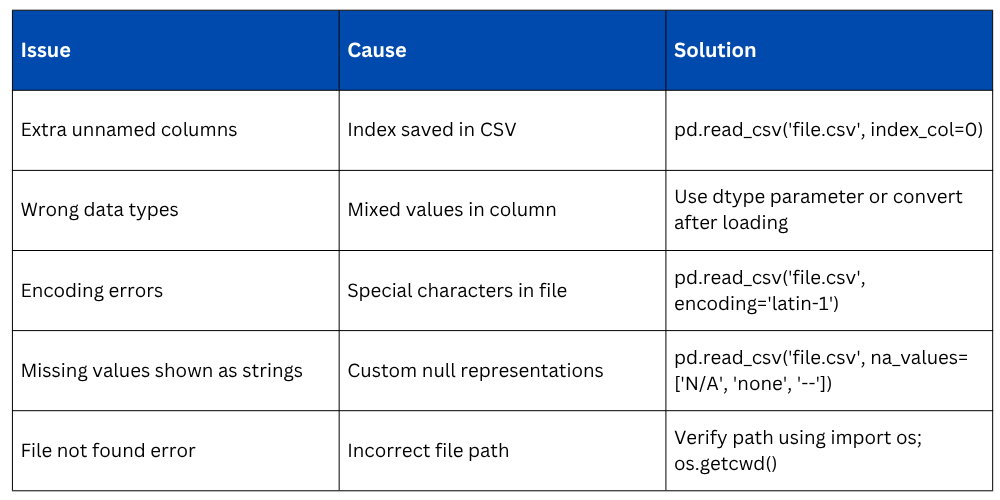
Real-world files are rarely perfect. These are the most frequently encountered issues and how to address them.

Class Sessions
Sales Campaign

We have a sales campaign on our promoted courses and products. You can purchase 1 products at a discounted price up to 15% discount.