Raw data is rarely ready for analysis straight out of the box. It often comes with inconsistent formatting, duplicate records, incorrect data types, unwanted whitespace, and columns that need restructuring.
Data cleaning and transformation is the process of fixing these issues and reshaping your data into a form that is accurate, consistent, and analysis-ready.
In practice, data professionals spend a significant portion of their time on this step, as the quality of your analysis is directly tied to the quality of your data.
Setting Up Sample DataFrame
import pandas as pd
import numpy as np
data = {
'Name': [' Alice ', 'bob', 'CAROL', 'David', 'David', 'Eva'],
'Age': [28, 34, 29, 41, 41, 'thirty-six'],
'Department': ['Marketing', 'finance', 'IT', 'HR', 'HR', 'Finance'],
'Salary': [52000, 67000, 71000, 48000, 48000, 74000],
'JoiningDate':['2021-03-15', '2019/07/22', '01-11-2020', '2017-05-10', '2017-05-10', '2018-09-30']
}
df = pd.DataFrame(data)
This DataFrame intentionally contains common real-world issues — extra spaces, inconsistent casing, duplicates, wrong data types, and inconsistent date formats, all of which we will fix step by step.
Removing Duplicate Records
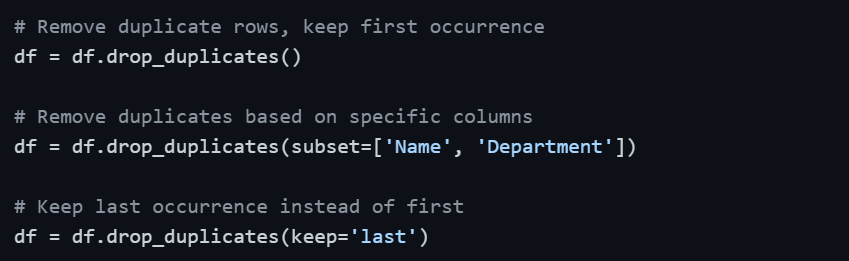
Duplicate rows are one of the most common data quality issues, especially when data is merged from multiple sources or exported from databases. They silently inflate counts and skew statistics.
Detecting Duplicates
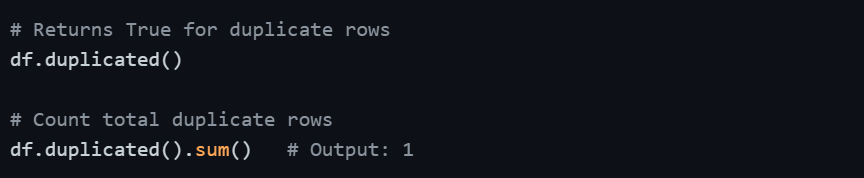
Viewing Duplicate Rows

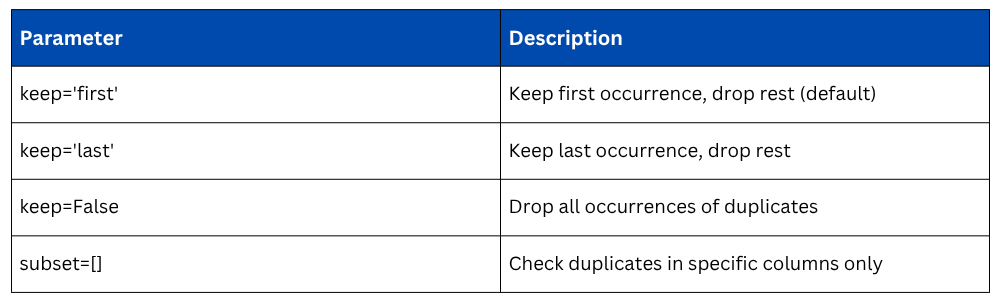
Removing Duplicates
Fixing Inconsistent Text — Whitespace and Casing
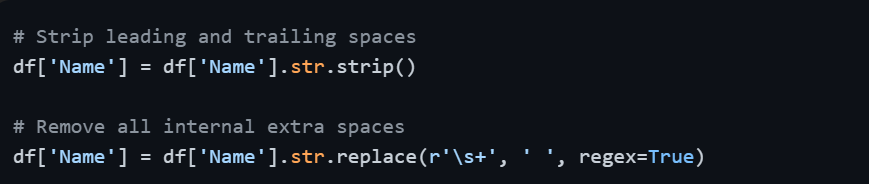
Text data is highly prone to inconsistency. A column with 'finance', 'Finance', and 'FINANCE' will be treated as three different categories, which breaks grouping and filtering operations. Similarly, extra spaces cause silent mismatches.
Removing Whitespace
Standardizing Letter Case
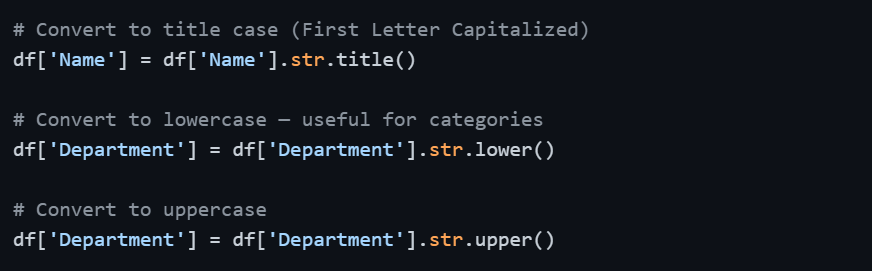
After applying .str.lower() to Department, values like 'finance', 'Finance', and 'FINANCE' all become 'finance' — consistent and ready for grouping.
Other Useful String Operations
# Replace specific text within a column
df['Department'] = df['Department'].str.replace('fin', 'Finance', regex=False)
# Check if column contains a substring
df['Name'].str.contains('al', case=False)
# Split a column into two
df[['First', 'Last']] = df['Name'].str.split(' ', expand=True)
Fixing Incorrect Data Types
Pandas sometimes misreads data types during import, numbers stored as strings, dates stored as objects, or boolean-like columns stored as integers. Operating on wrong data types produces errors or incorrect results.
Checking Current Data Types

Converting Data Types
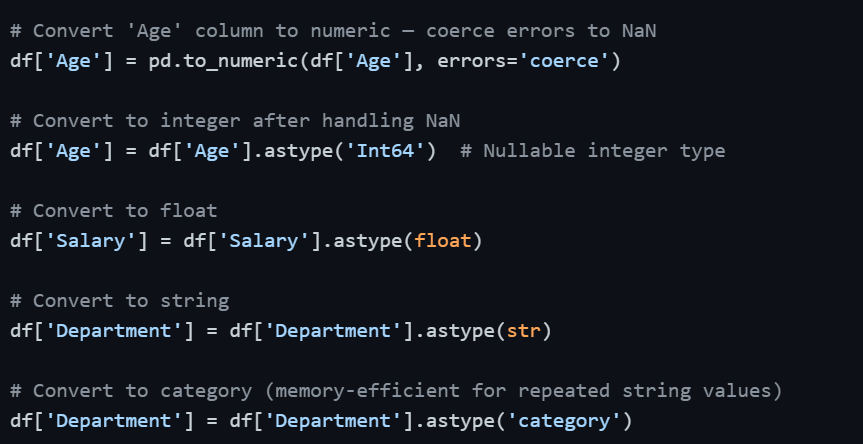
Using errors='coerce' in pd.to_numeric() is particularly important — it converts any value that cannot be converted to a number (like 'thirty-six') into NaN instead of raising an error.
Handling Inconsistent Date Formats
Dates are notoriously inconsistent in raw data. The same dataset might have '2021-03-15', '2019/07/22', and '01-11-2020' in the same column. Pandas' pd.to_datetime() intelligently handles most formats automatically.
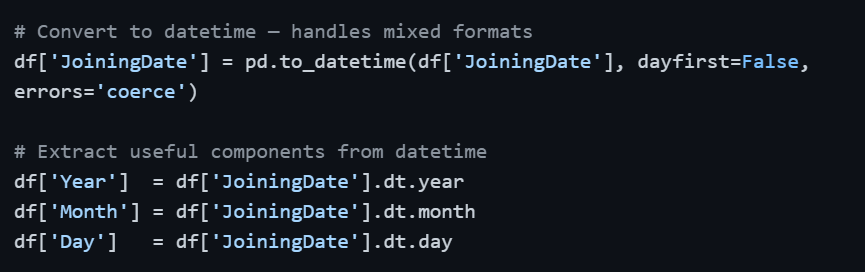
Once converted to datetime64, you can perform date arithmetic, sort chronologically, filter by date ranges, and extract time components — none of which is possible when the column is stored as a plain string.
Renaming Columns
Clean, consistent column names make your code more readable and prevent errors, especially when column names have spaces, special characters, or inconsistent casing.
.png)
Adding and Dropping Columns
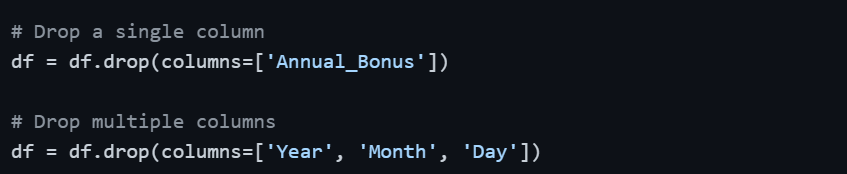
Transformation often involves creating new columns derived from existing ones or removing columns that are no longer needed.
Adding a New Column
.png)
Dropping Columns
Applying Custom Transformations — apply() and map()
When built-in methods are not enough, apply() lets you run any custom function across rows or columns, while map() works on individual Series values.
# Apply a custom function to a column
def categorize_salary(salary):
if salary >= 70000:
return 'High'
elif salary >= 50000:
return 'Medium'
else:
return 'Low'
df['Salary_Band'] = df['Salary'].apply(categorize_salary)
# Using lambda for simple transformations
df['Salary_K'] = df['Salary'].apply(lambda x: x / 1000)
# map() — replace values using a dictionary
df['Dept_Code'] = df['Department'].map({
'marketing': 'MKT',
'finance': 'FIN',
'it': 'IT',
'hr': 'HR'
})
Complete Cleaning Workflow — Putting It All Together
In practice, data cleaning follows a logical, sequential order. Here is a concise end-to-end cleaning routine:
# Step 1: Remove duplicates
df = df.drop_duplicates()
# Step 2: Fix text inconsistencies
df['Name'] = df['Name'].str.strip().str.title()
df['Department'] = df['Department'].str.strip().str.lower()
# Step 3: Fix data types
df['Age'] = pd.to_numeric(df['Age'], errors='coerce')
df['Salary'] = df['Salary'].astype(float)
# Step 4: Fix dates
df['JoiningDate'] = pd.to_datetime(df['JoiningDate'], errors='coerce')
# Step 5: Handle missing values (introduced by type conversion)
df['Age'] = df['Age'].fillna(df['Age'].median())
# Step 6: Rename columns for consistency
df.columns = df.columns.str.lower().str.replace(' ', '_')
# Step 7: Verify result
print(df.dtypes)
print(df.isnull().sum())

Class Sessions
Sales Campaign

We have a sales campaign on our promoted courses and products. You can purchase 1 products at a discounted price up to 15% discount.