Building on our understanding of what NumPy arrays are and why they matter, the next logical step is to explore the various ways to create them and the powerful operations we can perform on them.
NumPy offers a rich set of tools for constructing arrays — whether from scratch, from existing data, or using specialized functions, and once created, these arrays support a wide range of mathematical and logical operations that make data analysis both fast and intuitive.
Array Creation Methods
NumPy provides multiple ways to create arrays depending on the situation, whether you're working with existing data or need to generate structured data from scratch.
From Python Lists and Tuples
The most straightforward way to create a NumPy array is by converting an existing Python list or tuple using np.array().
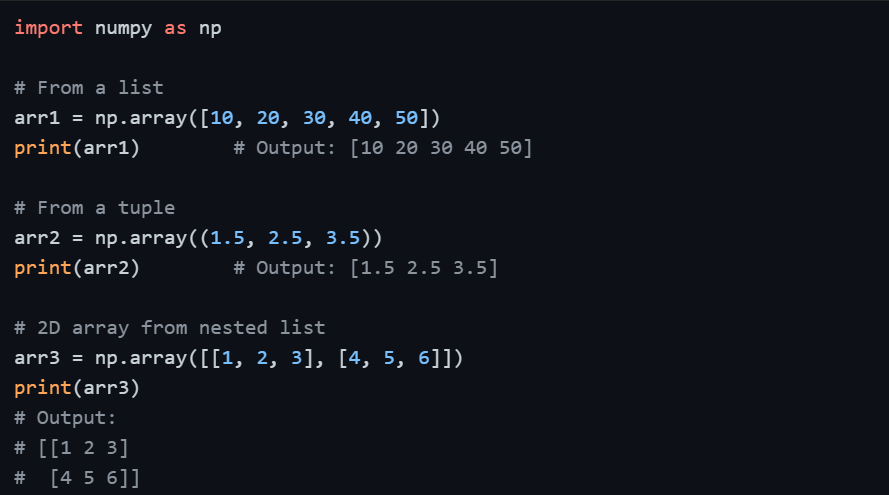
NumPy automatically infers the data type from the input. If the list contains floats, the array will be float; if integers, it will be integer.
Using Built-in Array Creation Functions
Rather than manually writing out values, NumPy provides dedicated functions to generate arrays efficiently. These are especially useful when initializing arrays for computations or placeholder data.
np.zeros() and np.ones()
These functions create arrays filled entirely with zeros or ones, which is commonly used to initialize placeholder arrays before filling them with data.
 and np.ones().png)
np.full()
Creates an array filled with a specific constant value of your choice.
.png)
np.arange()
Works similarly to Python's built-in range(), but returns a NumPy array. It accepts start, stop, and step values.
.png)
np.linspace()
Generates a specified number of evenly spaced values between a start and end point. This is particularly useful in plotting and simulations.
.png)
The key difference between arange() and linspace() is that arange() defines the step size, while linspace() defines the total number of points.
np.eye() — Identity Matrix
Creates a square matrix with ones on the diagonal and zeros elsewhere, commonly used in linear algebra.
 — Identity Matrix.png)
Generating Random Arrays
NumPy's random module is widely used in data science for simulations, testing, and generating sample datasets.
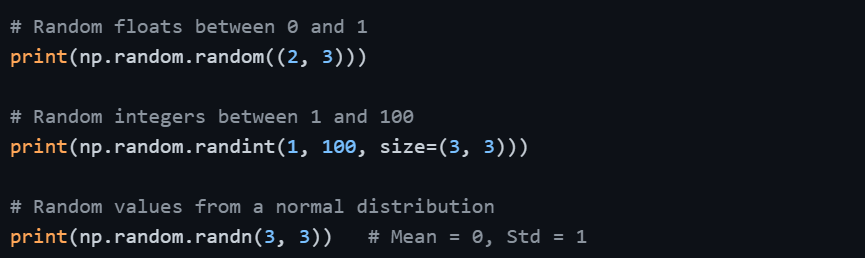
To ensure reproducibility, getting the same random values each time — use np.random.seed() before generating random arrays. This is a best practice when sharing or debugging data science code.

Array Operations
Once arrays are created, NumPy allows you to perform a wide variety of operations on them — all vectorized, meaning they apply to every element simultaneously without needing a loop.
Arithmetic Operations
NumPy supports all standard arithmetic operations between arrays and scalars (single values).
.png)
When two arrays are involved, operations are performed element-wise, meaning the first element of one array interacts with the first element of the other, and so on.
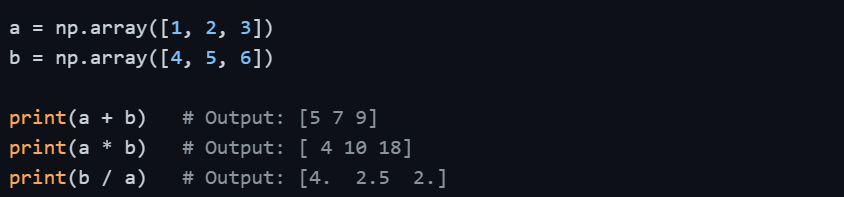
For element-wise operations to work between two arrays, they must have the same shape — unless broadcasting rules apply.
Universal Functions (ufuncs)
NumPy provides built-in mathematical functions called universal functions (ufuncs) that operate element-wise on arrays. These are faster and more efficient than applying Python's built-in math functions in a loop.
.png)
Aggregate / Statistical Operations
NumPy provides a clean set of functions to compute summary statistics across an array or along a specific axis.

Understanding axes is important here. axis=0 collapses rows (works down columns), while axis=1 collapses columns (works across rows).
Broadcasting
Broadcasting is one of NumPy's most powerful features. It allows arithmetic operations between arrays of different shapes, provided certain compatibility rules are met, without duplicating data in memory.
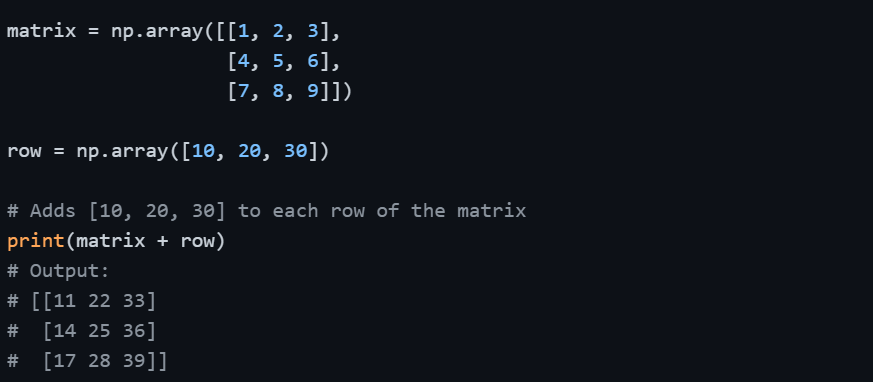
In this example, the 1D array row is automatically "broadcast" across all three rows of the matrix. Broadcasting eliminates the need for manual loops and makes code significantly more concise and efficient.
Comparison and Boolean Operations
NumPy supports element-wise comparison, returning boolean arrays that can be used to filter data.
scores = np.array([45, 72, 88, 55, 91, 60])
print(scores > 60) # Output: [False True True False True False]
print(scores[scores > 60]) # Output: [72 88 91] — filtered values
# Combining conditions
print(scores[(scores >= 55) & (scores <= 80)]) # Output: [72 55 60]
This boolean indexing pattern is used extensively in data filtering with both NumPy and Pandas.
