In network security and management, identifying common services running on devices is vital for understanding the network environment and potential vulnerabilities. Services like HTTP, FTP, SSH, and SMB provide various essential functions, from web hosting to secure remote access and file sharing.
What are Network Services?
Network services are software applications or protocols that enable communication, data exchange, and access to resources across devices on a network.
Each service operates on specific ports and uses defined protocols, facilitating specific functions such as web traffic, file transfer, or remote login. Identifying services is key for security scanning tools that look for exposed ports as potential entry points for attackers.
Common Network Services
Critical network functions rely on standardised services, each with specific ports and security considerations. Listed here are several core services that administrators and analysts should be familiar with:
1. HTTP (Hypertext Transfer Protocol): It is the foundation of data communication for the World Wide Web. It operates on TCP port 80 by default and handles requests and responses between web browsers and servers. HTTP is stateless and primarily delivers web pages, images, scripts, and media. Secured HTTP traffic uses HTTPS (port 443), encrypting data via SSL/TLS.
2. FTP (File Transfer Protocol): Used for transferring files between clients and servers over TCP ports 20 and 21. It supports user authentication but transmits data in plaintext, making it less secure than modern alternatives like SFTP or FTPS.
FTP servers enable uploading, downloading, and managing files remotely. Misconfigured FTP can expose sensitive data to interception or unauthorised access.
3. SSH (Secure Shell): Provides a secure, encrypted channel for remote login and management over TCP port 22. It replaces insecure protocols like Telnet by encrypting authentication credentials and data traffic.
SSH supports command execution, file transfers via SCP or SFTP, and tunnelling of other protocols. It is a critical tool for system administrators managing remote servers securely.
4. SMB (Server Message Block): It is a network file sharing protocol mostly used in Windows environments, operating on TCP ports 139 and 445. It allows applications and users to read, write, and request services of files on remote servers.
SMB supports features like file and printer sharing, authentication, and network browsing. SMB vulnerabilities have historically been exploited in ransomware and worm attacks, so securing this service is crucial.
How These Services are Identified
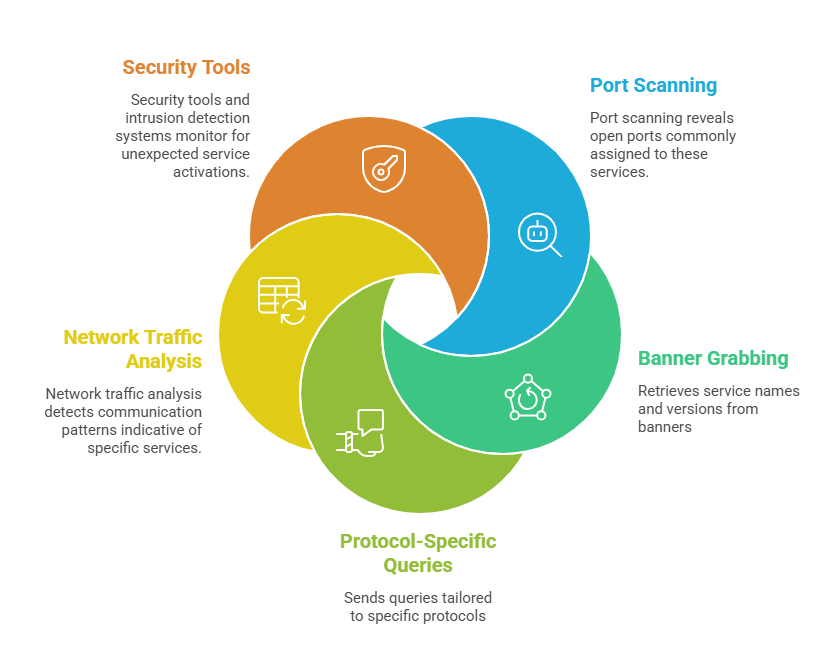
Importance of Service Identification
Understanding which services are running on a network is essential for maintaining a secure environment. Here are some key reasons why accurate service identification matters:
1. Helps in spotting unauthorised or vulnerable services running in a network.
2. Enables prioritising patches and security controls for critical exposed services.
3. Assists in compliance audits and network documentation.

Class Sessions
Sales Campaign

We have a sales campaign on our promoted courses and products. You can purchase 1 products at a discounted price up to 15% discount.