Cybersecurity vulnerabilities come in many forms, but some of the most common and easily preventable issues stem from misconfigurations, default credentials, weak passwords, and unpatched software.
These vulnerabilities represent fundamental security oversights that attackers actively seek to exploit. Understanding these common weaknesses and implementing basic security hygiene practices can significantly reduce organisational risk and prevent unauthorised access, data breaches, and system compromises.
Misconfigurations
Security misconfigurations occur when systems, applications, or networks are improperly set up or left in insecure default states. These errors can arise from human oversight, lack of security awareness, or failure to follow secure configuration guidelines.
Common Examples:
1. Leaving unnecessary features or services enabled that expand the attack surface.
2. Improperly configured access controls grant excessive permissions to users or services.
3. Publicly accessible cloud storage buckets (e.g., AWS S3) containing sensitive data.
4. Unprotected directories or files exposing configuration details, credentials, or sensitive information.
5. Failure to disable debugging or verbose error messages that reveal system information to attackers.
Why Misconfigurations are Dangerous: They create easy entry points for attackers who scan for common misconfigurations using automated tools. Misconfigurations can lead to data exposure, unauthorised access, and privilege escalation.
Prevention Strategies: .png)
Default Credentials
Default credentials are vendor-supplied usernames and passwords that come pre-configured with devices, software, databases, and network equipment. Common examples include "admin/admin" or "root/password."
Why They are a Major Risk: Default credentials are publicly documented and well-known to attackers. Automated tools and botnets actively scan the internet for devices using default credentials, making them prime targets for compromise.
Real-World Impact: Attackers exploiting default credentials can gain immediate administrative access to routers, IoT devices, databases, and cloud instances, enabling data theft, network infiltration, or deployment of malware.
Prevention Strategies
1. Change all default usernames and passwords immediately during initial system setup.
2. Enforce strong, unique passwords for all accounts.
3. Implement multi-factor authentication (MFA) wherever possible.
4. Conduct regular audits to identify systems still using default credentials.
Weak Passwords
Weak passwords are easily guessable credentials such as "password123," "qwerty," or simple dictionary words. They lack complexity, length, and randomness, making them vulnerable to brute-force and dictionary attacks.
Why Weak Passwords are Exploited: Attackers use automated tools to try common passwords and password lists against login portals. Weak passwords can be cracked within seconds or minutes, granting unauthorized access.
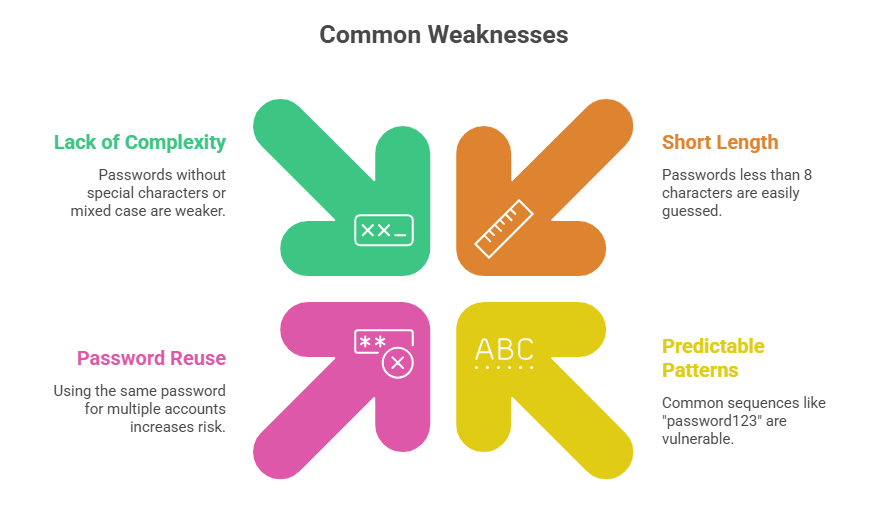
Prevention Strategies:
1. Enforce strong password policies requiring minimum length (12+ characters), complexity, and uniqueness.
2. Implement password expiration and history policies to prevent reuse.
3. Encourage or mandate the use of password managers.
4. Enable account lockout mechanisms after repeated failed login attempts.
5. Deploy MFA to add an additional security layer beyond passwords.
Unpatched Software
Unpatched software refers to systems, applications, or firmware that have not been updated with the latest security patches released by vendors to fix known vulnerabilities.
Why Unpatched Software is Critical: Once vulnerabilities are disclosed publicly, attackers develop exploits targeting these flaws. Systems running outdated software become easy targets, as attackers know exactly which vulnerabilities to exploit.
Examples of Exploited Vulnerabilities:
1. Operating system vulnerabilities (e.g., EternalBlue exploited in WannaCry ransomware).
2. Web application frameworks with known security flaws.
3. Firmware vulnerabilities in routers and IoT devices.
Prevention Strategies
1. Establish a patch management program to regularly apply security updates.
2. Automate patching where possible to ensure timely deployment.
3. Prioritize critical patches addressing high-severity vulnerabilities.
4. Monitor vendor security bulletins and vulnerability databases (CVE, NVD).
5. Test patches in non-production environments before deployment to avoid disruptions.

Class Sessions
Sales Campaign

We have a sales campaign on our promoted courses and products. You can purchase 1 products at a discounted price up to 15% discount.