Web applications are software programs that run on web servers and are accessed by users through web browsers over the internet or intranet. At the core of web communication are protocols such as HTTP and HTTPS, which enable the transfer of data between clients (browsers) and servers.
Alongside these protocols, technologies like cookies and sessions help manage user state and provide personalized experiences. Understanding these fundamentals is critical for developing, managing, and securing web applications.
HTTP (HyperText Transfer Protocol)
HTTP is the foundational protocol for web communication, facilitating data transfer between browsers and web servers. It follows a client-server model where the client sends an HTTP request, and the server returns an HTTP response, including web content like HTML pages, images, or files.
It is a stateless protocol, meaning each request is independent; the server does not retain information about previous requests. Typical request types include GET (request data), POST (submit data), PUT (update data), and DELETE.
HTTPS (HyperText Transfer Protocol Secure)
HTTPS is the secure version of HTTP that encrypts the data exchanged between the client and server using the SSL/TLS protocols. Encryption prevents attackers from intercepting or tampering with sensitive data such as passwords, credit card information, or personal details.
When users visit an HTTPS site, the server presents a digital certificate issued by a Certificate Authority (CA) to prove its identity. The browser and server then establish a secure connection through a TLS handshake, exchanging encryption keys before data transfer begins.
Cookies
Cookies are small pieces of data stored by the browser on behalf of websites to track and remember user information. They enable persistent sessions by storing identifiers like session IDs, preferences, and login states.
They have attributes such as expiration time, domain, path, and security (Secure and HttpOnly flags). Proper cookie management is essential to prevent security risks like session hijacking and cross-site scripting (XSS).
Sessions
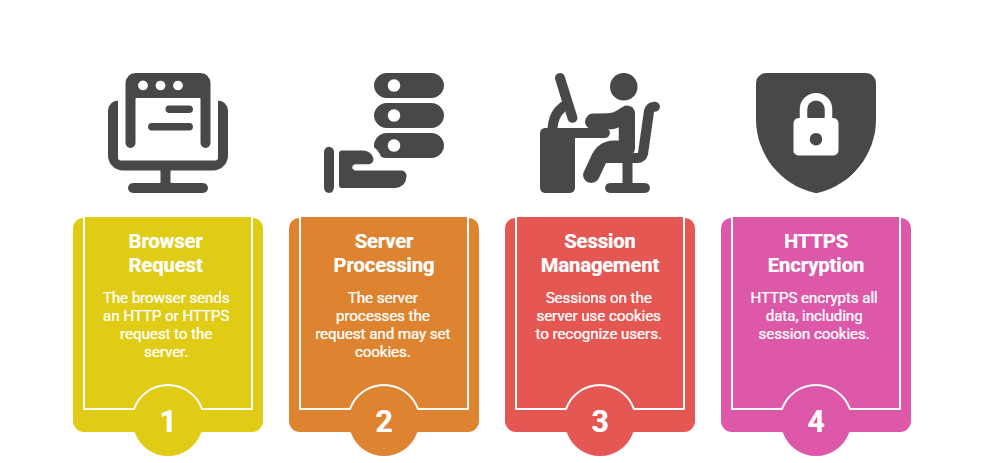
Sessions provide a way to maintain state in stateless HTTP by storing user data on the server side. When a user logs in, the server creates a session and assigns a unique ID, usually stored in a cookie on the client.
This ID is sent with subsequent requests to identify and authenticate the user, enabling personalized and secure interactions. Session data can include user preferences, authentication status, shopping cart contents, and more.
How They Work Together
Importance in Security
Maintaining strong security measures in web applications helps prevent data theft, session hijacking, and unauthorized access. Here are the key reasons why secure protocols and session practices matter:
1. HTTPS protects web applications against eavesdropping and man-in-the-middle attacks.
2. Secure cookies and proper session management prevent unauthorized access and session fixation.
3. Developers must implement best practices like using HTTPS only, setting secure cookie flags, and invalidating sessions on logout.

Class Sessions
Sales Campaign

We have a sales campaign on our promoted courses and products. You can purchase 1 products at a discounted price up to 15% discount.