Client-server architecture is a fundamental model in network computing where multiple clients connect to a centralized server to request and receive services or resources.
This design separates the responsibilities between clients, which handle user interactions and requests, and servers, which process these requests and manage data. Understanding this architecture is crucial for IT professionals, developers, and cybersecurity experts as it underpins many modern applications and network services.
What is a Client?
A client is any device or software application that requests services or resources from a server. It can be a web browser, email application, mobile app, or any user interface running on a workstation or device.
The client initiates communication by sending a request to the server and waits for the response. Although the client handles user inputs and displays outputs, it generally performs minimal processing.
What is a Server?
A server is a powerful computer or software system that provides services or resources to clients over a network. It listens for incoming client requests, processes them—which may involve database queries, computations, or other operations—and sends the appropriate response back.
A server can support multiple clients simultaneously while managing data storage, security, and business logic. Common examples include web servers, database servers, application servers, and file servers.
How Client-Server Architecture Works
Client–server architecture operates through a structured exchange of requests and responses between the client and server. The following steps explain how this interaction takes place.
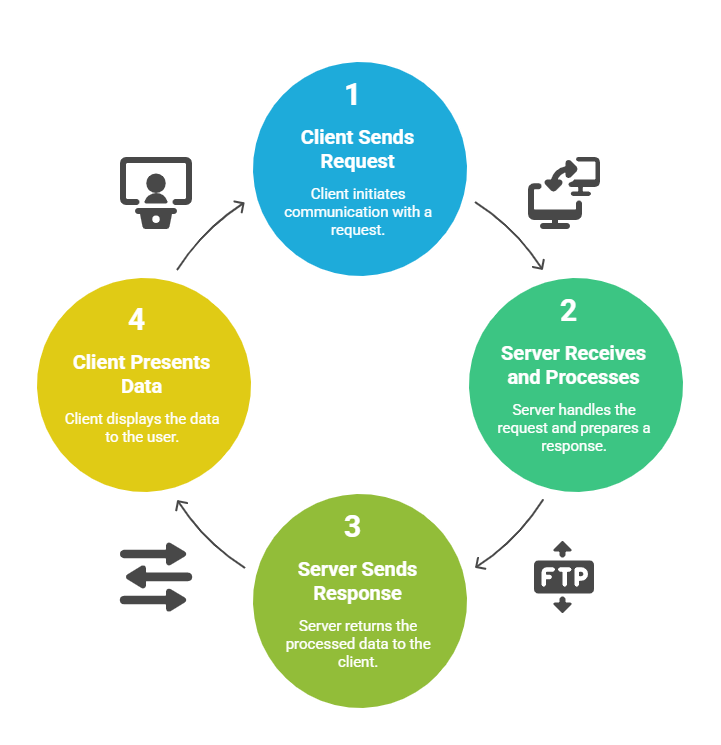
This request-response cycle continues for all interactions between client and server.
Key Characteristics
1. Centralization: Servers centralize data and resources, simplifying management and security.
2. Scalability: More clients can be added easily; servers can be scaled vertically (better hardware) or horizontally (more servers).
3. Separation of Concerns: Clients focus on user experience, while servers handle data processing and storage.
4. Communication Protocols: Standard protocols like HTTP, FTP, and SMTP allow consistent communication.
Client-Server Architecture Types
Client–server models categorize how tasks such as UI, logic, and data storage are distributed across components. Here are the main architectural tiers commonly used in modern systems.
1-Tier Architecture: All functions, such as user interface, processing, and data storage, are bundled into a single application; limited scalability.
2-Tier Architecture: Client handles UI and business logic; server manages database storage and queries (typical in database applications).
3-Tier Architecture: Separates presentation layer (client), application logic (middleware/server), and database. This improves scalability, flexibility, and security.
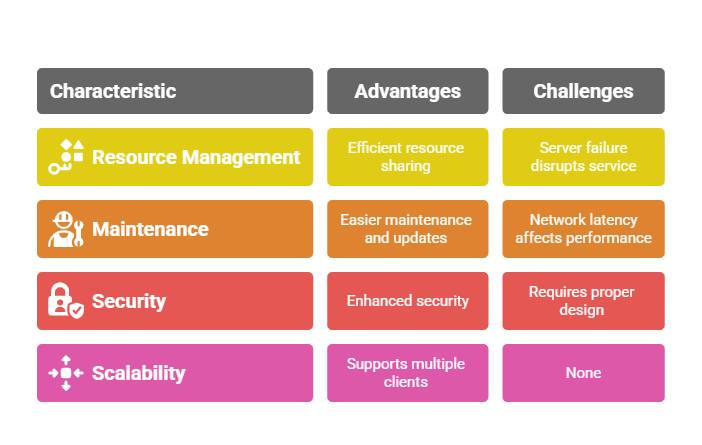
Advantages and Challenges

Class Sessions
Sales Campaign

We have a sales campaign on our promoted courses and products. You can purchase 1 products at a discounted price up to 15% discount.