Port scanning is a critical technique used in cybersecurity to discover active services on target systems by probing network ports. It plays a dual role: attackers use it to find vulnerabilities and entry points, while defenders use it to assess security and detect unauthorised openings. Understanding the status of ports—whether open, closed, or filtered—helps in evaluating network security posture and managing risk.
What is a Port?
A port is a virtual communication endpoint in a computer used by applications to send and receive data. Ports are identified by numbers ranging from 0 to 65535, with well-known ports reserved for common services (e.g., HTTP on 80, HTTPS on 443).
Effective network communication requires open ports that listen for incoming connections relevant to active services.
Port States
Knowing whether ports are open, closed, or filtered helps both attackers and defenders understand network exposure. Below is the list of the main categories of port states and their characteristics:
1. Open Ports: These ports have applications actively listening for connections. An open port indicates a service is available to communicate over the network. Attackers target open ports because they represent possible entry points.
2. Closed Ports: Closed ports are accessible but do not have any application listening. They respond to connection attempts but reject them, indicating no available service. Closed ports provide less risk since no service is exposed actively.
3. Filtered Ports: Filtered ports do not respond to connection attempts, often because a firewall or security device blocks or drops packets. These ports are hidden from scanners, making it unclear whether they are open or closed. Filtering increases security by obscuring network services.
How Port Scanning Works
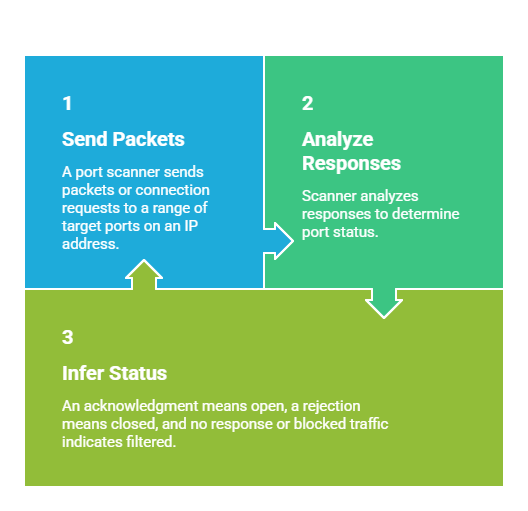
Scan Types: TCP SYN scans (half-open), TCP connect scans, UDP scans, and others. Each offers different stealth, speed, and accuracy characteristics.
Why is Port Scanning Important?
Both offensive and defensive teams rely on port scanning to assess exposures and validate protection mechanisms. Listed here are essential insights into why port scanning holds such importance:
For Attackers: Identifying open ports helps locate potential vulnerabilities to exploit, such as outdated services or unpatched software.
For Defenders: Regular port scanning reveals exposed services that can be tightened or patched, helps detect unauthorised devices, and verifies firewall effectiveness.
Port scanning is usually part of reconnaissance in the cybersecurity kill chain, influencing later phases of attack or defense.
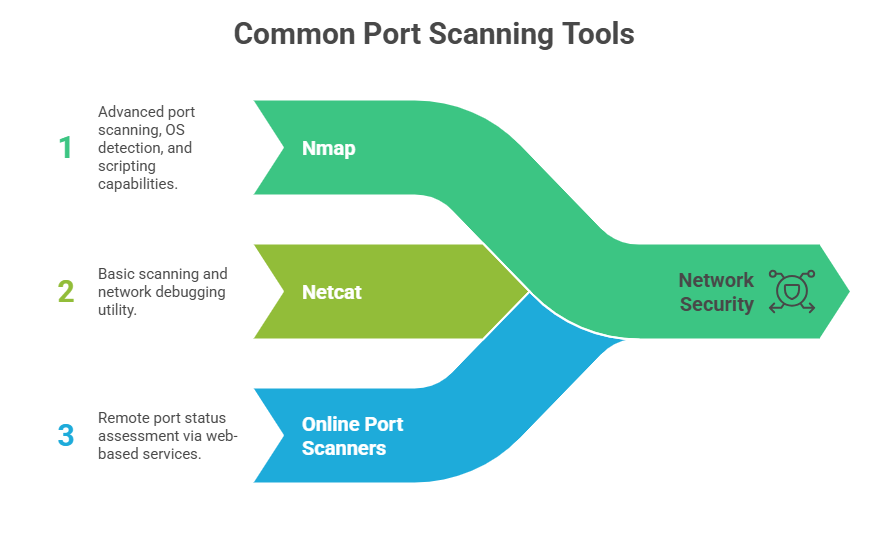 Mitigating Risks from Open Ports
Listed here are the best practices for reducing vulnerabilities related to open ports:
1. Limit exposed services to only those necessary.
2. Implement firewall rules to block or filter unused ports.
3. Use intrusion detection/prevention to monitor anomalous scanning activity.
4. Keep services patched and configured securely.

Class Sessions
Sales Campaign

We have a sales campaign on our promoted courses and products. You can purchase 1 products at a discounted price up to 15% discount.