File systems, users, permissions, and access controls are fundamental components of operating systems that govern how data is stored, accessed, and secured.
A file system organizes and manages files on storage devices, while users represent identity entities interacting with these files. Permissions define what actions different users can perform on files and directories, and access controls enforce these rules to ensure data confidentiality, integrity, and availability.
File Systems
A file system provides a structured way to store and retrieve data on storage media such as HDDs, SSDs, USB drives. Common file systems include NTFS (Windows), ext4 (Linux), FAT32, and exFAT. It keeps track of files, directories, metadata (creation date, size, etc.), and space allocation. They organize data into hierarchical trees of directories and subdirectories for easy navigation.
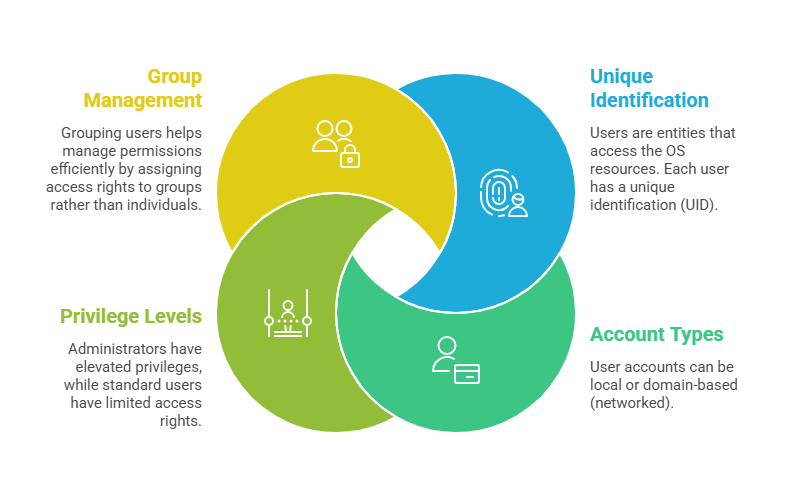
Users in Operating Systems
Permissions
Permissions specify what actions a user or group can perform on files/directories. The standard permissions are Read (view contents), Write (modify contents), and Execute (run a file or navigate a directory). Permissions can be assigned separately to the Owner, Group, and Others (everyone else).
For example, a file's permissions might allow the owner full access, the group read-only access, and others no access. Windows uses Access Control Lists (ACLs) for granular permissions; Linux uses a simpler model based on rwx bits and ACLs.
Access Controls
Access control methods determine how permissions are enforced and managed.
1. Discretionary Access Control (DAC): Users control access to their owned files. Common in Windows and Unix systems.
2. Mandatory Access Control (MAC): Central policy controls access, often used in high-security environments (e.g., SELinux).
3. Role-Based Access Control (RBAC): Access is granted based on user roles within organizations, simplifying management.
Access controls ensure that users only have the minimum necessary privileges, enforcing the principle of least privilege to reduce risks.
Special Permissions and Advanced Concepts
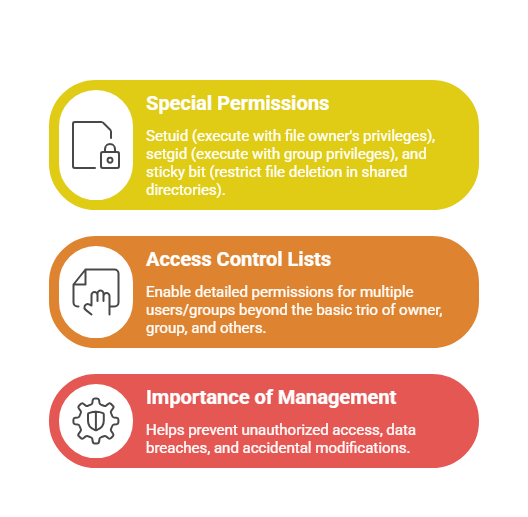
Managing Permissions
Managing permissions is essential for maintaining system security and ensuring users have the appropriate level of access. The following points highlight important considerations for effective permission management:
1. Both Windows and Linux provide command-line and graphical tools to view and modify permissions (e.g., chmod, chown on Linux; Properties dialog, icacls on Windows).
2. Permissions must be audited regularly to maintain security posture and comply with organizational policies.
3. Automated tools and policy frameworks assist in enforcing consistent permissions across complex environments.

Class Sessions
Sales Campaign

We have a sales campaign on our promoted courses and products. You can purchase 1 products at a discounted price up to 15% discount.