Workspaces and apps in Power BI are fundamental elements for organizing, collaborating, and distributing BI content effectively across teams and organizations.
Workspaces serve as collaborative environments where multiple users can store, develop, and manage datasets, reports, dashboards, and dataflows.
They facilitate teamwork with role-based permissions, allowing content creators, contributors, and viewers to collaborate securely and efficiently.
Apps, on the other hand, are curated bundles of reports and dashboards published from workspaces to deliver a polished, user-friendly experience targeted at a wider audience, including business users and executives.
Together, workspaces and apps enhance governance, content lifecycle management, and security while ensuring that content distribution is scalable and controlled.
Proper use of workspaces supports the BI development lifecycle, from prototyping to production, while apps simplify content consumption, enabling users to access the right insights with consistent branding, navigation, and user experience.
Workspaces in Power BI
The purpose is to provide a shared environment for BI team collaboration and content management.
Types:
1. Personal Workspace ("My Workspace"): A private area for individual users to develop and test content.
2. App Workspaces: Used by teams or departments for collaborative creation and management of BI artifacts.
Roles and Permissions:
1. Admin: Full control over workspace and content.
2. Member: Can edit content and manage resources.
3. Contributor: Can add and edit content but cannot manage workspace settings.
4. Viewer: Read-only access to view content only.
Content Management: Store Power BI reports, datasets, dashboards, and dataflows; enable version control and content staging.
Apps in Power BI
The purpose is to deliver curated, production-quality collections of reports and dashboards to end users.
1. Creation: Published directly from app workspaces to create a read-only, branded experience.
2. Distribution: Apps can be shared via Microsoft 365 groups, email, or embedded in portals.
Benefits: Simplified navigation, centralized access, controlled access permissions, and consistent UX/UI design.
User Experience: Allows personalization through favorites, subscriptions, and notifications.
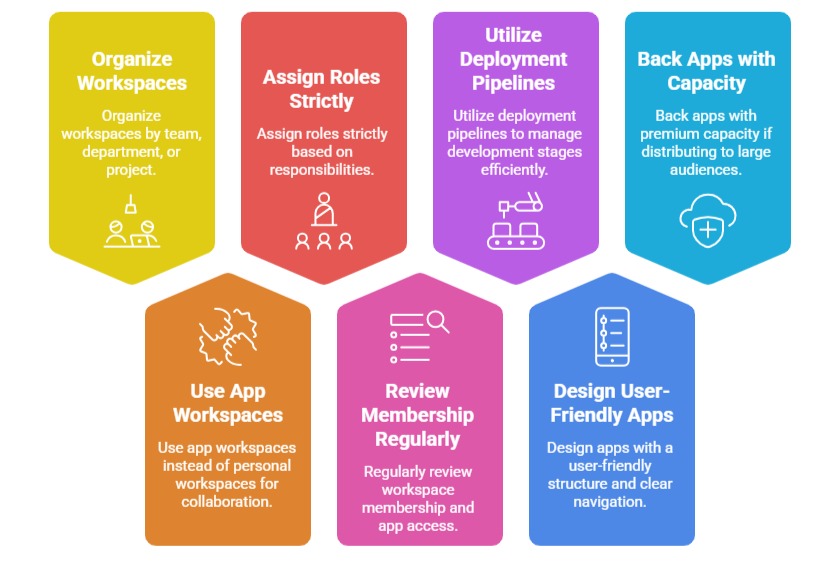
Best Practices for Workspaces and Apps

Class Sessions
Sales Campaign

We have a sales campaign on our promoted courses and products. You can purchase 1 products at a discounted price up to 15% discount.