Business Intelligence (BI) is the practice of collecting, analyzing, and transforming raw data into meaningful insights that support informed business decision-making.
At its core, BI enables organizations to gain a comprehensive understanding of their operations, customer behaviors, and market trends by leveraging data-driven analysis.
The process typically involves gathering data from multiple sources, cleaning and integrating it into a unified repository such as a data warehouse, and then analyzing and visualizing this data through various tools including dashboards and reports.
This approach helps businesses identify opportunities, improve efficiency, and respond proactively to challenges.
Modern BI is not limited to simple reporting; it encompasses advanced analytics techniques, such as data mining, performance benchmarking, and predictive modeling, to provide both descriptive (what happened) and prescriptive (what should be done) insights.
Key Concepts in Business Intelligence
Key components of a BI system include data integration, storage, analysis, and presentation layers, all supported by people and processes aligned to business goals.
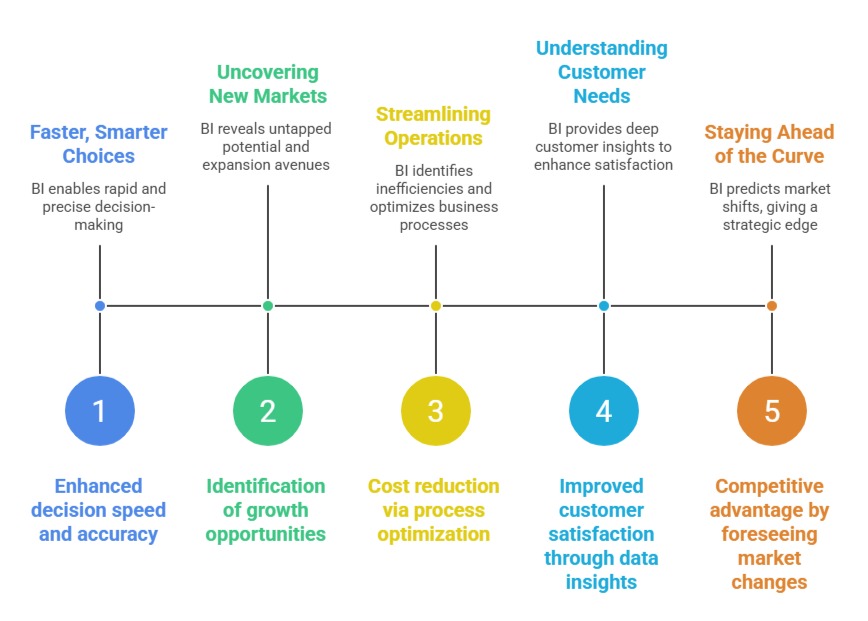
BI allows businesses to make fact-based decisions, set effective benchmarks, track key performance indicators (KPIs), and continuously optimize their strategies in competitive environments.
1. Data Gathering: Collecting information from diverse internal systems (like ERP, CRM) and external sources (market data, social media).
2. Data Cleaning & Transformation: Preparing data by eliminating errors, formatting, and standardizing for consistency.
3. Data Storage: Centralizing data in warehouses or cloud platforms for efficient access.
4. Data Analysis & Mining: Using statistical and machine learning techniques to uncover hidden patterns and insights.
5. Reporting & Visualization: Presenting data in intuitive formats such as charts and dashboards for decision-makers.
6. Descriptive vs Predictive Analytics: Understanding past trends and forecasting future outcomes to guide strategy.
7. Performance Metrics & Benchmarking: Measuring progress against targets and industry standards.
Benefits of Business Intelligence

Class Sessions
Sales Campaign

We have a sales campaign on our promoted courses and products. You can purchase 1 products at a discounted price up to 15% discount.