Time intelligence calculations are an essential aspect of business analytics in Power BI, allowing users to analyze data across varying time periods to detect trends, seasonal patterns, and business cycles.
These calculations transform raw date data into insightful metrics such as Year-to-Date (YTD), Month-to-Date (MTD), and Quarter-to-Date (QTD) values, enabling decision-makers to understand performance compared to previous periods and forecast future outcomes effectively.
Power BI provides an extensive set of DAX time intelligence functions that simplify these calculations by leveraging a properly structured date table in the data model.
These functions handle date filtering, aggregation, and comparison across standard time frames with minimal effort; they also facilitate custom period definitions for fiscal years or rolling windows.
Time intelligence functions enable users to evaluate cumulative totals, period-over-period growth, moving averages, and granular date slicing, which are vital for performance measurement and strategic planning.
Common Time Intelligence Calculations
Time intelligence calculations help analyze performance across different time periods. The key calculations listed below explain how DAX enables meaningful period-based comparisons and trends.
1. Year-to-Date (YTD)
Aggregates data from the start of the year up to the current date.
Useful for tracking annual progress in sales, expenses, or other KPIs.
Example DAX:
Total Sales YTD = TOTALYTD(SUM(Sales[Amount]), 'Date'[Date])
2. Month-to-Date (MTD)
Aggregates data from the beginning of the current month to the present date.
Helps assess monthly performance trends.
Example DAX:
Total Sales MTD = TOTALMTD(SUM(Sales[Amount]), 'Date'[Date])
3. Quarter-to-Date (QTD)
Aggregates data from the start of the current quarter to today.
Useful for quarterly performance reviews.
Example DAX:
Total Sales QTD = TOTALQTD(SUM(Sales[Amount]), 'Date'[Date])
4. Previous Period Comparisons
Functions like SAMEPERIODLASTYEAR(), PREVIOUSMONTH(), PREVIOUSQUARTER() enable comparisons with equivalent previous periods.
Important for understanding growth or decline patterns.
Example DAX:
Sales Last Year = CALCULATE(SUM(Sales[Amount]), SAMEPERIODLASTYEAR('Date'[Date]))
5. Rolling or Moving Averages
Calculates averages over a sliding window of days, weeks, or months to smooth out variability.
Useful for trend analysis and forecasting.
Custom formulas often combine DATESINPERIOD() or DATESBETWEEN() with aggregation.
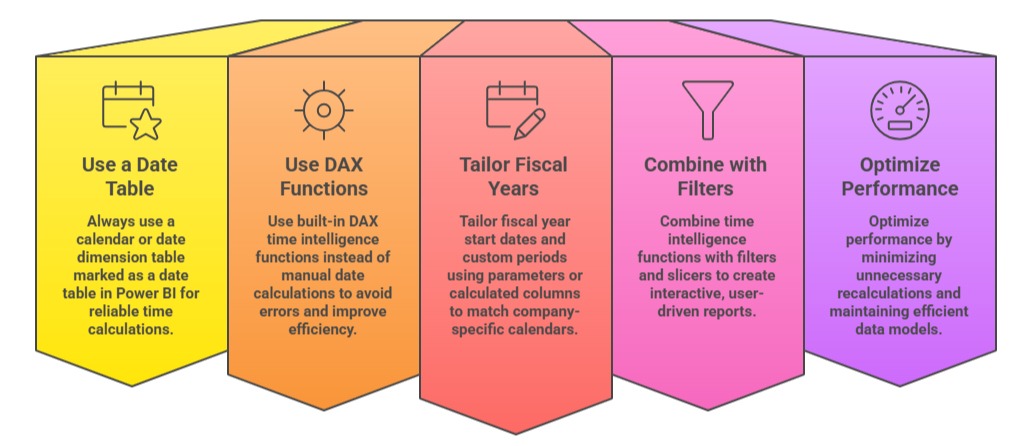
Best Practices for Time Intelligence Calculations

Class Sessions
Sales Campaign

We have a sales campaign on our promoted courses and products. You can purchase 1 products at a discounted price up to 15% discount.