Python's real power comes from its vast ecosystem of third-party libraries, tools like NumPy, Pandas, Scikit-learn, and TensorFlow that make AI development possible.
To use these libraries, you need a package manager, a tool that downloads, installs, updates, and removes packages for you.
Python has two primary package managers: pip and conda. Knowing how to use them confidently is an essential practical skill for every Python and AI developer.
What is a Package?
A package is a collection of pre-written Python code that extends what Python can do. Instead of writing complex mathematical or data processing functions from scratch, you install a package and use it directly.
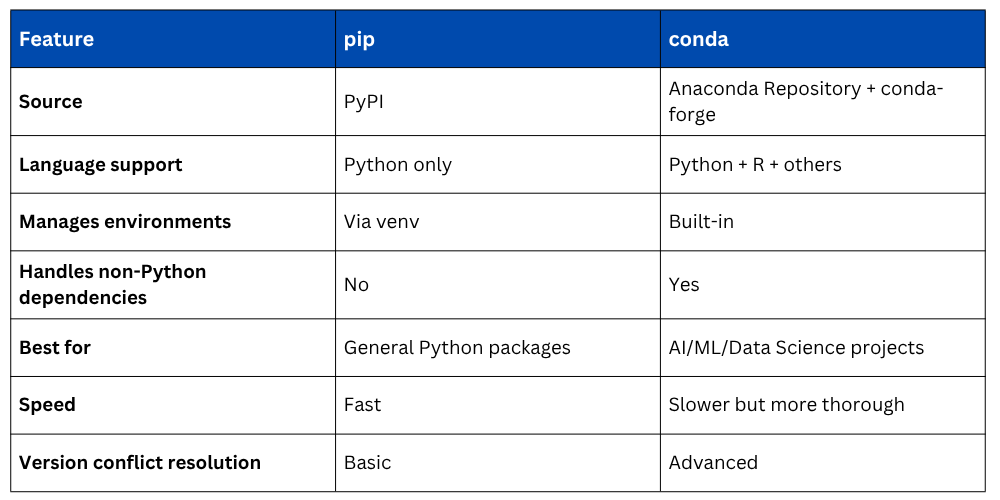
1. pip — Python's default package manager, works with the Python Package Index (PyPI).
2. conda — Anaconda's package manager, handles both Python packages and system-level dependencies.
pip — Python's Default Package Manager
pip comes pre-installed with Python. It connects to PyPI (pypi.org) — a repository of over 400,000 packages, and installs them with a single command.
Core pip Commands
bash
# Install a package
pip install numpy
# Install a specific version
pip install numpy==1.24.0
# Install multiple packages at once
pip install numpy pandas matplotlib
# Upgrade a package to the latest version
pip install --upgrade numpy
# Uninstall a package
pip uninstall numpy
# List all installed packages
pip list
# Show details about a specific package
pip show numpy
# Check for outdated packages
pip list --outdated
Installing from a Requirements File
In professional projects, all required packages are listed in a requirements.txt file. This allows anyone to recreate the same environment instantly.
requirements.txt:

Install everything at once:

Generate a requirements file from your current environment:

conda — Anaconda's Package Manager
conda is the package manager that comes with Anaconda and Miniconda. It is more powerful than pip for AI/ML work because it also manages non-Python dependencies and handles complex library compatibility automatically.
Core conda Commands
bash
# Install a package
conda install numpy
# Install from a specific channel
conda install -c conda-forge scikit-learn
# Install a specific version
conda install numpy=1.24.0
# Update a package
conda update numpy
# Update all packages
conda update --all
# Uninstall a package
conda remove numpy
# List installed packages
conda list
# Search for a package
conda search pandas
Managing Environments
An environment is an isolated workspace with its own Python version and packages. This prevents conflicts between projects that need different versions of the same library.
Why Environments Matter: Imagine Project A needs TensorFlow 2.10 and Project B needs TensorFlow 2.15. Installing both globally causes conflicts. With environments, each project gets its own isolated setup.
conda Environment Commands
bash
# Create a new environment
conda create --name ai_project python=3.10
# Activate the environment
conda activate ai_project
# Deactivate the environment
conda deactivate
# List all environments
conda env list
# Remove an environment
conda env remove --name ai_project
# Export environment to a file
conda env export > environment.yml
# Recreate environment from file
conda env create -f environment.yml
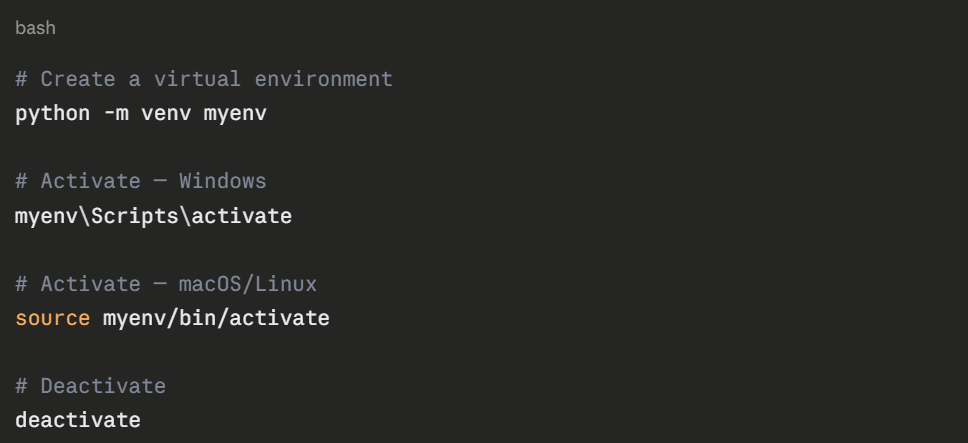
pip Virtual Environments (venv)
pip vs conda — Key Differences
Installing Common AI Packages
Here are the standard installation commands for the most common AI and data science libraries: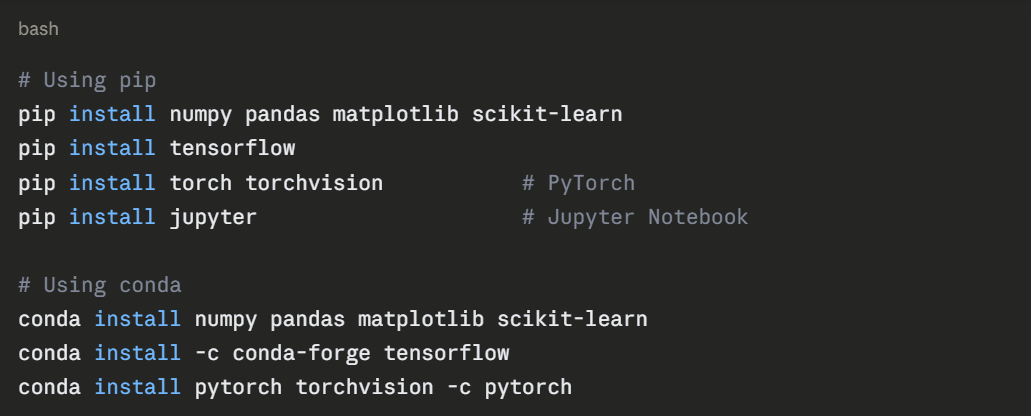
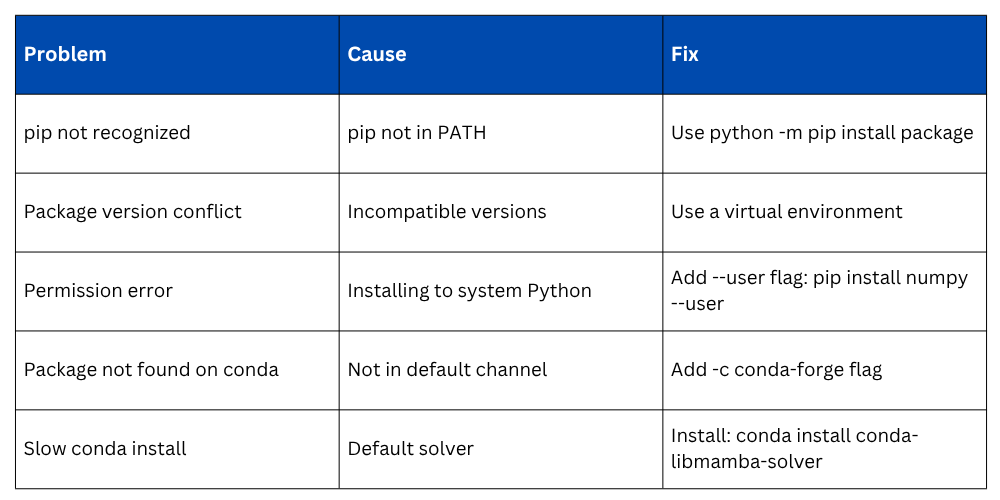
Troubleshooting Common Issues
Best Practices
Following these habits keeps your Python environment clean and your projects reproducible:
1. Always use a virtual environment — never install packages directly into the system Python.
2. Pin package versions in requirements.txt or environment.yml for reproducibility.
3. Use conda for AI/ML projects — it handles complex dependencies better than pip alone.
4. Keep environments project-specific — one environment per project avoids conflicts.
5. Regularly update packages — especially security-sensitive ones.

Class Sessions
Sales Campaign

We have a sales campaign on our promoted courses and products. You can purchase 1 products at a discounted price up to 15% discount.