Writing your first Python program is a milestone moment, and the good news is, it takes just one line of code. Python is designed to be readable and minimal, so you can focus on learning the logic rather than wrestling with complex syntax.
The Classic First Program
Every programmer's journey begins with the same tradition — printing the words "Hello, World!" to the screen. In Python, this requires just one line:

Output:

That is it. No extra setup, no semicolons, no boilerplate. This simplicity is what makes Python so approachable, especially compared to languages like Java or C++, where the same output requires five or more lines of code.
Understanding the print() Function
The print() function is one of Python's most commonly used built-in tools. It displays whatever you place inside the parentheses on the screen.
 Function.png)
You can print different types of content:

Text inside print() must always be wrapped in quotes, either single ' ' or double " ". Numbers and expressions do not need quotes.
Running Your Program in Jupyter Notebook
Jupyter Notebook runs code in individual blocks called cells. Here is how to write and run your first program:
1. Open Jupyter Notebook from Anaconda Navigator.
2. Click New → Python 3 to create a new notebook.
3. Click inside the first cell and type:

4. Press Shift + Enter to run the cell
The output appears directly below the cell. You can add a new cell and try different print() statements one at a time, this is what makes Jupyter ideal for learning.
Running Your Program in VS Code
In VS Code, Python code is written in a .py file and run all at once.
1. Open VS Code and create a new file — name it first_program.py
2. Type the following:

3. Click the Run button (▶) at the top right, or press Ctrl + F5
The output appears in the Terminal panel at the bottom of the screen:

Writing a Slightly Larger Program
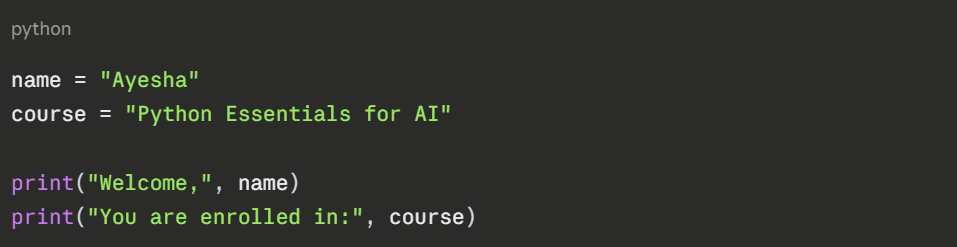
Output:

Here, name and course are variables — containers that store values.
Taking Input from the User
Python can also ask the user to type something using the input() function. This makes programs interactive.

How it works:
1. Python displays the message Enter your name: and waits.
2. The user types their name and presses Enter.
3. Python stores what was typed and prints the greeting.
input() always returns text (a string). If you need a number from the user, you will need to convert it.
Common Mistakes Beginners Make
These are the most frequent errors when writing a first program, and how to fix them:
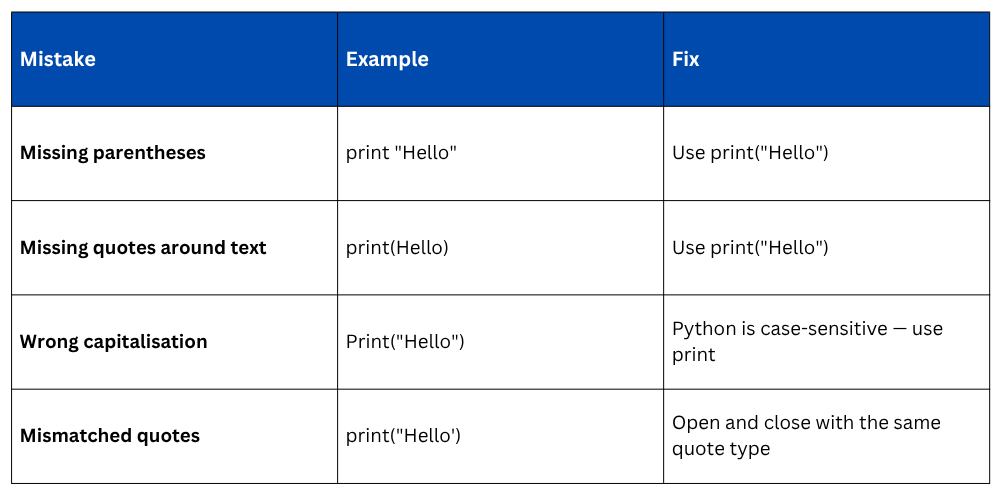
If Python encounters an error, it will display a message in red. Read it carefully, it usually tells you exactly which line the problem is on and what went wrong.
What Happens When You Run a Python Program?
Understanding the flow of execution helps you think like a programmer.

Python is an interpreted language, it reads and executes your code one line at a time, from top to bottom. There is no separate compilation step.
If a line has an error, Python stops at that line and reports it, which makes finding and fixing mistakes straightforward.
Adding Comments to Your Code
Comments are notes you write inside your code for yourself or others. Python ignores them when running the program, they exist purely for explanation.

Use the # symbol to start a comment. Good comments make your code easier to understand, a habit worth building from day one.

Class Sessions
Sales Campaign

We have a sales campaign on our promoted courses and products. You can purchase 1 products at a discounted price up to 15% discount.