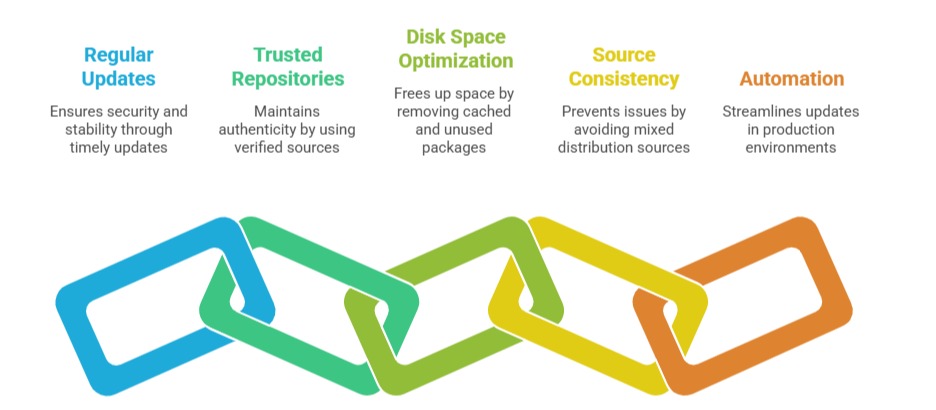
System package managers are fundamental tools in Linux distributions that automate the installation, upgrade, configuration, and removal of software packages.
These tools simplify software management by handling package dependencies, retrieving software from repositories, and maintaining a consistent and secure software environment.
With a package manager, users avoid the complexities of manual installation, such as compiling software from source, and gain the ability to keep systems updated efficiently.
Core Functions of Package Managers
For system administrators, package managers are essential tools for maintaining stable environments. The key functions listed below support secure updates, clean uninstallation, and repository management.
1. Installation: Automates downloading and installing software packages from configured repositories or local files.
2. Dependency Resolution: Automatically manages dependencies by installing required libraries and packages, ensuring software runs correctly.
3. Upgrade and Update: Provides mechanisms to update installed packages to newer versions with security patches and feature improvements.
4. Removal: Facilitates safe uninstallation of packages and optionally removes orphaned dependencies.
5. Information Retrieval: Allows querying installed packages, searching available software, and viewing package metadata.
6. Repository Management: Handles adding, enabling, or disabling software repositories to extend available software sources.
Popular Linux System Package Managers
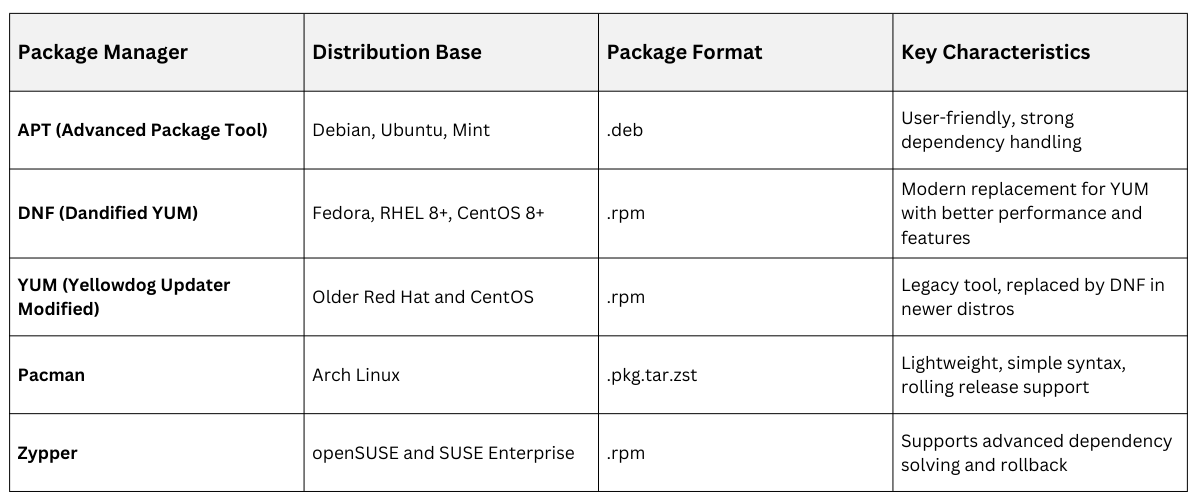 Basic Package Manager Commands
Different Linux distributions use different package managers with similar core commands. The key commands below compare how common package management tasks are performed in APT, DNF, and Pacman.
1. Install a Package
- APT:
sudo apt install package_name- DNF:
sudo dnf install package_name- Pacman:
sudo pacman -S package_name2. Remove a Package
- APT:
sudo apt remove package_name- DNF:
sudo dnf remove package_name- Pacman:
sudo pacman -Rs package_name3. Update Package Lists
- APT:
sudo apt update- DNF:
sudo dnf check-update- Pacman:
sudo pacman -Sy4. Upgrade Installed Packages
- APT:
sudo apt upgrade- DNF:
sudo dnf upgrade- Pacman:
sudo pacman -Su5. Search for Packages
- APT:
apt search keyword- DNF:
dnf search keyword- Pacman:
pacman -Ss keyword6. List Installed Packages
- APT:
apt list --installed- DNF:
dnf list installed- Pacman:
pacman -QBest Practices for Package Management