Zsh (Z shell) is a powerful and highly customizable Unix shell that builds upon the traditional shell experience while introducing a plethora of advanced features. It is designed to enhance productivity, usability, and aesthetics for power users and developers alike.
Enhanced auto-completion, syntax highlighting, spell correction, flexible prompt customization, and a rich plugin ecosystem make Zsh a preferred shell for modern Linux users.
Enhanced Auto-Completion and Spelling Correction
Zsh offers intelligent and context-aware auto-completion that goes beyond basic command and filename completion found in other shells.
1. Menu Completion: Auto-completes commands and filenames interactively, allowing selection from a list.
2. Path Expansion: Supports recursive glob patterns like **/*.txt to find files recursively.
3. Spelling Correction: Automatically detects and offers corrections for mistyped commands, improving workflow accuracy. For example:
$ gti status

zsh: correct 'gti' to 'git' [Y/n]?
4. Autosuggestions: Often enabled via plugins, this feature suggests command completions based on history as you type.
Syntax Highlighting and Visual Feedback
Zsh supports syntax highlighting that color codes commands, options, and arguments for improved readability and error detection.
1. Commands typed in the shell are highlighted in different colors depending on their validity - valid commands are shown normally, while errors or unknown commands show in red or other alerting colors.
2. Syntax highlighting helps quickly catch typos and understand command structure visually without execution.
Powerful Prompt Customization
Zsh lets users build dynamic, informative, and visually appealing prompts far beyond the traditional simple prompt.
1. Prompts can display context such as username, hostname, current directory, git branch status, background job count, and more.
2. Prompt themes (like Powerlevel10k, Spaceship) provide ready-to-use, highly scalable prompt designs with icons, colors, and asynchronous updates that do not slow the shell.
3. Users can script their own prompt logic using Zsh prompt framework variables and functions.
Robust Plugin Ecosystem
Zsh’s functionality can be significantly extended with plugins, often managed through frameworks like Oh My Zsh, Prezto, or Zgen.
Plugins offer enhancements across various domains, such as version control, syntax highlighting, autosuggestions, directory navigation, and productivity tools.
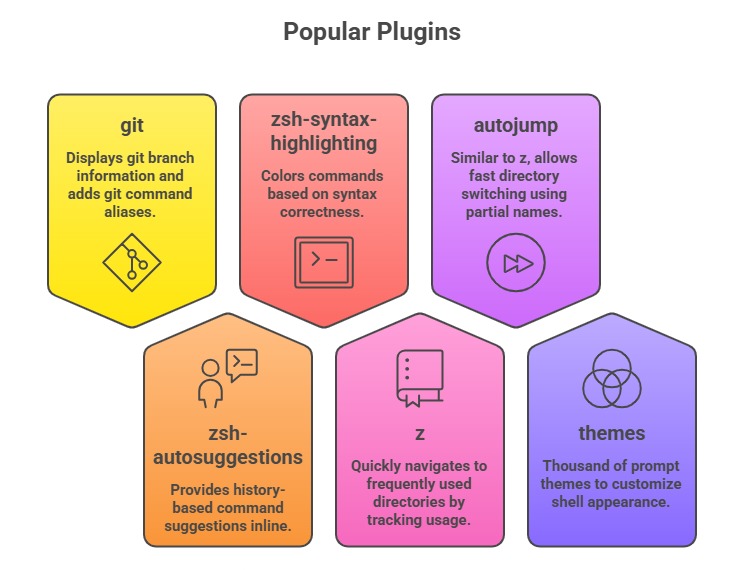
Installing Oh My Zsh, a popular framework, comes preloaded with many such plugins and themes, simplifying configuration.
Shell Options and Configurations
Zsh supports a vast array of shell options to tailor behavior:
1. Extended globbing for powerful pattern matching.
2. Recursive directory searching with **/filename.
3. Improved history management with timestamped commands and search.
4. Better array and variable handling compared to Bash.
5. Advanced job control and process substitution capabilities.
Users configure these behaviors mainly via the ~/.zshrc file using setopt and environment variables.
Performance Enhancements
Despite the rich feature set, Zsh supports performance optimizations:
1. Plugin and completion caching speeds up startup.
2. Asynchronous prompt updates prevent lag in heavy prompts.
3. Disabling unused features reduces resource consumption.
Maintaining a lean plugin list and using optimized themes (e.g., Powerlevel10k) help keep Zsh fast and responsive.
Practical Example: Minimal .zshrc Setup
# Enable Oh My Zsh framework

export ZSH="$HOME/.oh-my-zsh"


# Set theme

ZSH_THEME="powerlevel10k/powerlevel10k"


# Enable plugins

plugins=(git zsh-autosuggestions zsh-syntax-highlighting)


# Source Oh My Zsh

source $ZSH/oh-my-zsh.sh


# Additional options

setopt autocd             # Change directory by just typing its name

setopt correct_all        # Enable spelling correction on commands
This configuration provides a responsive, user-friendly shell with powerful auto-completion and visual feedback.
