Integrating a development stack is crucial for creating a cohesive and efficient environment where developers can design, build, test, and deploy applications seamlessly.
A well-integrated Linux development stack includes a combination of programming languages, package managers, IDEs or editors, databases, build tools, and containerization platforms that work harmoniously.
This integration streamlines workflows, maximizes productivity, and simplifies complex tasks like dependency management, debugging, and deployment.
Core Components of a Development Stack
The main elements of a development stack cover everything from programming languages to deployment infrastructure. These components work together to streamline development workflows and ensure reliable application delivery.
1. Programming Languages and Runtimes: Languages like Python, JavaScript (Node.js), Java, Ruby, and Go form the foundation. Managing multiple versions and dependencies through version managers (nvm for Node.js, pyenv for Python) ensures compatibility and ease of use.
2. Package Managers: Enable efficient installation and updating of libraries and development tools. Examples include npm/yarn for JavaScript, pip for Python, and system package managers like apt and dnf.
3. IDEs and Editors: Powerful editors like Visual Studio Code, JetBrains IntelliJ, Vim/NeoVim, and Atom provide syntax highlighting, debugging, and code refactoring tools essential for development.
4. Database Systems: Integration with databases like MySQL, PostgreSQL, MongoDB, and Redis is vital for backend development and caching.
5. Build and Task Runners: Tools like Webpack, Gulp, Maven, and Gradle automate building, testing, and deployment processes.
6. Containerization and Virtualization: Docker and Kubernetes enable isolated, reproducible development and production environments.
7. Source Control: Git integration facilitates collaboration and version management.
Integration Strategies
Effective integration strategies ensure that development tools and environments work together without friction. The following practices help teams maintain compatibility and simplify day-to-day development.
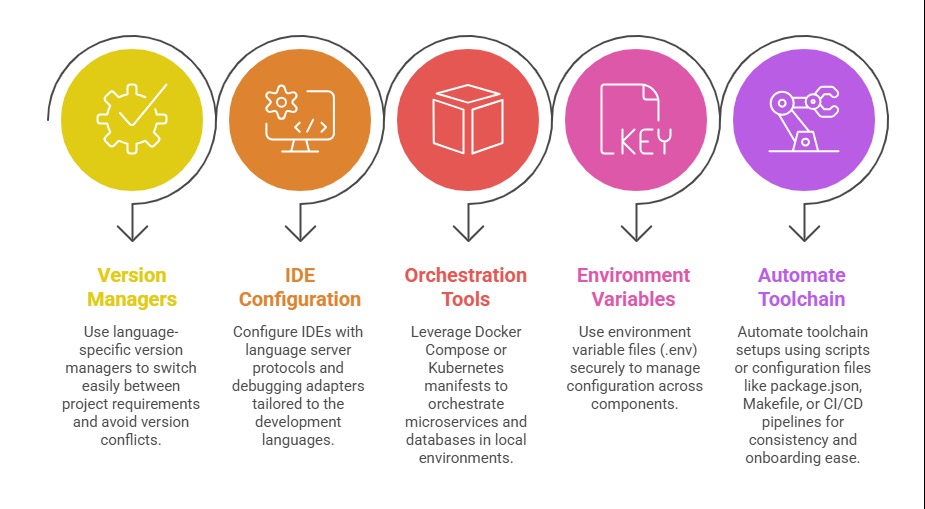
Setting Up a Typical Linux Development Environment
For developers getting started on Linux, a structured setup helps avoid common configuration issues. The steps below highlight core components required for a complete development environment.
1. Select your Linux distribution (Ubuntu, Fedora, Debian) based on support and preference.
2. Install essential tools:
sudo apt install git curl wget build-essential
Language version managers, e.g., nvm install node, pyenv install 3.x.x.
Code editors and IDEs, Visual Studio Code installation with extensions for linting, debugging.
3. Configure databases with default credentials and permissions suited for development.
4. Containerize your entire stack to replicate production more closely.
5. Set up Git for version control with SSH keys and global config.
6. Use shell customization for prompt visibility of git branches and automation scripts.
Benefits of Integration
1. Streamlined workflow with all tools working cohesively.
2. Simplified debugging with IDE integration across the language runtimes.
3. Easy environment replication ensuring consistency across teams.
4. Faster onboarding of new developers with automated setups.
5. Enhanced productivity via automation and optimized configurations.
