Linux offers a variety of powerful tools for monitoring file systems and overall system health, essential for maintaining performance, diagnosing issues, and ensuring reliability.
File monitoring tools help observe changes to critical files and directories, while system monitoring tools provide real-time data about CPU usage, memory consumption, network traffic, and process activity.
Leveraging these tools effectively enables system administrators and developers to proactively manage resources, detect anomalies, and optimize system operations.
File System Monitoring Tools
Monitoring file system changes is critical for security, data integrity, and troubleshooting.
1. inotify / incron: Kernel subsystem that provides notifications on file/directory events such as modifications, deletions, or creations.
inotifywait and inotifywatch are command-line interfaces.
incron allows setting up cron-like jobs triggered by filesystem events.
2. AIDE (Advanced Intrusion Detection Environment): Creates checksums (hashes) of files and compares for unauthorized or unexpected changes. Useful for integrity verification and intrusion detection.
3. Auditd (Linux Audit Framework): Tracks and logs file access and changes with granularity, useful in compliance and security contexts.
4. Tripwire: Similar to AIDE, provides file integrity monitoring with reports on change detection.
System Monitoring Tools
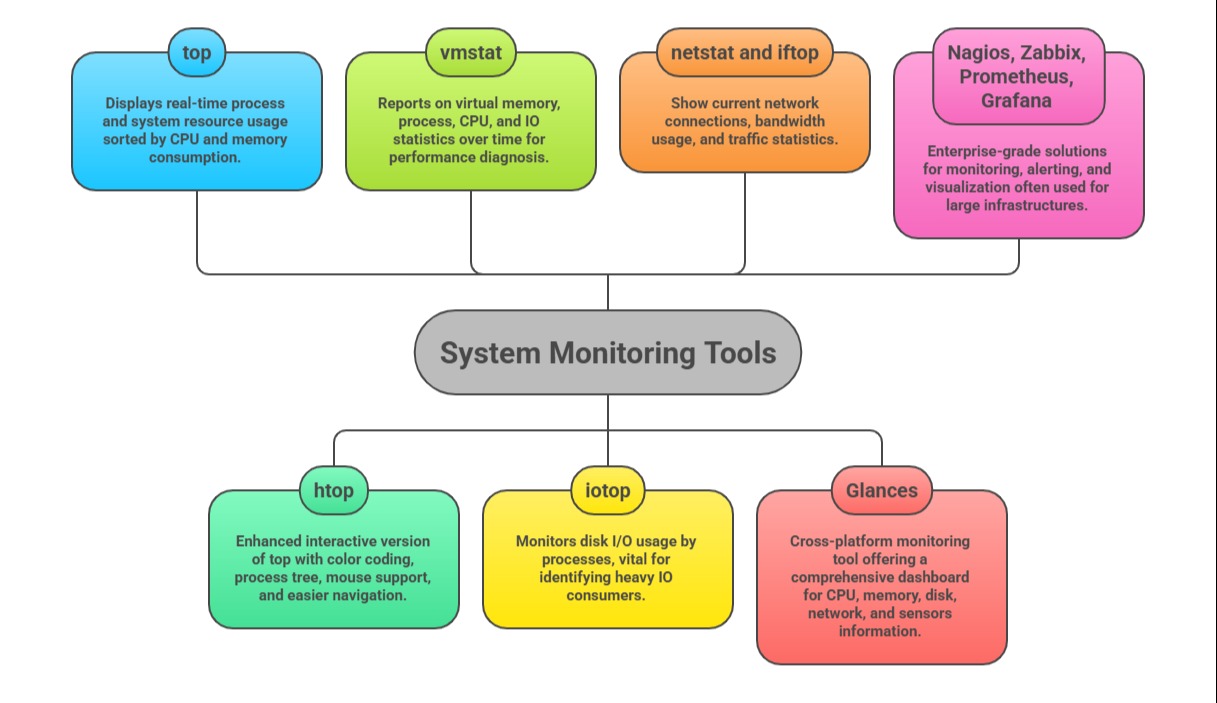
System monitoring tools track resource utilization and system performance in real-time or historical context.
Log Monitoring Tools
Monitoring and analyzing logs are integral for both system and application health checks.
1. journalctl: For systems with systemd, aggregates and filters logs.
2. Logwatch: Generates summaries from log files.
3. ELK Stack (Elasticsearch, Logstash, Kibana): Powerful centralized logging platform for searching and visualizing logs.
Integration and Automation
Integration and automation enhance the effectiveness of monitoring by connecting tools with configuration management systems such as Ansible and alerting platforms for seamless response handling.
Scheduled cron jobs and scripts automate routine tasks like system health checks and log rotation, reducing manual effort. Dashboard visualizations provide long-term trend analysis, helping teams anticipate issues and make proactive decisions.

Class Sessions
Sales Campaign

We have a sales campaign on our promoted courses and products. You can purchase 1 products at a discounted price up to 15% discount.