Kubernetes is a widely adopted container orchestration platform that automates deployment, scaling, and management of containerized applications. It introduces abstractions such as Pods and Services to encapsulate containers and expose them reliably within clusters.
The kubectl command-line tool serves as the interface for interacting with Kubernetes clusters, managing resources, and querying cluster state. Understanding essential Kubernetes concepts and commands is critical for modern container-based infrastructure management.
Kubernetes Concepts
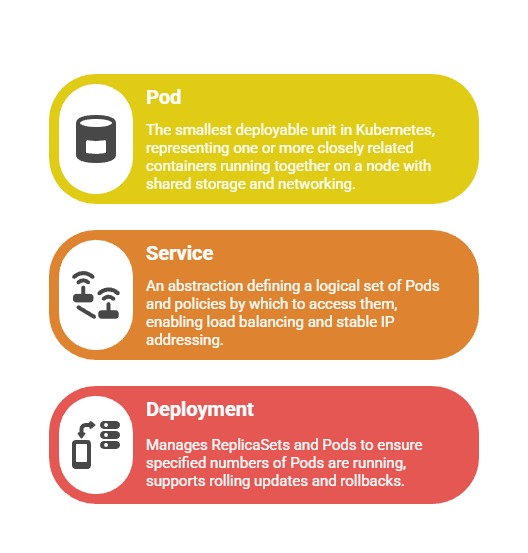
Kubernetes abstracts container management through well-defined building blocks. Following are the primary concepts used in Kubernetes environments.
Basic kubectl Commands
The kubectl utility allows administrators to deploy, inspect, and troubleshoot Kubernetes resources. Below is a list of commonly used basic kubectl commands.
1. Verify kubectl installation and cluster connection:
kubectl version

kubectl cluster-info
2. List nodes in cluster:
kubectl get nodes3. List all Pods in the default namespace:
kubectl get pods4. Get detailed info about a Pod:
kubectl describe pod <pod-name>5. View logs of a container in a Pod:
kubectl logs <pod-name>6. Open an interactive terminal inside a running Pod:
kubectl exec -it <pod-name> -- /bin/bashPod and Service Management
Administrators use pod and service commands to maintain application availability and accessibility. Below are the primary commands for pod deployment and service exposure.
1. Create a Pod from a YAML configuration:
kubectl apply -f pod.yaml2. Delete a Pod:
kubectl delete pod <pod-name>3. Expose a Deployment as a Service with NodePort (external access):
kubectl expose deployment <deployment-name> --type=NodePort --port=80 --target-port=80804. List Services:
kubectl get servicesConfiguration Deployment
Use YAML manifests to declare desired application state: Pods, Services, Deployments, ConfigMaps.
1. Apply changes declaratively with:
kubectl apply -f <file.yaml>2. Scale Deployments to adjust replica count:
kubectl scale deployment/<deployment-name> --replicas=33. Update Deployments with new container images or configurations using kubectl apply.
