File permissions and ownership form the cornerstone of Linux's security model by controlling access rights to files and directories. Proper understanding and management of permissions ensure that only authorized users and groups can read, modify, or execute files, thereby maintaining system integrity and privacy.
Linux uses a permission model based on three basic rights — read (r), write (w), and execute (x) — assigned individually to the file owner, group, and others. Beyond basic permissions, special modes such as setuid, setgid, and the sticky bit provide additional control mechanisms.
Tools like chmod and chown manage these settings, and the umask command defines default permissions for newly created files. Permissions can be specified using symbolic or octal notation, offering flexibility for various administrative workflows.
Linux Permission Model
The Linux permission model defines how access to files and directories is controlled on a system. It determines who can read, modify, or execute resources, ensuring security and proper user separation.
1. Read (r):
For files: Allows reading the file’s content.
For directories: Allows listing files inside.
2. Write (w):
For files: Allows modifying or deleting the file.
For directories: Permits adding, renaming, or deleting files.
3. Execute (x):
For files: Allows executing the file as a program or script.
For directories: Allows entering and traversing the directory.
Permissions are grouped into three sets:
1. Owner (user who owns the file)
2. Group (members of the file’s group)
3. Others (all other users)
Example listing:
-rwxr-xr--Owner has read, write, execute; group has read and execute; and others have read only
Special Permissions
Special permissions play a critical role in balancing usability and security in Linux systems. They enable controlled privilege elevation and protect shared directories from misuse.
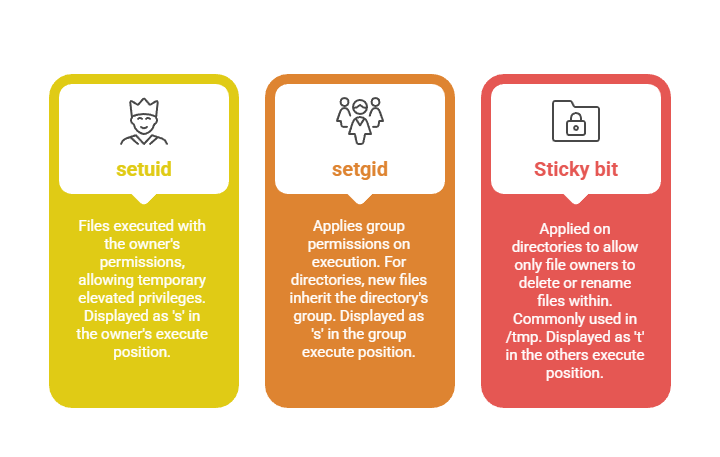
Managing Permissions with chmod
The chmod command is the primary tool for modifying file and directory permissions in Linux. It allows administrators and users to precisely control access using symbolic or numeric modes.
1. symbolic notation:
chmod u+rwx,g+rx,o-rwx fileadds read, write, execute to owner, read execute to group, removes all for others.
2. octal notation:
Numerical values sum the permissions:
Read = 4
Write = 2
Execute = 1
Example:
chmod 750 filemeans owner has 7 (rwx), group has 5 (r-x), others none.
Changing Ownership with chown and chgrp
Linux provides chown and chgrp for controlling file ownership and group assignments. The list below explains how to apply these commands for effective access management.
1. Change file owner:
sudo chown username file2. Change file group:
sudo chgrp groupname file3. Change both owner and group:
sudo chown username:groupname fileumask Configuration
umask sets default permission mask subtracting permissions from new files/directories on creation. Default umask often 022 resulting in files created as 644 and directories as 755.
1. View umask:
umask2. Set umask example:
umask 027
Class Sessions
Sales Campaign

We have a sales campaign on our promoted courses and products. You can purchase 1 products at a discounted price up to 15% discount.