Ensuring file integrity and implementing effective backup strategies are vital components of Linux system reliability and data security. File integrity verification using checksums like md5sum and sha256sum confirms data authenticity and detects corruption or tampering.
Backup solutions safeguard data against loss, hardware failure, or human error, with incremental backup techniques offered by tools like rsync optimizing storage and transfer times.
Additionally, version control systems such as Git provide granular change tracking for file and code management. Together, these practices form a robust approach to data protection and recovery.
Checksum Verification for File Integrity
Checksums uniquely represent file contents enabling integrity verification.
Common tools:
1. md5sum: Generates MD5 hash; fast but less secure against collisions.
2. sha256sum: Produces a SHA-256 hash; stronger cryptographic guarantees.
Example:
sha256sum file.txt > file.txt.sha256

sha256sum -c file.txt.sha256  # Verifies the file integrity
It useful for verifying downloads, backups, and system files.
Backup Strategies and Tools
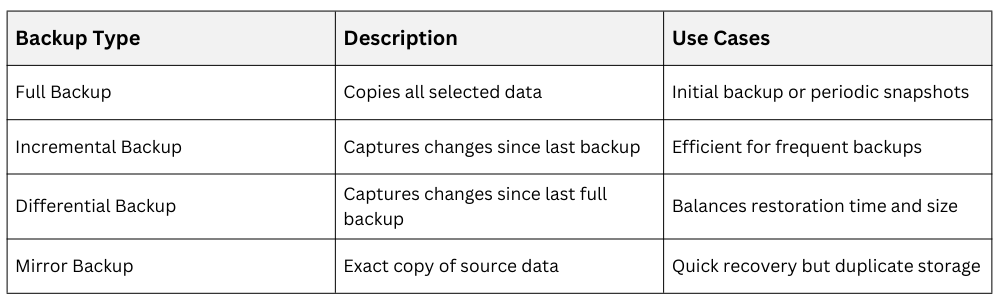
Backup planning should be based on the importance of the data and how frequently it changes, ensuring critical and rapidly changing information is protected more often.
To improve resilience and reduce the risk of data loss, backups should be stored on separate devices or in geographically distributed locations so that failures, disasters, or security incidents at one site do not compromise all backup copies.
rsync for Incremental Backup
rsync synchronizes files efficiently by transferring only changed parts. It supports local and remote backups via SSH.
Basic syntax:
rsync -avz /source/ user@backupserver:/backup/Flags:
1. -a: archive mode (recursive, preserves attributes)
2. -v: verbose output
3. -z: compression during transfer
It supports exclusion of files or directories, partial transfers, and resume capabilities.
Version Control with Git Basics
Git tracks file changes over time, allowing review, rollback, and collaboration.
Core commands:
1. Initialize repository
git init2. Stage changes
git add file.txt3. Commit changes
git commit -m "Descriptive message"4. View history
git logGit repositories can be local or hosted remotely (e.g., GitHub, GitLab).
