Advanced input/output (I/O) techniques in Linux shell scripting revolve around controlling how data flows into and out of commands or scripts. These techniques use file descriptors, redirection operators, pipes, process substitution, and here-documents to manage complex data streams efficiently.
Linux treats input/output streams as files accessed via numeric file descriptors. Standard input (stdin), standard output (stdout), and standard error (stderr) are fundamental streams, identified by file descriptors 0, 1, and 2 respectively. Understanding how to redirect, combine, and manipulate these streams underpins powerful shell scripting capabilities.
File Descriptors
File descriptors are integer handles representing open files or data streams. By default:
0 — Standard Input (stdin): Data input to commands.
1 — Standard Output (stdout): Normal output of commands.
2 — Standard Error (stderr): Error messages and diagnostics.
Other descriptors (3 and above) can be assigned for custom stream handling or advanced redirections.
Redirection Operators
Redirection operators reroute I/O streams between files, commands, or the terminal.
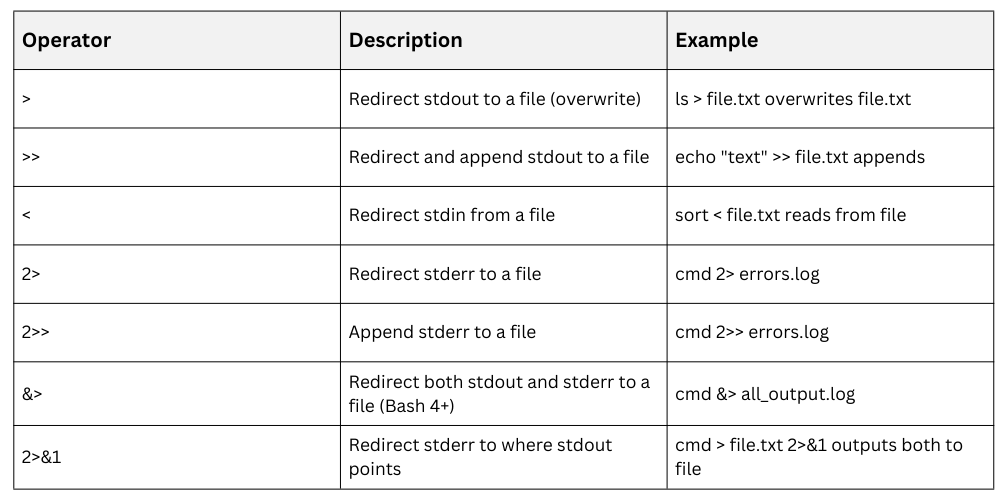
Redirections are essential for logging, error handling, and controlling script output.
Pipes (|)
Pipes connect the stdout of one command directly to the stdin of another, enabling command chaining.
Example:
ps aux | grep sshThis sends the process list output to grep for filtering.
Process Substitution
Process substitution allows the output of a command to be treated as a file input for another, creating temporary file descriptors.
Syntax:
cmd1 <(cmd2)Example:
diff <(ls dir1) <(ls dir2)This compares directory listings using diff without creating intermediate files.
Here-Documents
Here-documents provide a way to feed multiline input to commands or scripts directly in the script.
Syntax:
command <<EOF

line1

line2

EOF
Example:
cat <<EOF > file.txt

This is line 1

This is line 2

EOF
This writes the enclosed lines into file.txt.

Class Sessions
Sales Campaign

We have a sales campaign on our promoted courses and products. You can purchase 1 products at a discounted price up to 15% discount.