Linux modern systems use systemd as the primary system and service manager, handling the lifecycle of services and daemons. Managing services efficiently is crucial for system administrators to ensure applications and system components start, stop, restart correctly, and launch automatically at boot.
The systemctl command is the central tool for controlling and querying systemd services, providing a unified way to manage service states, dependencies, and configurations.
Systemd Service Lifecycle Management
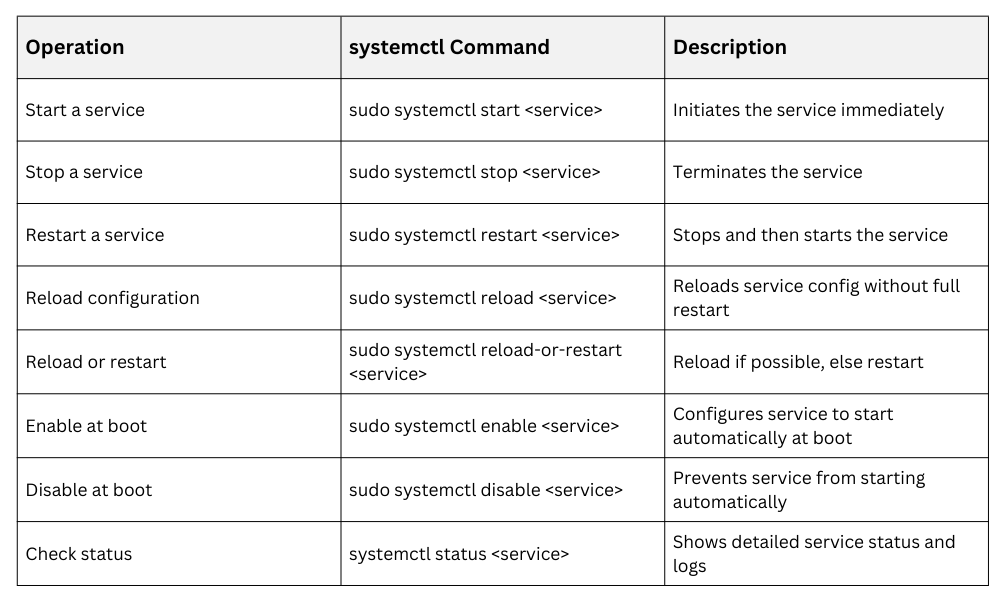 Checking Service Status
The status command gives extensive feedback including whether the service is running, its process ID (PID), logs from journal, and if any errors occurred during startup.
Example:
systemctl status nginxThis output helps troubleshoot service failures by presenting recent log entries from the journal.
Service Dependency Management
systemd manages dependencies between services using directives within the unit files:
Requires= defines mandatory dependencies.
After= and Before= set ordering of service start/stop.
Target units group services for collective management (e.g., multi-user.target).
Understanding dependency chains ensures services start in the correct order and can recover gracefully.
Custom Service Creation
Custom services are defined using unit files typically placed under /etc/systemd/system/.
A minimal service file example:
[Unit]

Description=Custom Backup Service

After=network.target


[Service]

Type=simple

ExecStart=/usr/local/bin/backup.sh

Restart=on-failure


[Install]

WantedBy=multi-user.target
1. Description: Human-readable explanation
2. After: Specifies service start order
3. ExecStart: Command or script the service runs
4. Restart: Defines restart behavior on failure
5. WantedBy: Declares which target this service is part of for enabling
After creating or modifying unit files, always reload systemd daemon to apply changes:
sudo systemctl daemon-reload.png)
