System logging is a critical aspect of Linux system administration that helps track and analyze system behaviour, troubleshoot issues, and maintain security and compliance. Linux provides several mechanisms for logging, including the systemd journal accessed via journalctl, traditional syslog, automated log rotation with logrotate, centralized logging approaches, and kernel-level audit logging with auditctl.
journalctl: Systemd Journal Log Querying and Filtering
The journalctl command is the primary tool for querying and filtering systemd's centralized, binary log database. It collects logs from the kernel, init system, services, and applications.
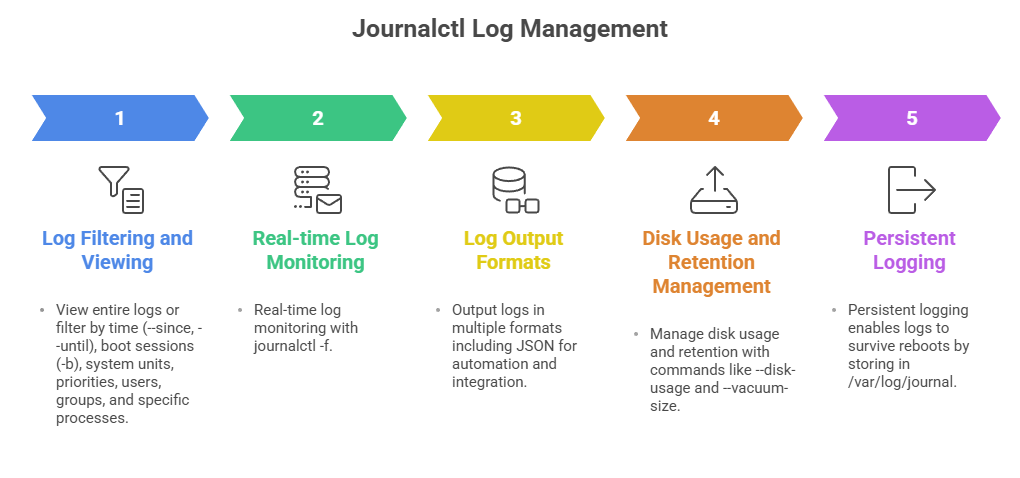
Examples:
journalctl -b                  # Logs from current boot

journalctl --since "2025-01-01" --until "2025-01-02"  # Logs from date range

journalctl -u sshd             # Logs from sshd service

journalctl -f                  # Follow logs in real-time
Syslog Configuration
Syslog remains a widely-used standard for logging on Linux, using daemons like rsyslog or syslog-ng. Syslog collects and writes logs to plain text files in /var/log/, allowing compatibility with many legacy applications.
1. Configuration typically in /etc/rsyslog.conf or /etc/syslog-ng/.
2. Supports filtering messages by facility, severity, or program.
3. Can forward logs to remote servers for centralized logging.
Example snippet:
*.info;mail.none;authpriv.none;cron.none /var/log/messages

authpriv.* /var/log/secure
Log Rotation with logrotate
Log files grow over time and consume disk space; logrotate automates compression, archiving, and removal of old logs to manage this.
1. Configurations reside in /etc/logrotate.conf and /etc/logrotate.d/.
2. You can define rotation schedules (daily, weekly), compression options, retention limits, and post-rotate commands.
3. Prevents disk filling and ensures log availability.
Example config:
/var/log/httpd/*.log {

    daily

    rotate 14

    compress

    delaycompress

    missingok

    notifempty

    create 640 root adm

    sharedscripts

    postrotate

        systemctl reload httpd.service

    endscript

}
Centralized Logging Concepts
Centralized logging collects logs from multiple systems into a single server or cluster for analysis, alerting, and archival.
1. Uses syslog forwarding, rsyslog with TCP/UDP, or tools like Fluentd, Graylog, ELK stack (Elasticsearch, Logstash, Kibana).
2. Facilitates correlation of events across systems, security monitoring, audit trails, and compliance.
Audit Logging with auditctl
The Linux Audit system tracks security-relevant events such as file access, authentication attempts, and command executions.
1. Controlled via auditctl for setting audit rules and parameters.
2. Audit logs reside in /var/log/audit/audit.log.
3. Supports log rotation analogous to standard logs.
4. Critical for compliance with regulations and forensic investigations.
Basic command example to add a file watch:
auditctl -w /etc/passwd -p wa -k passwd_changes-w: watch file, -p: permissions (write, attribute change), -k: key for searching logs

Class Sessions
Sales Campaign

We have a sales campaign on our promoted courses and products. You can purchase 1 products at a discounted price up to 15% discount.