Advanced file operations include finding and filtering files with versatile command-line tools like find and locate, constructing complex path expressions for targeted searches, managing file permissions and attributes, understanding and using hard links and symbolic links, and controlling inode management. Proficient use of these techniques helps admins organize, navigate, and manipulate the file system securely and systematically.
Finding and Filtering Files
Linux offers flexible file discovery mechanisms for both administrators and users. Below are the most commonly used commands for searching and filtering files.
1. find is a powerful recursive search utility that locates files based on name patterns, modification time, size, permissions, ownership, and more.
Example:
find /var/log -name "*.log" -mtime -7Finds .log files changed within the last 7 days under /var/log.
Common options:
-name: search by file name pattern
-type: filter by file type (f for file, d for directory)
-size: filter by file size
-user / -group: find files by ownership
-exec: run arbitrary commands on the found files
2. locate uses a prebuilt database for quick filename searches, but may not reflect recent changes until the database updates.
Command:
locate filename.txt3. updatedb updates the locate database.
Complex Path Expressions
Combine multiple conditions with boolean operators:
find /home -type f \( -name "*.txt" -o -name "*.log" \)1. Use negation with ! or -not to exclude matches.
2. Use regex or wildcards for flexible pattern matching.
File Permissions and Attributes
File permissions and attributes in Linux control how files and directories can be accessed and modified, providing an essential layer of system security and management. Permissions can be viewed using ls -l, while extended file attributes are displayed with lsattr.
Administrators manage access rights by modifying permissions with chmod, changing file ownership with chown, and adjusting group ownership with chgrp.
In addition to standard permissions, special file attributes can be applied using chattr, such as setting the immutable attribute (chattr +i), which prevents a file from being altered or deleted—even by the root user—thereby offering enhanced protection for critical system files.
Hard Links and Symbolic Links
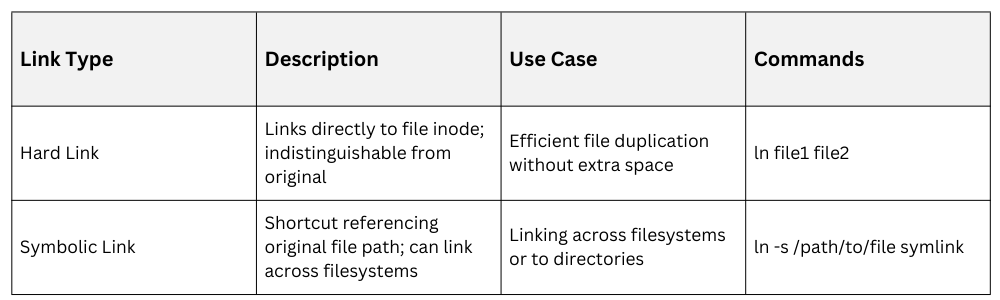
Deleting a hard link removes only that specific link, and the underlying file remains accessible as long as at least one hard link still exists. In contrast, symbolic links depend on their target file, so if the target is removed or moved, the symbolic link becomes broken and no longer points to a valid file.
Inode Management
Every file in Linux is represented by an inode that holds its essential metadata. Below is a list of important points for managing and interpreting inodes.
1. Inodes store file metadata (ownership, permissions, pointers to data blocks).
2. Display inode numbers with:
ls -i3. Key to understanding hard links (multiple filenames point to the same inode).
4. Important for troubleshooting filesystem limits or corrupted inode issues.
