Security-Enhanced Linux (SELinux) implements Mandatory Access Control (MAC) to enforce fine-grained security policies beyond traditional discretionary access controls. SELinux controls access to files, processes, and resources based on predetermined policies enforcing the principle of least privilege.
Understanding SELinux requires familiarity with its operating modes, security contexts (labels), policy management using tools like semanage, and troubleshooting techniques. Proper SELinux configuration significantly strengthens Linux system security by preventing unauthorized or potentially harmful actions.
SELinux Operating Modes
SELinux provides mandatory access control by enforcing security policies on Linux systems. The following modes determine how these policies are applied and how violations are handled.
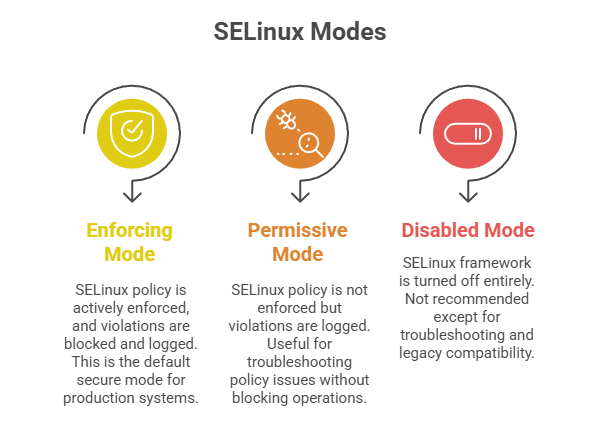
Toggle modes at runtime using:
sudo setenforce 0       # Set permissive mode

sudo setenforce 1       # Set enforcing mode
Check status with:
sestatusSecurity Contexts and Labels
SELinux labels (contexts) assign identities to files, processes, and ports controlling access.
Context format: user:role:type:level
E.g., a web server content file might have context system_u:object_r:httpd_sys_content_t:s0.
Tools like ls -Z and ps -Z display contexts for files and processes.
Policy Management with semanage
The semanage utility manages SELinux policy components such as booleans, file contexts, ports, and modules.
Key commands:
1. List booleans:
sudo semanage boolean -l2. Change boolean value:
sudo semanage boolean -m --on httpd_can_network_connect3. List and add file contexts:
sudo semanage fcontext -l  # List

sudo semanage fcontext -a -t httpd_sys_content_t "/my/custom/path(/.*)?"  # Add context
4. Manage ports for services:
sudo semanage port -a -t http_port_t -p tcp 8080After modifying contexts or policies, apply changes with restorecon.
SELinux Troubleshooting
1. Review audit logs for denial messages in /var/log/audit/audit.log or with ausearch.
2. Use audit2allow tool to generate policy modules that allow denied actions when appropriate.
3. Temporarily set services or domains to permissive without disabling SELinux globally:
sudo semanage permissive -a httpd_t4. Common troubleshooting steps include verifying file contexts, enabling required booleans, and ensuring correct port contexts.
