Docker is a leading containerization platform that simplifies application deployment by encapsulating software and its dependencies into portable containers. Understanding Docker’s command-line interface (CLI) and the container lifecycle is essential for effective container management.
This includes creating, running, stopping, and removing containers, managing container images, and configuring networking and storage for containers.
Docker Command-Line Interface
Docker CLI offers straightforward commands to interact with images, containers, and Docker environment components.
Container Lifecycle Management
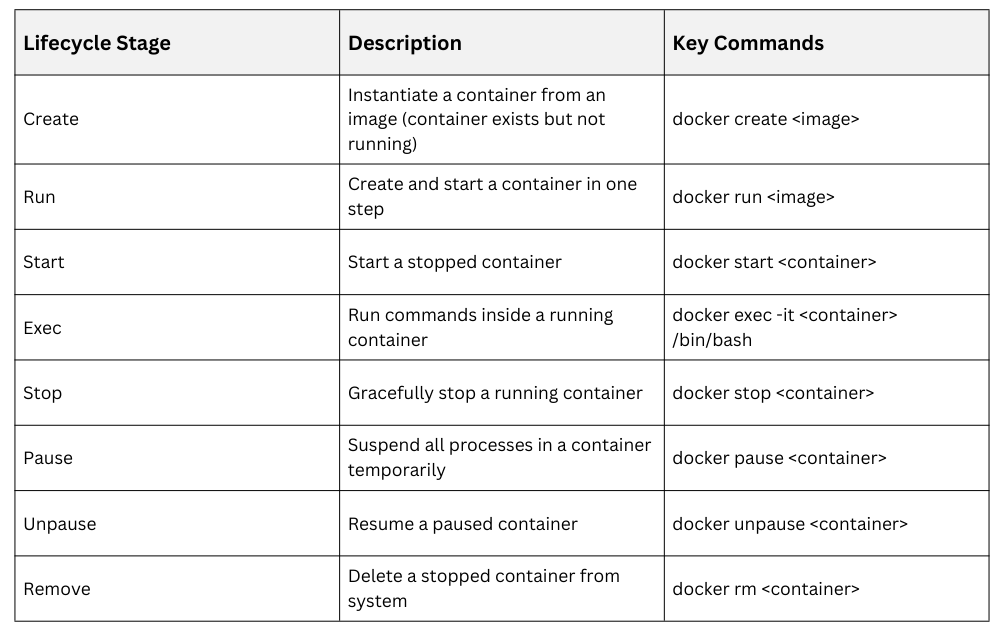
Image Management
Managing container images is essential for efficient and secure Docker environments. Below is a list of common commands used for image management.
1. Pull images from Docker Hub:
docker pull nginx2. List images locally stored:
docker images3. Remove unused images:
docker rmi <image_id>Container Networking Basics
Containers typically connect to default bridge networks for inter-container communication. Ports within containers can be mapped to host ports for accessibility:
docker run -p 8080:80 nginxCustom networks can be created for isolated or cross-host communication.
Container Storage
Containers use writable layers on top of images; changes are lost when containers are removed unless volumes are used. Docker volumes persist data across container lifecycles and facilitate data sharing:
docker volume create mydata

docker run -v mydata:/app/data ubuntu