System maintenance encompasses critical tasks that ensure the Linux operating system boots, operates, and shuts down reliably while maintaining system integrity. This includes understanding the boot and shutdown sequences, managing runlevels and targets, performing system initialization, executing recovery procedures, and applying system updates using package management tools like apt, yum, and dnf.
Boot and Shutdown Sequences
The boot and shutdown sequences define how a Linux system starts, runs services, and powers off safely. The points below describe each phase of this process.
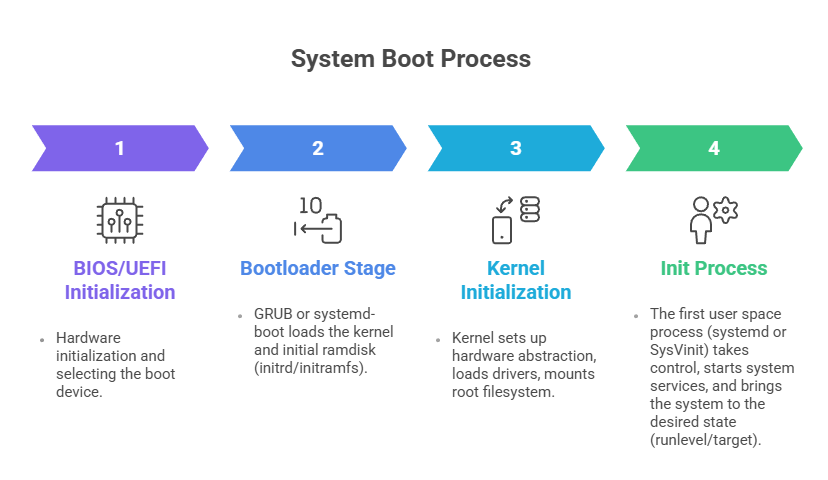
Shutdown Sequence: Controlled by systemd or init, stopping services gracefully, unmounting filesystems, terminating processes, and finally powering off or rebooting.
Commands:
sudo systemctl reboot      # Restart system

sudo systemctl poweroff    # Shutdown system

sudo shutdown now          # Immediate shutdown
Runlevels and Targets
To manage system startup behavior, it is important to understand runlevels and systemd targets. The list below introduces their purpose and usage.
Runlevels (SysVinit): Numbered states defining system modes, e.g.,
0: Halt
1: Single-user mode (maintenance)
3: Multi-user shell mode
5: Multi-user graphical mode
6: Reboot
Targets (systemd): Modern replacement for runlevels with more flexibility; targets like multi-user.target and graphical.target correspond to traditional runlevels.
Managing targets with systemd:
systemctl get-default          # Show default target

sudo systemctl set-default multi-user.target  # Set default target runlevel

sudo systemctl isolate graphical.target      # Switch to graphical mode immediately
System Initialization
The init system is responsible for executing startup scripts or units, mounting filesystems, and signaling readiness. systemd replaces traditional init scripts with unit files, dependencies, and parallelized service startup for efficiency.
Recovery Procedures
Recovery procedures allow administrators to restore system functionality when normal boot fails. The following points describe common recovery options and corrective steps.
1. Boot into rescue.target or emergency.target for troubleshooting without normal multi-user services.
2. Use GRUB menu at boot time to select recovery mode.
3. Repair filesystems, reset passwords, disable faulty services from rescue shell.
System Updates Management
Regular system updates are essential for maintaining stability and protecting against vulnerabilities. The list below highlights commands used to manage updates effectively.
1. APT (Debian/Ubuntu):
Commands:
sudo apt update            # Refresh package database

sudo apt upgrade           # Upgrade installed packages

sudo apt full-upgrade      # Upgrade including package removals
2. YUM (Older RHEL/CentOS):
Commands:
sudo yum check-update

sudo yum update
3. DNF (Fedora, RHEL 8+):
Commands:
sudo dnf check-update

sudo dnf upgrade
Automating updates with unattended upgrades or cron jobs helps maintain security and system stability.
