Data compression reduces the size of files and data streams to optimize storage and transmission efficiency. Choosing the right compression algorithm and tools is essential for balancing speed, compression ratio, and resource usage.
In Linux, various compression utilities like gzip, bzip2, xz, and zip offer diverse capabilities suited for different requirements. Compression also plays a vital role in optimizing archives and enabling incremental backups.
Analyzing compression ratios helps inform good storage and backup strategies in professional environments.
Compression Algorithms and Tool Selection
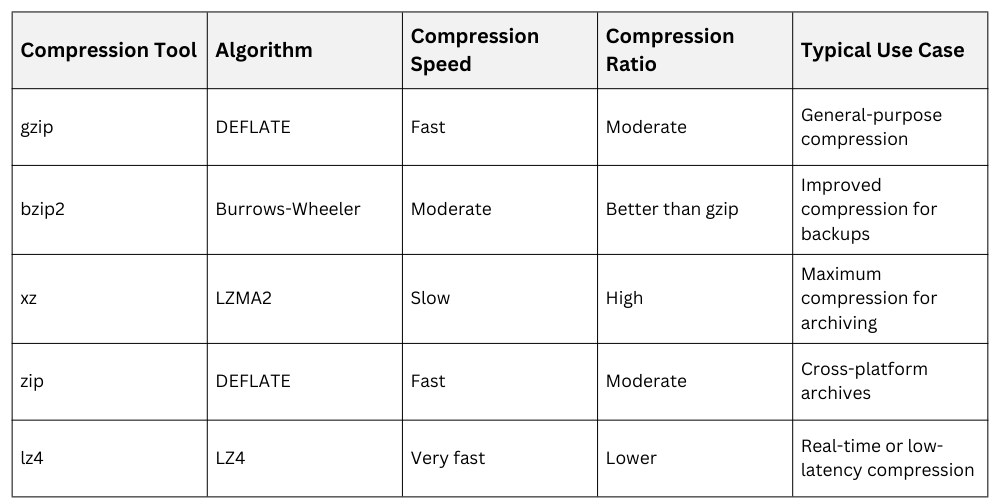
The gzip utility is commonly used for fast file compression and decompression, providing moderate size reduction with minimal CPU overhead. bzip2 offers better compression ratios than gzip but operates more slowly, making it suitable for backups or scenarios where compression time is less critical.
xz delivers very high compression ratios, which is ideal for long-term archival storage, though it requires significantly more CPU resources and longer processing time.
Archive Optimization
It combine compression with archiving utilities like tar for creating compressed archives:
tar -czvf archive.tar.gz directory/Selecting the right compression level (usually 1-9) allows balancing speed and size. Split large archives into chunks for storage or transfer using split.
Incremental Backups
Incremental backups store and compress only the files that are new or have changed since the last backup, which helps save storage space and reduce backup time. Tools such as rsync can efficiently detect file changes and, when combined with compression, enable faster and more resource-efficient backups.
Additionally, snapshot-based or block-level backup tools support incremental data patterns by tracking changes at a lower level, making them well suited for large systems and frequent backup schedules.
Compression Ratio Analysis
Compression ratio = (compressed size) / (original size), often expressed as a percentage.
A lower ratio indicates better compression. It analyze ratios to choose effective tools or parameters based on data type and redundancy.
Example:
gzip -c file.txt | wc -c   # Compressed size

wc -c file.txt # Original size 
Class Sessions
Sales Campaign

We have a sales campaign on our promoted courses and products. You can purchase 1 products at a discounted price up to 15% discount.