Batch file processing streamlines the execution of commands on multiple files or datasets efficiently, saving time and reducing manual effort. Linux offers powerful tools such as xargs to build dynamic commands from standard input, enabling parallel execution and complex command construction.
Bulk file operations, including renaming, and robust archive management with utilities like tar, zip, gzip, bzip2, and xz facilitate efficient data handling, backup, and compression.
Using xargs for Command Building
xargs reads input from standard input or piping and constructs arguments to a provided command, overcoming argument list limits.
Basic example: List all .txt files and remove them:
find . -name "*.txt" | xargs rmWith parallel execution (-P), speed up batch processing:
find /data -type f | xargs -P 4 -I {} gzip "{}"-I {} defines placeholder to insert each input, useful for complex commands.
Parallel Processing
xargs -P enables concurrent command runs, harnessing multi-core CPUs. It is useful for large file sets or CPU-intensive operations.
Example:
find /logs -name "*.log" | xargs -P 8 gzipBulk Rename Operations
Rename multiple files using a combination of find, mv, and scripting. Tools like rename (Perl or util-linux versions) simplify pattern-based renaming.
Example: Rename .txt files to .bak extension:
rename 's/\.txt$/\.bak/' *.txtFor complex rename logic, use loops or scripting with xargs.
Archive Creation and Extraction
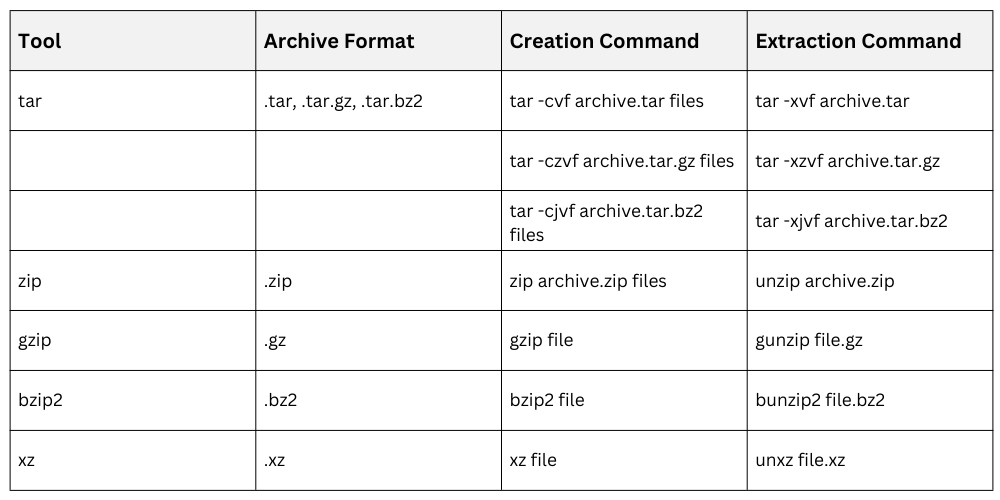
The tar utility is used to combine multiple files and directories into a single archive and can optionally apply compression to reduce size. Common compression tools used alongside tar include gzip, bzip2, and xz, each offering different levels of compression and performance.
In contrast, zip performs both archiving and compression in a single step and is widely used in cross-platform environments due to its broad compatibility across operating systems.

Class Sessions
Sales Campaign

We have a sales campaign on our promoted courses and products. You can purchase 1 products at a discounted price up to 15% discount.