Process and job control are core concepts in Linux that enable users and administrators to manage the execution of programs and scripts efficiently. This involves starting processes in the foreground or background, monitoring and manipulating running tasks, and handling process termination or suspension via signals.
Understanding process and job control provides granular control over how commands execute and interact within the shell, enabling multitasking and effective system administration.
Process Creation and Execution Modes
To manage tasks efficiently, it is important to understand process creation and execution modes. The list below introduces how commands interact with the shell during execution.
1. Foreground Processes: Commands run interactively in the terminal, occupying the shell until completion.
2. Background Processes: Commands appended with & run asynchronously, allowing continued shell use.
Example:
sleep 100 & # Runs sleep in the backgroundJob Management Commands
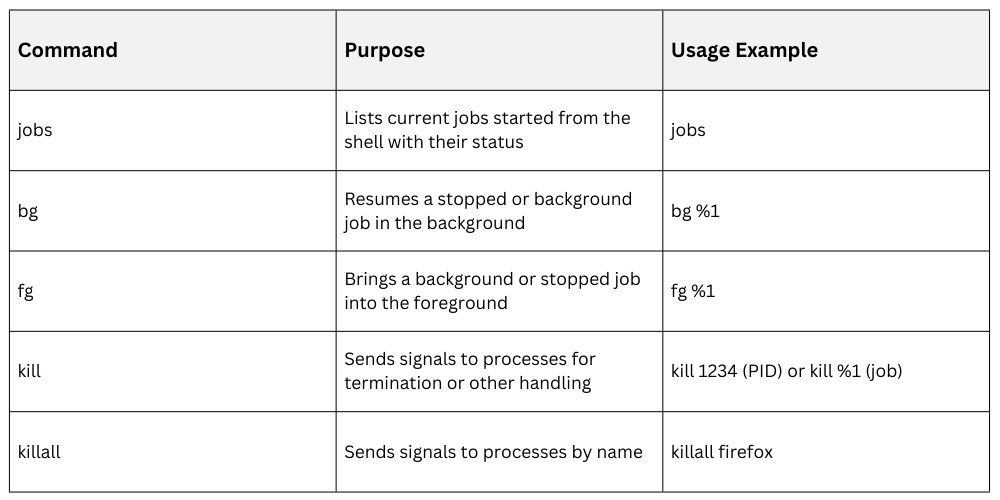 Managing Jobs
Managing jobs helps you switch between tasks efficiently while working in the terminal. The points below explains how to suspend, resume, and view job status.
1. Use Ctrl+Z to suspend a foreground process temporarily.
2. Resume with bg to continue running in the background or fg to bring it back to foreground.
3. jobs shows job IDs and status (Running, Stopped).
Process Monitoring Tools
Linux provides several tools to monitor processes in real time and on demand. The list below highlights the most commonly used commands for process visibility.
1. ps: Lists current processes. Useful options:
ps aux: Detailed list of all processes
ps -ef: Shows users, parents, and start times
2. top/htop: Real-time monitoring of system processes with CPU, memory usage.
3. pgrep: Searches running processes by name and returns PIDs.
Example of using pgrep and killing a process:
pgrep sshd

kill <PID>
Process Signals
To manage processes effectively, it is important to understand Linux process signals and their purpose. The points below introduces the most frequently used signals.
Common signals sent via kill include:
SIGTERM (15): Graceful termination
SIGKILL (9): Forceful kill
SIGSTOP: Stops (pauses) process
SIGCONT: Continues stopped process
You can send specific signals like:
kill -9 1234 # Force kill process 1234