Backup, recovery, and monitoring are essential practices for ensuring database reliability and business continuity in backend systems.
Databases can fail due to hardware issues, software bugs, or human error, making reliable recovery mechanisms critical.
Write-Ahead Logging (WAL) records changes before they are applied, enabling databases to recover to a consistent state after a crash.
Point-in-time recovery (PITR) builds on WAL to restore a database to an exact moment, helping recover from accidental data loss or corruption.
Monitoring tools such as pgBadger analyze database logs to provide insights into query performance, errors, and usage patterns.
Continuous monitoring helps detect issues early and maintain stable, high-performing backend systems.
Understanding Write-Ahead Logging (WAL)
Write-Ahead Logging (WAL) is PostgreSQL's core mechanism for ensuring data durability, logging changes before they're applied to the database.
It underpins reliable backups and recovery, preventing data loss even during power failures.
WAL works by recording every database modification—like inserts, updates, or deletes—in sequential log files before committing them to disk.
This "write-ahead" approach guarantees that if a crash occurs, PostgreSQL can replay the logs to restore consistency.
Think of it as a safety net: your backend app writes data, WAL captures it safely, and recovery rebuilds from there.
How WAL Ensures Durability
PostgreSQL follows the ACID properties, with WAL enforcing the "D" (durability). Here's the process in action:
1. Your app sends a transaction (e.g., UPDATE users SET balance = balance - 100 WHERE id = 123).
2. PostgreSQL writes the change to a WAL file on disk before updating the main data pages.
3. The transaction commits only after the WAL record is fsynced (flushed to disk).
4. During recovery, WAL replays unapplied changes from log files.
This prevents partial writes. For example, in a high-traffic e-commerce backend, WAL ensures that even if your server reboots mid-Black Friday sale, no orders vanish.
Key WAL Configurations for Backend Devs
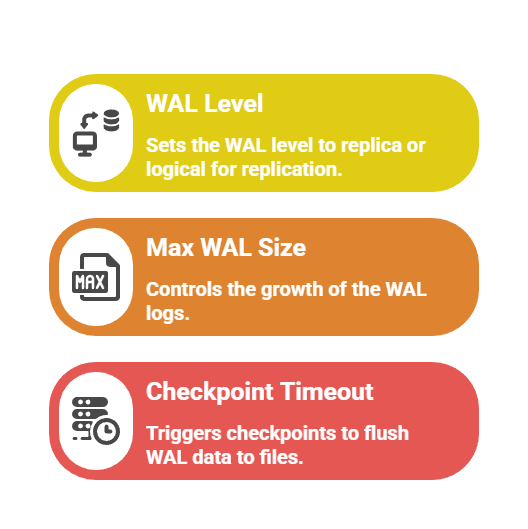
Without proper WAL tuning, your backups become useless, as we'll see next.
Backup Strategies in PostgreSQL
Effective backups are your first line of defense, capturing database state for restores. PostgreSQL offers logical (SQL dumps) and physical (file-system copies) backups, each suited to different backend scenarios.
Physical backups using pg_basebackup create binary copies of the entire cluster, ideal for full recovery in production apps.
Combine them with WAL archiving for complete protection. Logical backups via pg_dump export schema and data as SQL, perfect for schema changes or migrations in development.
Logical Vs. Physical Backups
Use this table to choose the right method for your FastAPI or Django project:
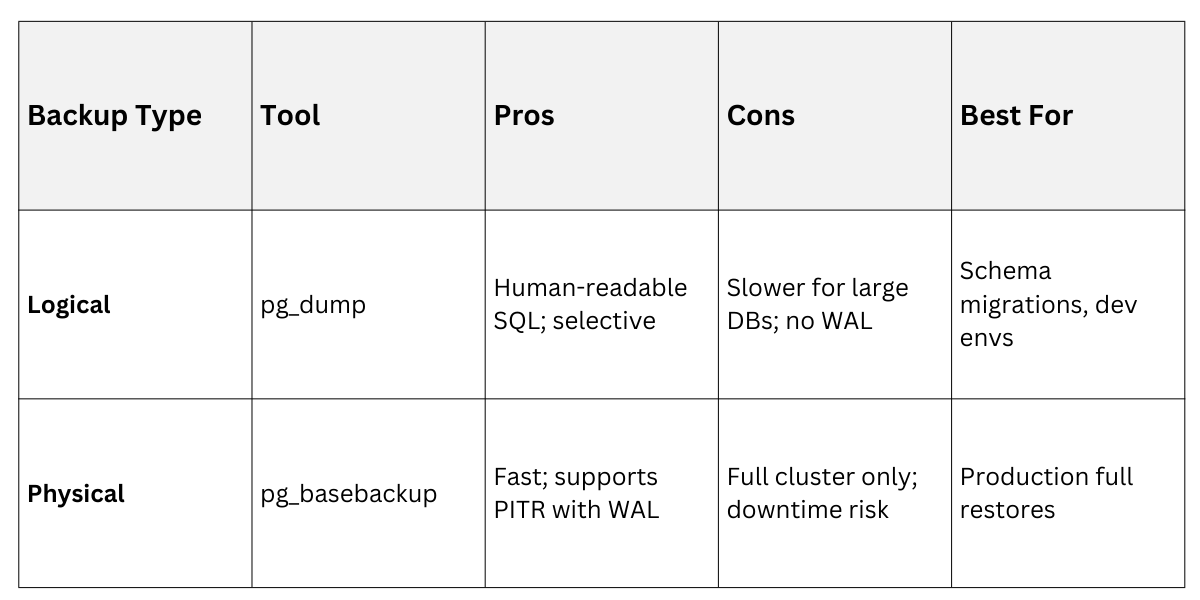
Example: Run pg_dump -U postgres -d myapp_db > backup.sql for a quick logical backup before deploying a new feature.
Point-in-Time Recovery (PITR)
Point-in-Time Recovery (PITR) lets you rewind your database to any moment, recovering from errors like accidental DELETE statements.
It relies on WAL archives from a base backup, replaying logs up to your desired timestamp.
PITR shines in backend ops: imagine a buggy script wiping user sessions—restore to 2 hours ago without losing the day's good data. Setup involves base backups plus continuous WAL shipping to secure storage like S3.
Setting Up PITR Step-by-Step
Follow these steps to enable PITR on a PostgreSQL 17+ server:
1. Configure postgresql.conf
wal_level = replica

archive_mode = on

archive_command = 'cp %p /path/to/wal_archive/%f'
2. Take a base backup
pg_basebackup -U postgres -D /backup/dir -Ft -z -P3. For recovery, create recovery.conf (or postgresql.conf in PG12+ with recovery_target_time)
restore_command = 'cp /path/to/wal_archive/%f %p'

recovery_target_time = '2025-12-29 13:00:00 IST'
4. Start the recovered cluster: pg_ctl start.
In a real backend scenario, script this with cron jobs: daily base backups to AWS S3, WAL streamed every 5 minutes. Tools like pgBackRest or Barman automate it, handling compression and retention (e.g., keep 7 daily, 4 weekly backups).
Pro Tip: Test PITR quarterly—industry standard from PostgreSQL docs recommends simulating failures to verify.
Monitoring PostgreSQL Performance
Monitoring keeps your database healthy, spotting issues before they crash your app.
Tools track queries, WAL growth, and I/O, alerting on anomalies like slow vacuums.
pg_stat_statements (built-in) logs top queries, while external tools provide dashboards. For backend devs, integrate with Prometheus/Grafana for app-level insights.
Key Metrics to Monitor
.png)
Using pgBadger for In-Depth Analysis
pgBadger is a battle-tested log analyzer that turns PostgreSQL logs into actionable HTML reports. It parses WAL-related events, slow queries, and errors, helping optimize your backend's database layer.
Install via pgbadger --help, then run pgbadger postgresql.log -o report.html. Reports visualize bottlenecks, like WAL write storms during peak traffic.
pgBadger Report Breakdown
Generate reports weekly for your Django app
pgbadger /var/log/postgresql.log -S 1h --exclude-queryid=bad_query_id -o weekly.htmlKey Sections in a pgBadger Report
1. Query Time Breakdown: Pie chart of total time (e.g., 40% on WAL syncs).
2. Top 20 Queries: Identifies N+1 issues in your ORM.
3. WAL Statistics: Tables showing archive delays.
Example Insight: A report reveals 60% of time in CHECKPOINT—solution: increase checkpoint_completion_target = 0.9.
Latest Features (PG 17+): pgBadger 11.5+ supports extended query IDs and logical replication stats, aligning with PostgreSQL's 2025 enhancements for better observability.
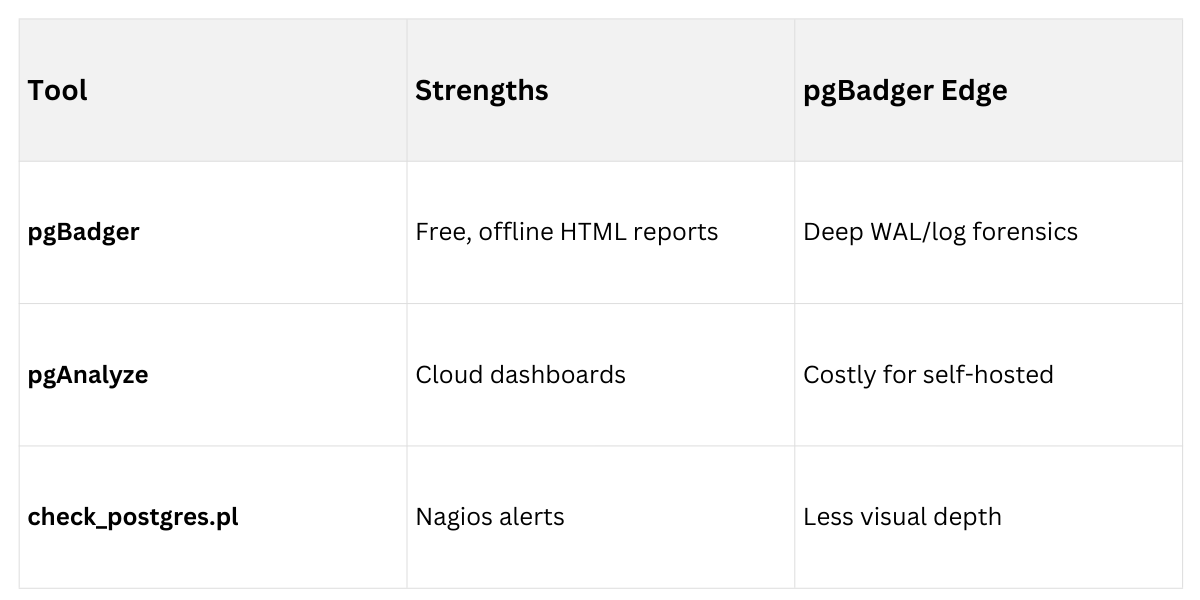
pgBadger with alternatives
 Best Practices for Production
Tie it all together with these backend-focused habits:
1. Automate backups: Use Ansible or Docker Compose for pg_basebackup + WAL to S3.
2. Retention policy: 1 week hourly PITR, 1 month daily.
3. Monitoring stack: pgBadger + Grafana for queries, pg_stat_wal_receiver for replication lag.
4. Test recovery: Quarterly drills, per PostgreSQL Community guidelines.
5. Security: Encrypt WAL archives with pgcrypto; role-based access for backups.
For a FastAPI service, integrate via /health endpoints querying pg_stat_database.
