Column-family and graph databases are specialized NoSQL systems designed to handle large-scale, complex data scenarios.
Column-family databases, such as Apache Cassandra, store data in columns rather than rows, enabling high write throughput and efficient access to large distributed datasets.
Cassandra is widely used in systems that require high availability, fault tolerance, and horizontal scalability across multiple nodes.
Graph databases, like Neo4j, focus on storing and querying relationships between data entities.
They represent data as nodes and relationships, making them ideal for applications where connections are as important as the data itself, such as social networks, recommendation engines, and fraud detection systems.
Column-Family Databases: Understanding the Wide-Column Model
Column-family databases, also called wide-column stores, store data in dynamic columns rather than rigid rows, making them ideal for handling variable data structures at petabyte scale.
They depart from relational tables by grouping related columns into families, allowing sparse, schema-flexible designs that support massive parallelism.
Concepts of Column-Family Stores
At their heart, column-family databases organize data into rows identified by a unique key, with column families acting as containers for sorted key-value pairs. Each row can have different columns, enabling flexibility without schema migrations—a boon for evolving backend APIs.
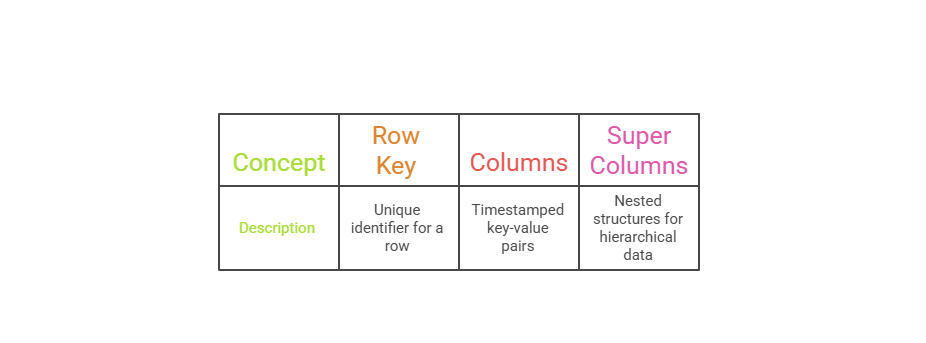
Consider a Backend User Analytics App: A relational table might force uniform profiles, but a column-family stores sparse event data—like only "login_times" for active users—saving space and query time.
Relational SQL Vs. Column Friendly
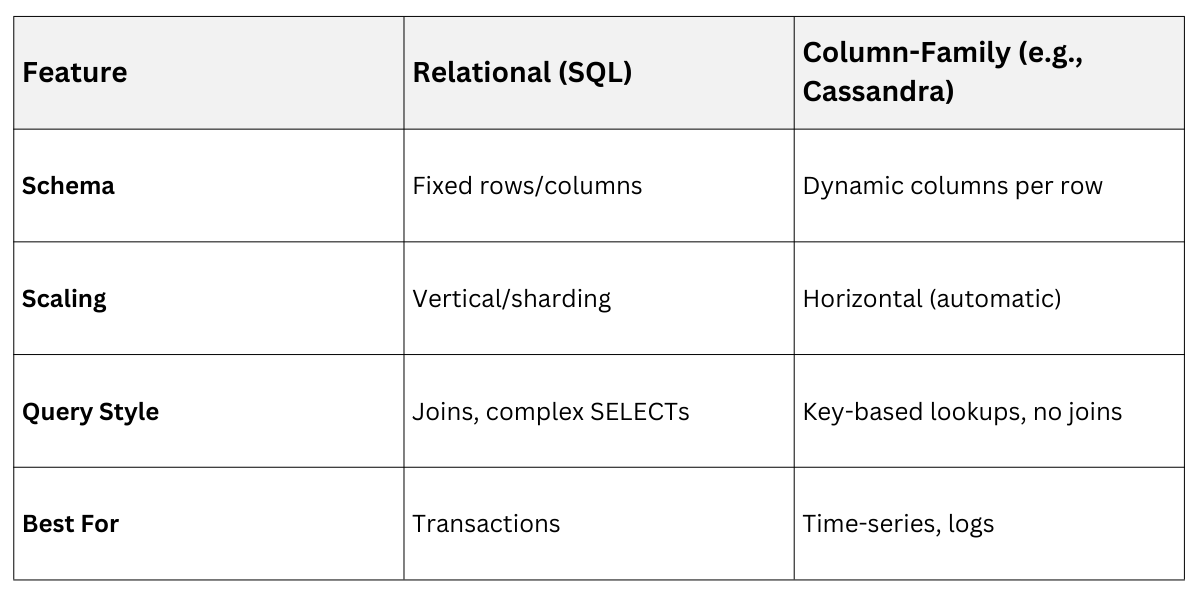 Why Cassandra? Basics and Strengths for Backend Devs
Apache Cassandra, an open-source distributed NoSQL database, leads the column-family space with its masterless architecture, inspired by Amazon Dynamo and Google Bigtable.
It guarantees high availability via tunable consistency levels (e.g., QUORUM for reads/writes) and linear scalability across commodity hardware—no single point of failure.
Key Strengths
1. Fault Tolerance: Data replicates across nodes in a ring topology; if one fails, others serve seamlessly.
2. Write-Optimized: Logs data sequentially to commitlogs, then memtables, flushing to SSTables—perfect for IoT or logging backends.
3. CQL (Cassandra Query Language): SQL-like syntax lowers the learning curve for SQL devs.
In practice, companies like Netflix use Cassandra for 1.5 trillion operations daily in their recommendation backend, handling spikes without downtime.
Getting Started with Cassandra: Setup and Basic Operations
Cassandra's setup is straightforward for backend prototypes, but production demands cluster planning.
It runs on Linux/Mac/Windows, with Docker images for quick spins—essential for local dev matching your course's Python/Flask stacks.
Installing and Creating Your First Keyspace
Follow these steps to bootstrap a Cassandra instance:
1. Download and Install: Grab the latest from apache.org (e.g., 4.1.5 as of 2025). Use brew install cassandra on Mac or Docker: docker run --name cassandra -p 9042:9042 cassandra:latest.
2. Start the Node: Run cassandra -f or docker start cassandra. Connect via cqlsh (CQL shell).
3. Create Keyspace: A namespace like a database—use replication for distribution:
CREATE KEYSPACE myapp WITH replication = {'class': 'SimpleStrategy', 'replication_factor': 1};

USE myapp;
4. Define Table: Column families are tables in CQL:
CREATE TABLE users (

    user_id UUID PRIMARY KEY,

    email TEXT,

    preferences MAP<TEXT, TEXT>

);
This setup mirrors a backend user store: user_id partitions data, ensuring even distribution.
Core CRUD Operations and Best Practices
Cassandra prioritizes denormalization—store data as you query it—to avoid costly scans.
Here's a numbered flow for inserting and querying user profiles
1. Insert Data
INSERT INTO users (user_id, email, preferences) VALUES (uuid(), 'user@example.com', {'theme': 'dark'});2. Read with Consistency
SELECT * FROM users WHERE user_id = <uuid> USING CONSISTENCY QUORUM;3. Update (adds new column versions)
UPDATE users SET preferences['lang'] = 'en' WHERE user_id = <uuid>;4. Delete: Tombstones mark removals for eventual consistency.
DELETE FROM users WHERE user_id = <uuid>;Best Practices
1. Use composite primary keys (e.g., PARTITION KEY (user_id), CLUSTERING KEY (timestamp)) for sorting.
2. Avoid SELECT *—specify columns to minimize data transfer.
3. Monitor with nodetool for compaction and repair.
4. Integrate with Python via cassandra-driver: pip install cassandra-driver for Flask/FastAPI apps.
For a backend example, track e-commerce orders: One table per query pattern, like orders_by_user and orders_by_date, each denormalized for fast reads.
Cassandra Vs. Other NoSQL
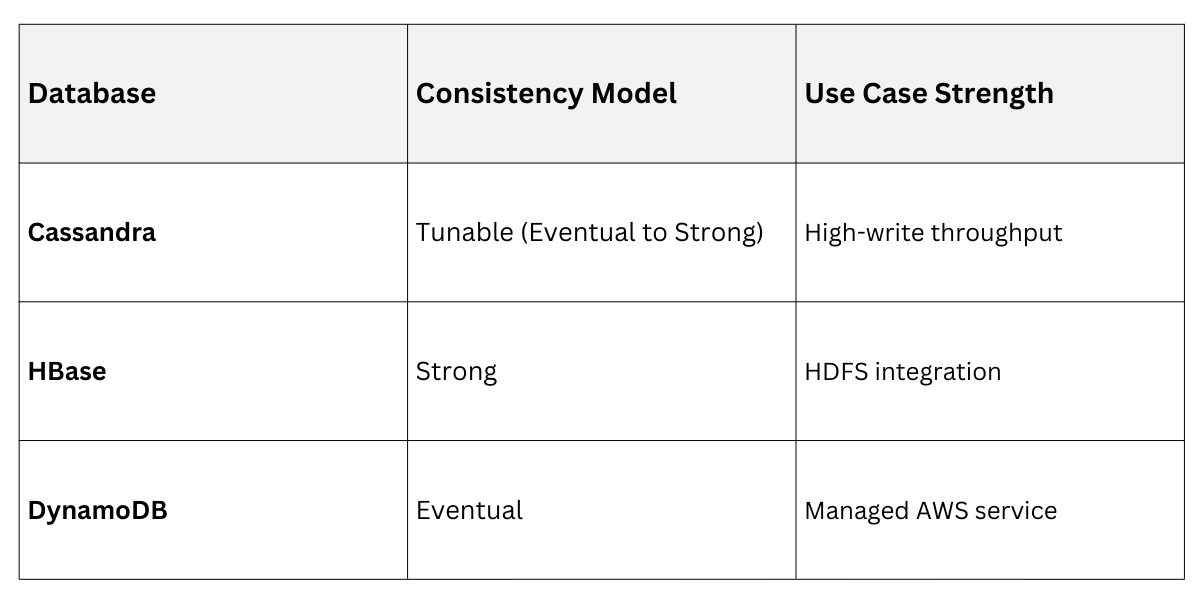
Graph Databases: Modeling Relationships with Neo4j
Graph databases treat data as nodes, relationships, and properties, outperforming tables for interconnected queries.
Neo4j, the leading graph DB, uses the property graph model—nodes linked by directed relationships—making it intuitive for backend features like fraud detection or friend suggestions.
Fundamentals of Graph Data Modeling
In Neo4j, everything revolves around nodes (entities), relationships (connections with types/directions), and properties (key-value attributes).
Queries use Cypher, a declarative language: MATCH (n:Person)-[:FRIENDS_WITH]->(m) RETURN n, m.
Practical backend win: Social apps query "friends of friends" in milliseconds, vs. recursive SQL joins that explode in complexity.
Core Elements
1. Nodes: CREATE (u:User {name: 'Alice', id: 1})
2. Relationships: MATCH (a:User {id:1}), (b:User {id:2}) CREATE (a)-[:FOLLOWS]->(b)
3. Labels: Categorize nodes for indexing (e.g., :Product, :Order).
Neo4j Setup and Hands-On Queries for Backend Use Cases
Neo4j's community edition is free; enterprise adds clustering.
Start with Docker: docker run --name neo4j -p 7474:7474 -p 7687:7687 neo4j:latest.
Building a Relationship-Heavy Backend Model
Model a recommendation system:
1. Create Nodes
CREATE (u1:User {name: 'Alice'})

CREATE (p1:Product {name: 'Laptop'})
2. Add Relationships
MATCH (u:User {name: 'Alice'}), (p:Product {name: 'Laptop'})

CREATE (u)-[:PURCHASED {date: '2025-01-01'}]->(p)
3. Query Paths
MATCH (u:User {name: 'Alice'})-[:PURCHASED]->(p:Product)<-[:PURCHASED]-(other:User)-[:PURCHASED]->(rec:Product)

WHERE NOT (u)-[:PURCHASED]->(rec)

RETURN rec.name AS recommendation
This finds "users like you bought" instantly.
Performance Tips (Neo4j 5.20+ best practices)
1. Use indexes: CREATE INDEX users_name FOR (u:User) ON (u.name)
2. Leverage Graph Data Science Library: for algorithms like PageRank.
3. Python driver: pip install neo4j; connect in FastAPI for real-time graphs.
4. Scale with Fabric: for multi-database federation.
Graph Vs. Column-Family
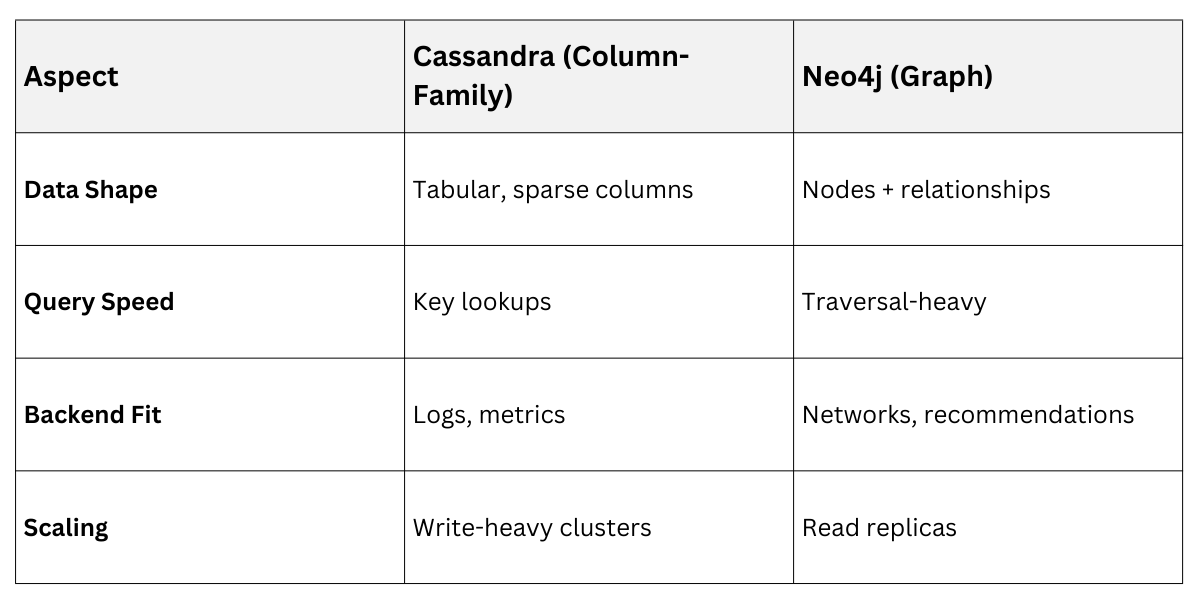

Class Sessions
Sales Campaign

We have a sales campaign on our promoted courses and products. You can purchase 1 products at a discounted price up to 15% discount.