The relational model is the most widely used approach for designing and managing databases.
It organizes data into structured tables that represent real-world entities, making data easy to store, query, and maintain.
Each table consists of rows and columns, where columns define attributes and rows store individual records.
The relational model emphasizes data integrity and clear relationships between data elements, which is essential for building reliable backend systems.
Core Components of the Relational Model
The relational model represents data as a collection of tables, each acting like a spreadsheet but with enforced rules for integrity.
Tables, rows, and columns, which form the foundation for any relational database management system (RDBMS) like PostgreSQL or MySQL.
Tables: The Foundation of Data Organization
A table is a two-dimensional structure that stores related data in rows and columns, much like a ledger in an e-commerce backend.
Think of it as the container for your app's entities—such as a "users" table holding customer details.
1. Tables enforce uniformity: Every row follows the same column structure.
2. They support relationships across tables: enabling queries like "fetch all orders for a specific user."
In practice, when designing a backend for a blog app, you'd create a posts table to store articles, ensuring all entries share columns like title and content.
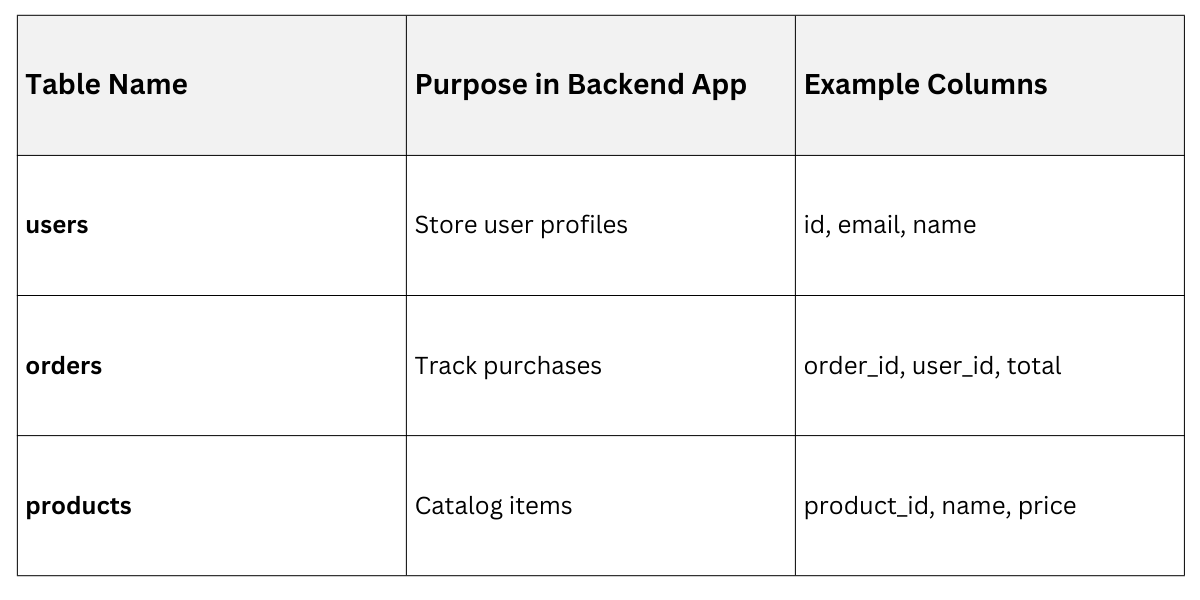
This structure aligns with industry standards like SQL:1999, promoting data normalization to reduce redundancy.
Rows and Columns: Data Atoms
Rows (also called tuples or records) represent individual instances of data, like a single user's profile. Each row captures a complete entity, ensuring atomicity—no partial updates.
Columns (attributes or fields) define the properties of those entities, specifying data types like INTEGER for IDs or VARCHAR for names. Columns enforce consistency across rows.
Here's How they Work Together:
1. Define columns with types and sizes (e.g., email VARCHAR(255)).
2. Insert rows as complete sets (e.g., one row per user).
3. Query rows selectively via columns (e.g., SELECT name FROM users WHERE email = 'user@example.com').
Example: In a task management backend:
| id (Column: INT) | task_name (Column: VARCHAR) | status (Column: ENUM) | Row Example |
|---|---|---|---|
| 1 | "Build API endpoint" | "In Progress" | Complete row for Task 1 |
| 2 | "Deploy to server" | "Pending" | Complete row for Task 2 |
This setup prevents mismatches, like storing a number in a text column, which RDBMS validators catch early.
Keys: Uniquely Identifying and Linking Data
Keys are special columns (or combinations) that ensure uniqueness and connectivity, critical for backend integrity. Primary keys uniquely identify rows, while foreign keys create links between tables, forming relationships.
Primary Keys: The Unique Identifiers
A primary key (PK) is a column—or set of columns—that uniquely identifies each row in a table. It must be NOT NULL and UNIQUE, often auto-incremented for simplicity.
Why it matters in backend dev: PKs power efficient lookups and prevent duplicates, like ensuring no two users share the same ID.
1. Natural PK: Real-world unique values, e.g., email (but risky if changeable).
2. Surrogate PK: Generated IDs, e.g., AUTO_INCREMENT in MySQL.
Best Practice: Use surrogate integer PKs for performance, per ANSI SQL standards.
Example SQL Creation
CREATE TABLE users (

    id INT PRIMARY KEY AUTO_INCREMENT,

    email VARCHAR(255) UNIQUE

);
Foreign Keys: Building Relationships
A foreign key (FK) in one table points to a primary key in another, enforcing referential integrity—like linking an order to its user.
This creates three relationship types:
1. One-to-One: Rare, e.g., user to user_profile.
2. One-to-Many: Common, e.g., one user to many orders.
3. Many-to-Many: Via junction tables, e.g., users to products via order_items.
Example: Orders table with FK to users
CREATE TABLE orders (

    order_id INT PRIMARY KEY AUTO_INCREMENT,

    user_id INT,

    FOREIGN KEY (user_id) REFERENCES users(id)

);
Benefits in Backend:
1. Prevents orphan records (e.g., orders without users).
2. Enables JOINs: SELECT * FROM orders JOIN users ON orders.user_id = users.id.
Constraints: Enforcing Data Integrity
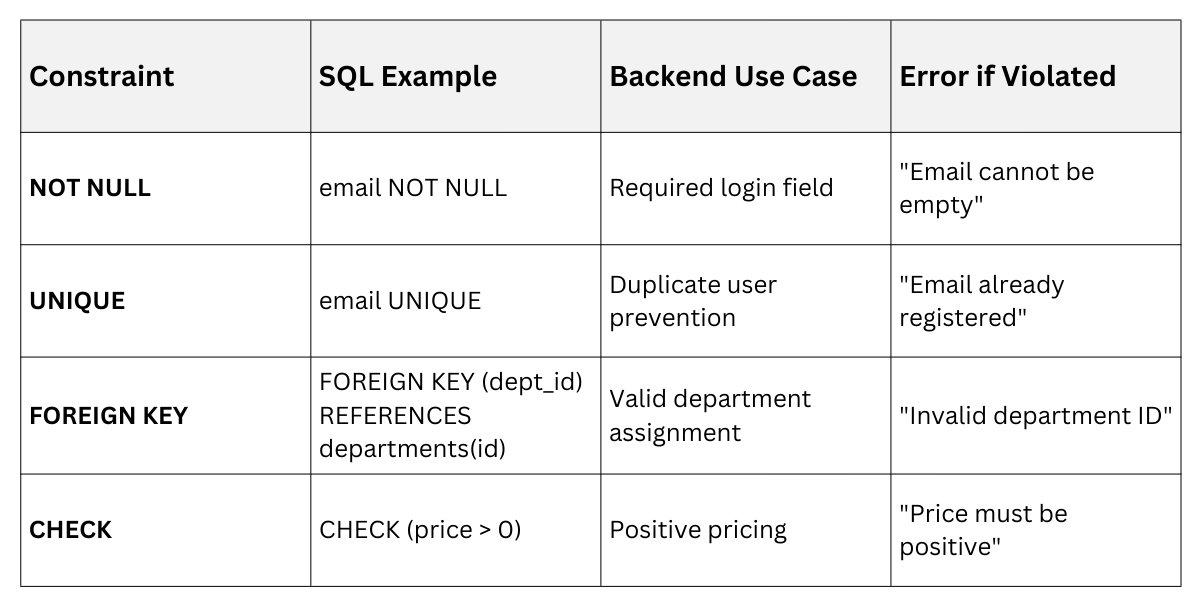
Constraints are rules applied to columns or tables, safeguarding data quality during inserts, updates, or deletes.
They align with ACID properties (Atomicity, Consistency, Isolation, Durability), essential for reliable backends.
Every RDBMS supports core constraints, with best practices from ISO/IEC 9075 (SQL standard).
Types of Constraints and Their Usage
.png)
Constraints catch errors proactively, reducing backend bugs.
1. NOT NULL: Ensures a column always has a value. Example: name VARCHAR(100) NOT NULL.
2. UNIQUE: Prevents duplicates across rows. Example: Email must be one-of-a-kind.
3. PRIMARY KEY: Combines NOT NULL + UNIQUE (one per table).
4. FOREIGN KEY: Links tables, with options like ON DELETE CASCADE (auto-delete related rows).
5. CHECK: Custom validations. Example: CHECK (age >= 18) for adult users.
6. DEFAULT: Auto-fills values. Example: status VARCHAR(20) DEFAULT 'Pending'.
Implementation Steps
1. Add during table creation: ALTER TABLE users ADD CONSTRAINT chk_age CHECK (age >= 0);.
2. Test with invalid data: Attempt INSERT with age=-5 → fails.
3. Handle in backend code: Use ORM try-catch for graceful errors.
Constraints in Action
In a FastAPI backend, constraints integrate seamlessly with Pydantic models for validation.
Advanced Considerations and Best Practices
For production backends, go beyond basics with indexing, normalization, and modern RDBMS features.
Normalization and Indexing
Normalization organizes tables to minimize redundancy (1NF-3NF). Example: Split user addresses into a separate table to avoid repeating zip codes.
Indexes speed up queries on PKs/FKs:
1. B-tree indexes default for equality searches.
2. PostgreSQL's latest (v16+) supports partial indexes for selective data.
Tip: Index FKs always, but sparingly—indexes slow writes.
Handling Modern Scenarios
1. Composite Keys: Multiple columns as PK, e.g., (user_id, session_date).
2. UPSERT (INSERT ON CONFLICT): PostgreSQL feature for idempotent operations.
3. Cascading Actions: ON UPDATE CASCADE propagates PK changes.
Example for E-commerce Backend
ALTER TABLE orders

ADD CONSTRAINT fk_user

FOREIGN KEY (user_id) REFERENCES users(id)

ON DELETE RESTRICT ON UPDATE CASCADE;
This prevents deleting users with active orders while syncing ID changes.

Class Sessions
Sales Campaign

We have a sales campaign on our promoted courses and products. You can purchase 1 products at a discounted price up to 15% discount.