Performance tuning focuses on optimizing backend systems to handle high traffic and deliver fast responses.
Techniques such as caching, read replicas, and efficient connection lifecycle management play a major role in reducing database load and improving scalability.
Integrating caching solutions like Redis allows frequently accessed data to be served from memory instead of querying the database repeatedly.
Read replicas help distribute read-heavy workloads, while proper connection handling ensures database resources are used efficiently.
Caching with Redis Integration
Caching stores frequently accessed data in memory for lightning-fast retrieval, bypassing slower disk-based database queries.
Redis, an in-memory key-value store, excels here due to its speed, persistence options, and support for advanced data structures like lists and sets.
Redis integration transforms backend performance by offloading read-heavy operations. Let's explore how to set it up and use it effectively in Python applications.
Why Redis for Caching?
Redis powers caching at companies like Twitter and GitHub because it delivers sub-millisecond latencies. Unlike traditional caches, it supports eviction policies (e.g., LRU) to manage memory automatically.
Key Benefits
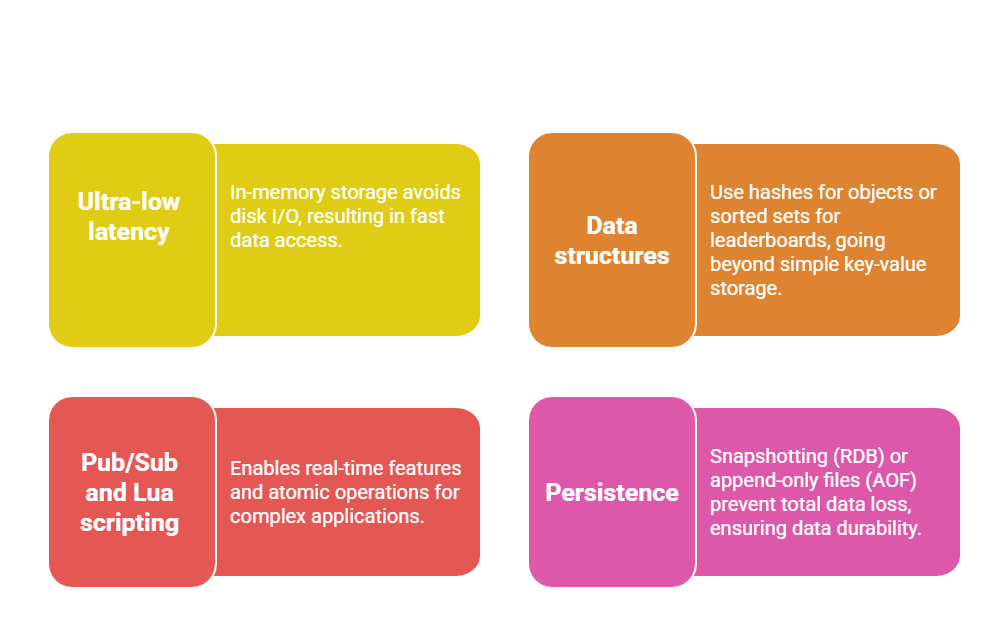
Consider a user profile API: Without caching, each request hits the database, spiking CPU usage. With Redis, you cache the profile for 5 minutes, serving 90% of requests from memory.
Implementing Redis Caching in Python
Use the redis-py library for seamless integration. Install via pip install redis, then connect in your backend.
Here's a step-by-step process for a Flask app:
1. Install and connect
import redis

import json

from flask import Flask


app = Flask(__name__)

r = redis.Redis(host='localhost', port=6379, db=0)
2. Cache a database query (e.g., user data)
@app.route('/user/<int:user_id>')

def get_user(user_id):

    cache_key = f"user:{user_id}"

    cached = r.get(cache_key)

    if cached:

        return json.loads(cached)


    # Fallback to DB (using SQLAlchemy)

    user = User.query.get(user_id)

    if user:

        data = user.to_dict()

        r.setex(cache_key, 300, json.dumps(data))  # Expire in 5 min

        return data

    return "User not found", 404
3. Handle cache invalidation: On user updates, delete related keys
def update_user(user_id, data):

    # Update DB first

    user = User.query.get(user_id)

    user.name = data['name']

    db.session.commit()

    # Invalidate cache

    r.delete(f"user:{user_id}")
4. Advanced: Cache patterns
Write-Through: Update cache and DB simultaneously.
Cache-Aside: Read from cache, write to DB (most common).
TTL Tuning: Use setex for auto-expiry based on data volatility.
Read Replicas for Scalability
Read replicas are database copies that handle read-only queries, offloading traffic from your primary (write) database.
This horizontal scaling technique shines in read-heavy apps like social feeds or dashboards.
By duplicating data asynchronously, read replicas boost throughput without duplicating write costs.
They're standard in managed services like AWS RDS, Google Cloud SQL, or PostgreSQL streaming replication.
Setting Up Read Replicas
Most relational databases (PostgreSQL, MySQL) support built-in replication. For example, PostgreSQL uses logical or physical streaming replication.
Prerequisites
1. Primary database with WAL (Write-Ahead Logging) enabled.
2. Replica servers with matching configs.
Steps to configure PostgreSQL replicas
1. On primary: Edit postgresql.conf
wal_level = replica

max_wal_senders = 10

wal_keep_size = 1GB
2. Create replication user
CREATE USER replicator REPLICATION LOGIN PASSWORD 'securepass';3. On replica: Initialize with pg_basebackup
pg_basebackup -h primary_host -D /var/lib/postgresql/data -U replicator -P -v -R4. Start replica: Set primary_conninfo in recovery.conf and restart.
In your Python backend (e.g., Django), route reads dynamically:
# settings.py

DATABASES = {

    'default': {'ENGINE': 'django.db.backends.postgresql', 'NAME': 'app', 'HOST': 'write-primary'},

    'read': {'ENGINE': 'django.db.backends.postgresql', 'NAME': 'app', 'HOST': 'read-replica'},

}


# views.py

from django.db import connections


def get_posts():

    with connections['read'].cursor() as cursor:

        cursor.execute("SELECT * FROM posts ORDER BY created_at DESC")

        return cursor.fetchall()
Routing Reads and Handling Lag
Use libraries like django-db-router or SQLAlchemy's readwrite splitting.
1. Connection pooling: Tools like PgBouncer distribute to replicas.
2. Lag monitoring: Query pg_stat_replication on primary—keep lag <1s.
3. Failover: Promote replica on primary failure using Patroni or similar.
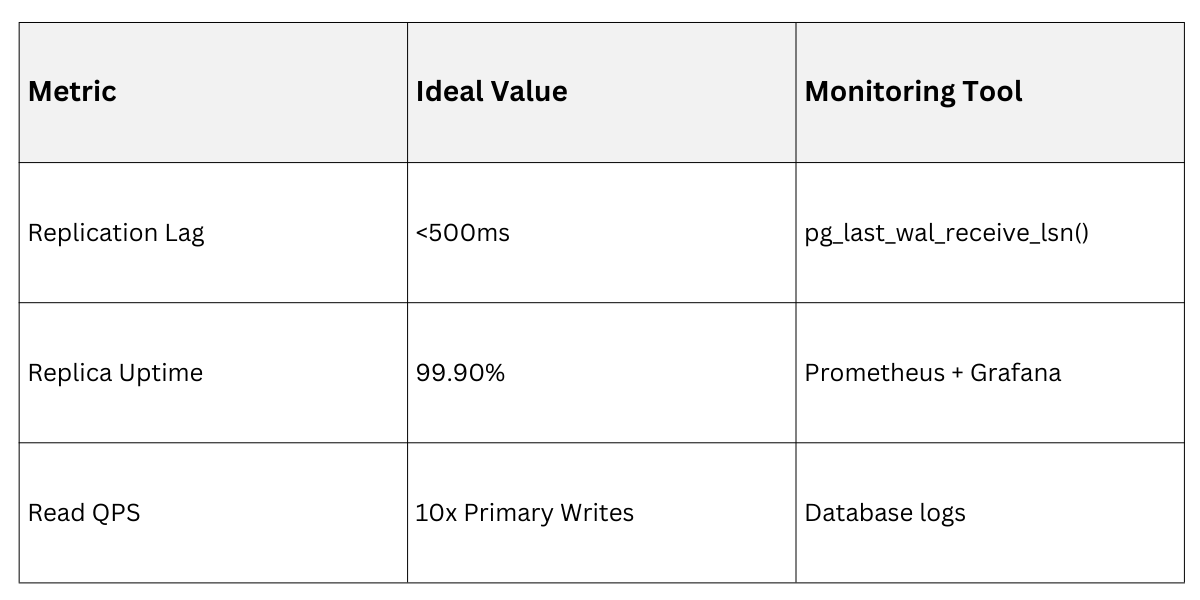
Practical Tip: For e-commerce, route product listings to replicas but user carts to primary for consistency.
Optimizing Connection Lifecycle
Database connections are expensive to create—each involves handshakes, authentication, and session setup.
Connection lifecycle management reuses pools to minimize overhead, preventing "connection storms" under load.
Poor management leads to exhausted pools and timeouts; proper tuning sustains thousands of concurrent users.
Connection Pooling Fundamentals
Use pools to maintain a "warm" set of connections. Libraries like SQLAlchemy's QueuePool or aiopg for async handle this.
Core Concepts
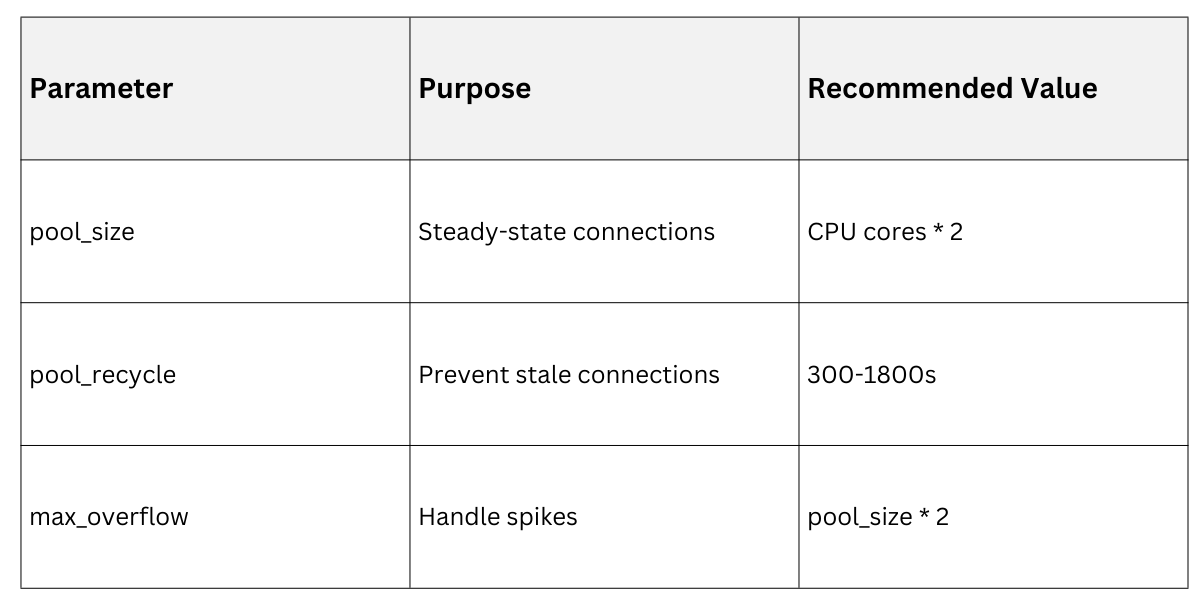
1. Pool size: Match app concurrency (e.g., 20-50 for Gunicorn workers).
2. Overflow: Allow temporary extras.
3. Pre-ping: Validate idle connections.
Configuration Example in SQLAlchemy
from sqlalchemy import create_engine

from sqlalchemy.pool import QueuePool


engine = create_engine(

    "postgresql://user:pass@host/db",

    poolclass=QueuePool,

    pool_size=10,      # Max connections

    max_overflow=20,   # Temporary extras

    pool_pre_ping=True, # Check on checkout

    pool_recycle=3600  # Refresh every hour

)
Best Practices for Lifecycle Tuning
1. Follow these steps to optimize
Tune pool parameters based on workload:
High-read: Larger pools.
2. Write-heavy: Smaller to avoid contention.
def is_connection_healthy(conn):

    conn.execute("SELECT 1")

    return True
3. Implement health checks
import asyncpg

from sqlalchemy.ext.asyncio import create_async_engine


engine = create_async_engine("postgresql+asyncpg://...", pool_size=20)
4. Monitor and alert
Track active/idle ratios via pg_stat_activity.
Use pgbouncer for advanced multiplexing.
In production, integrate with ORM query optimization—e.g., Django's connection.close() in middleware for long-lived processes.
These strategies—caching, replicas, and pooling—interact: Cache first, route reads to replicas, and pool efficiently.

Class Sessions
Sales Campaign

We have a sales campaign on our promoted courses and products. You can purchase 1 products at a discounted price up to 15% discount.