ACID transactions ensure reliable and consistent data operations in relational databases.
In backend development, transactions group multiple database actions into a single unit of work so that either all operations succeed or none take effect.
Commands like BEGIN, COMMIT, and ROLLBACK control the lifecycle of a transaction, while savepoints allow partial rollbacks within a transaction.
These features are essential for maintaining data integrity, especially in systems handling concurrent users and critical operations such as payments or inventory updates.
What are ACID Transactions?
ACID transactions form the gold standard for data integrity in relational databases, a concept originating from Jim Gray's 1981 work and formalized in standards like SQL:2016.
They guarantee that complex operations behave predictably, even under high load or failures.
Think of a transaction as a "promise" your database makes: it either fully succeeds or fully undoes changes, protecting your backend from chaos.
Core ACID Properties
Each property addresses a specific reliability challenge. Here's a breakdown:
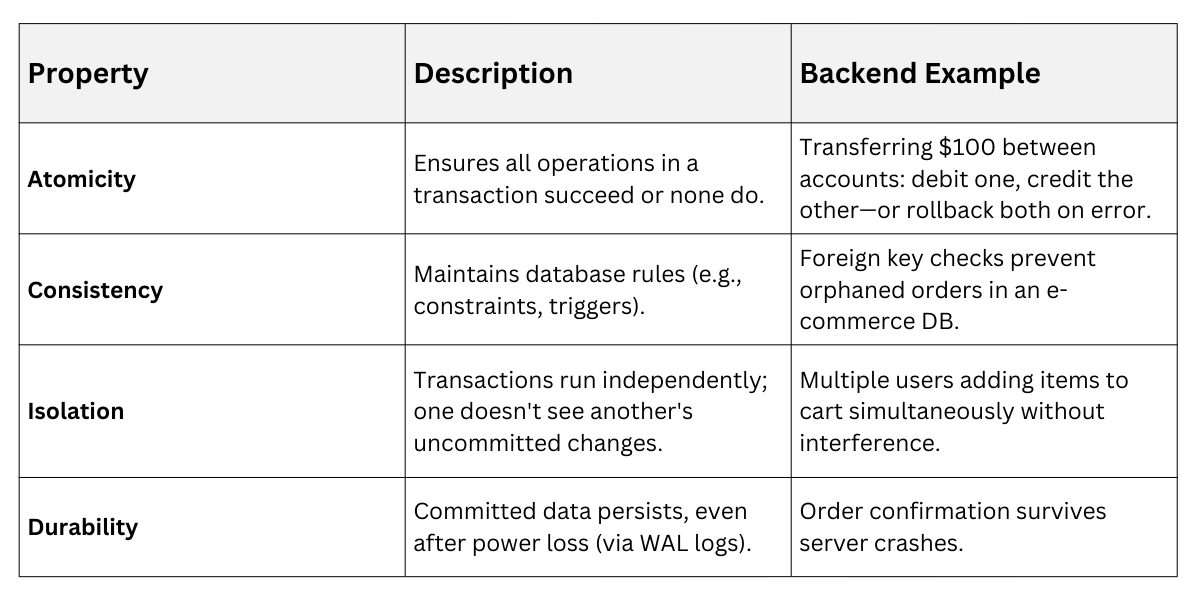
These properties rely on the commands we'll explore next, with isolation levels (e.g., READ COMMITTED in PostgreSQL) tunable for performance.
Starting a Transaction: The BEGIN Command
BEGIN initiates a transaction, switching your database session from auto-commit mode (default in many systems) to manual control.
Until you COMMIT or ROLLBACK, changes are tentative and isolated.
This is crucial in backends where a single API endpoint might execute multiple SQL statements—like updating inventory and logging a sale.
How to Use BEGIN
1. Execute BEGIN; to start.
2. Perform your SQL operations (INSERT, UPDATE, DELETE).
3. End with COMMIT (save) or ROLLBACK (undo).
Practical Example in Python (SQLite)
import sqlite3


conn = sqlite3.connect('store.db')

cursor = conn.cursor()


cursor.execute("BEGIN;")  # Start transaction

cursor.execute("UPDATE inventory SET stock = stock - 1 WHERE item_id = 1;")

cursor.execute("INSERT INTO orders (item_id, quantity) VALUES (1, 1);")


# If all good: cursor.execute("COMMIT;")

# On error: cursor.execute("ROLLBACK;")

conn.close()
Without BEGIN, SQLite auto-commits each statement—risky for multi-step ops.
Pro Tip: In PostgreSQL or MySQL, use BEGIN TRANSACTION; for explicitness. Modern ORMs like SQLAlchemy handle this automatically but expose it for fine control.
Making Changes Permanent: COMMIT
COMMIT finalizes a transaction, making all changes visible to other sessions and durable.
It's your "green light" to persist data after verifying everything worked.
In backend apps, commit only after business validations—like checking stock before confirming an order.
When and Why to COMMIT
1. Commit early, commit often: For long transactions, use savepoints (covered later) to minimize rollback scope.
2. Best Practice: Wrap in try-catch blocks to commit on success, rollback on failure.
Example Scenario: User checkout in a FastAPI backend.
BEGIN;

UPDATE products SET stock = stock - 5 WHERE id = 42;

INSERT INTO orders (user_id, product_id, qty) VALUES (123, 42, 5);

COMMIT;  -- Now visible to inventory reports
If a constraint fails (e.g., stock < 0), the entire block undoes—no phantom deductions.
Industry Standard: ACID compliance requires WAL (Write-Ahead Logging) for durability, standard in PostgreSQL 17+ and MySQL 8.4+.
Undoing Changes: ROLLBACK
ROLLBACK aborts the transaction, reverting all changes since BEGIN to their pre-transaction state. It's your safety net for errors, deadlocks, or validation failures.
Backend developers love ROLLBACK for its simplicity—it restores consistency instantly, preventing "zombie" data states.
ROLLBACK in Action
1. Start with BEGIN.
2. Run operations.
3. On error (e.g., unique constraint violation), issue ROLLBACK;.
Python Example with Error Handling
try:

    cursor.execute("BEGIN;")

    cursor.execute("INSERT INTO users (email) VALUES ('dup@example.com');")  # Fails if duplicate

    cursor.execute("UPDATE profiles SET last_login = NOW() WHERE user_id = LAST_INSERT_ID();")

    conn.commit()

except sqlite3.IntegrityError:

    conn.rollback()  # Undoes everything

    print("Transaction rolled back due to duplicate email.")
Key Benefit: Isolation ensures concurrent transactions don't see partial rollbacks.
Advanced Note: Implicit rollbacks occur on connection loss, but explicit ones give you control.
Granular Control: Savepoints
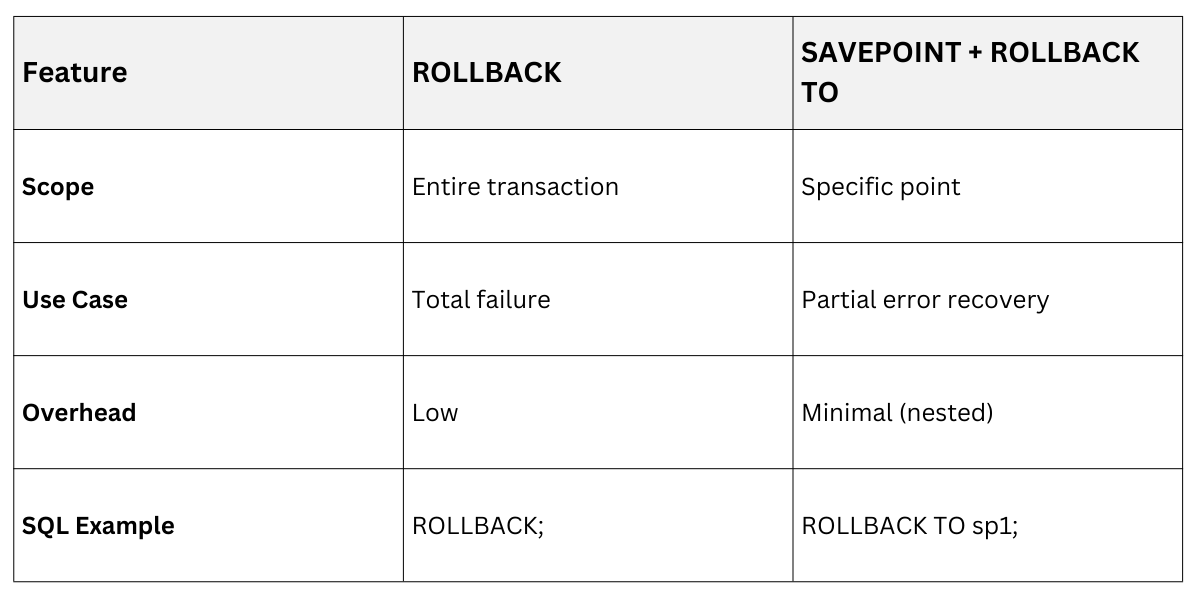
Savepoints add flexibility within transactions, letting you rollback to a midpoint without scrapping everything.
Created with SAVEPOINT name;, they're nested checkpoints.
Ideal for backends with conditional logic—like processing an order with optional upsells.
Working with Savepoints
1. SAVEPOINT sp1; – Mark a point.
2. Do risky operations.
3. ROLLBACK TO sp1; – Revert to that point.
4. Continue and COMMIT;.
Rollback vs. Savepoints
Real-World Python/SQLite Example:
BEGIN;

INSERT INTO orders (user_id) VALUES (123);  -- Main order


SAVEPOINT upsell;

UPDATE inventory SET stock = stock - 1 WHERE item_id = 99;  -- Optional add-on

-- If out of stock:

ROLLBACK TO upsell;  -- Keeps main order, skips upsell


INSERT INTO payments (order_id) VALUES (LAST_INSERT_ID());

COMMIT;
Best Practice: Limit nesting (e.g., PostgreSQL caps at 64); release with RELEASE SAVEPOINT sp1; to free resources.
Practical Backend Integration and Best Practices
Transactions shine in web apps. Here's how to apply them effectively.
Common Pitfalls and Solutions
1. Long Transactions: Block locks; use short ones or READ ONLY mode.
2. Deadlocks: Detect with SHOW ENGINE INNODB STATUS; (MySQL) and retry.
3. Nesting: Supported in PostgreSQL via SAVEPOINT; emulated elsewhere.
Best Practices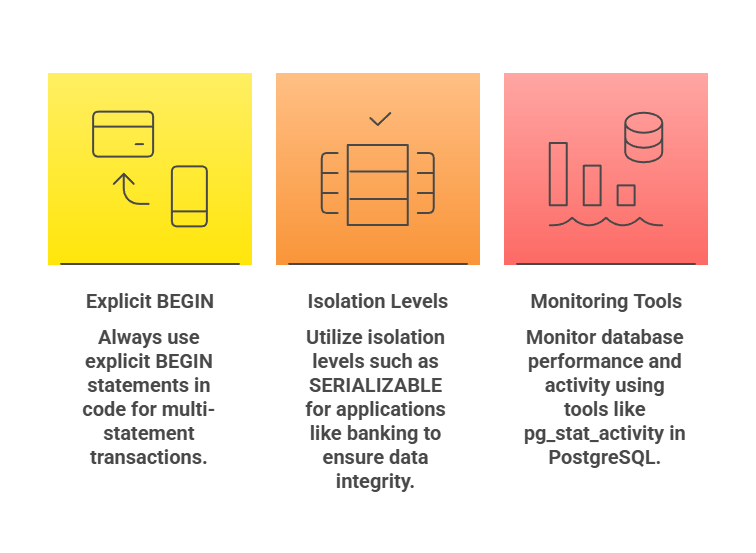
Test failures: Simulate with RAISE EXCEPTION in PL/pgSQL.
Performance Tip: Batch commits reduce I/O; index wisely for speed.
Isolation Levels in Transactions
Transactions don't operate in a vacuum—isolation levels fine-tune visibility. SQL standards define four: READ UNCOMMITTED (risky), READ COMMITTED (default), REPEATABLE READ, SERIALIZABLE (strictest).
Set With: SET TRANSACTION ISOLATION LEVEL READ COMMITTED;
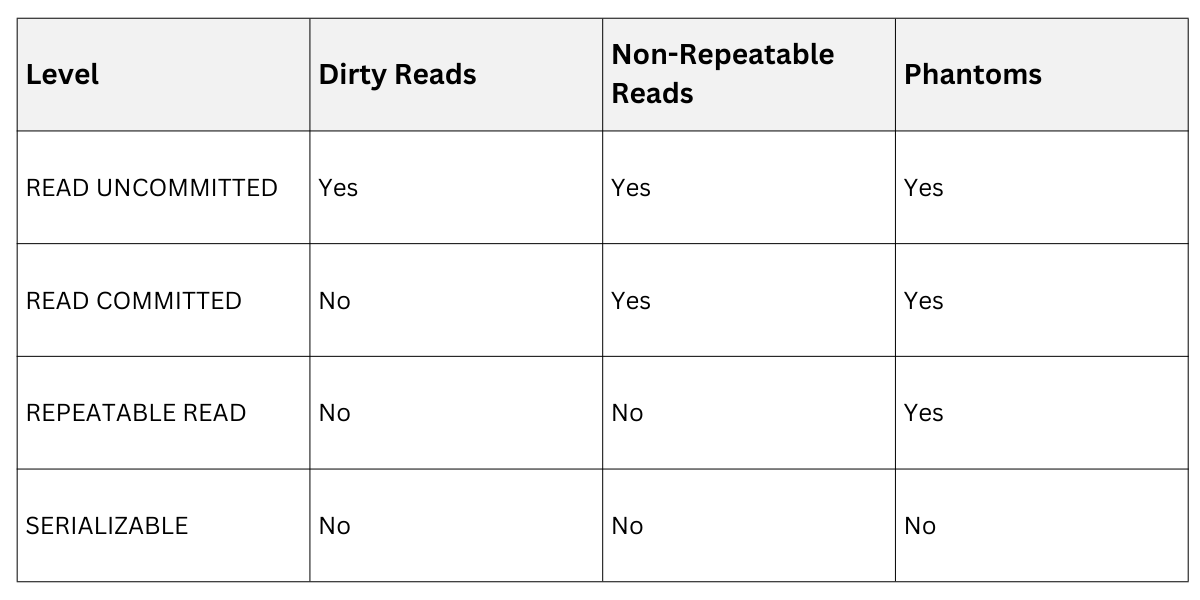
Choose based on needs: e-commerce often uses READ COMMITTED for balance.
