Authentication and authorization are critical security components in backend systems that control who can access data and what actions they are allowed to perform.
Authentication verifies a user’s identity, while authorization determines their permissions based on roles or policies.
In database-driven applications, these mechanisms help protect sensitive data and prevent unauthorized operations.
User roles group permissions and simplify access control by assigning predefined privileges to users.
Row-Level Security (RLS) adds an extra layer of protection by restricting access to specific rows in a database table based on the user’s identity or role.
This ensures that users can only view or modify the data they are authorized to access, even if they share the same application.
Authentication Fundamentals
Authentication is the gatekeeper process that confirms a user's identity before granting database access.
Think of it as showing your ID at a club door—without it, no entry. In backend development, robust authentication prevents impersonation attacks and sets the stage for authorization.
Common Authentication Methods
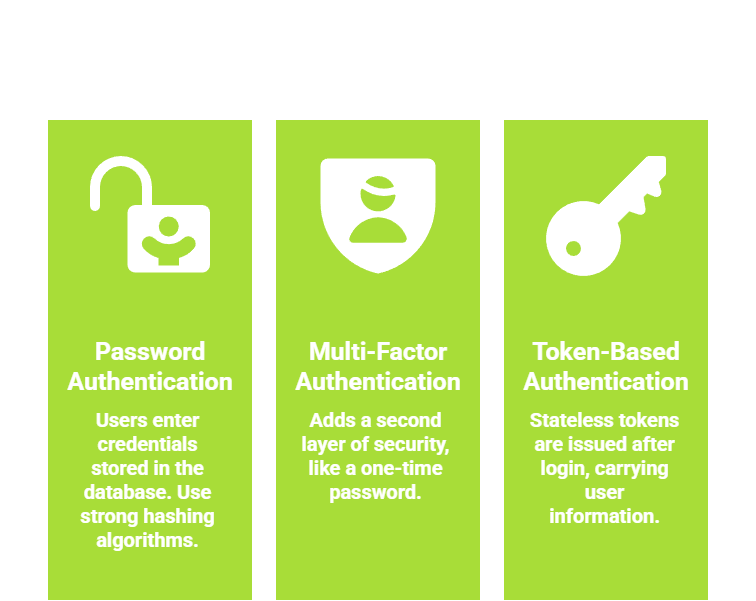
Practical Example: In a Flask app with PostgreSQL, use python-jose for JWTs. After login, query SELECT * FROM users WHERE email = $1 AND password_hash = crypt($2, password_hash), then issue a token with {"user_id": 123, "roles": ["user", "admin"]}.
Implementing Authentication in Your Backend
Follow these steps to wire authentication into your database-driven API:
1. Create a users table with columns: id, email, password_hash, roles (JSONB array for flexibility).
2. On login endpoint: Validate credentials, generate JWT with expiration (e.g., 15 minutes), store refresh tokens securely.
3. Middleware check: Decode JWT on protected routes; reject invalid/expired tokens with HTTP 401.
4. Refresh mechanism: Issue long-lived refresh tokens stored in HTTP-only cookies to swap for new access tokens.
This setup aligns with OWASP guidelines, ensuring your database queries only run for verified identities.
Authorization with User Roles
Once authenticated, authorization decides permissions—like allowing a "user" to view their data but an "admin" to delete any record. User roles provide a scalable way to manage this, avoiding per-user permission sprawl. Roles map to database privileges, making enforcement declarative and auditable.
Defining and Assigning Roles
Roles are typically stored as enums or JSON arrays in your users table for easy querying. Start simple, then scale.
Core Role Types
1. Viewer: Read-only access (e.g., reports).
2. Editor: CRUD on owned resources.
3. Admin: Full access, including user management.
Example Schema (PostgreSQL)
CREATE TYPE user_role AS ENUM ('viewer', 'editor', 'admin');

ALTER TABLE users ADD COLUMN role user_role DEFAULT 'viewer';
To Assign Roles Dynamically
1. Admin dashboard queries UPDATE users SET role = 'admin' WHERE id = 456;.
2. In code, check via if 'admin' in user_roles: grant_full_access().
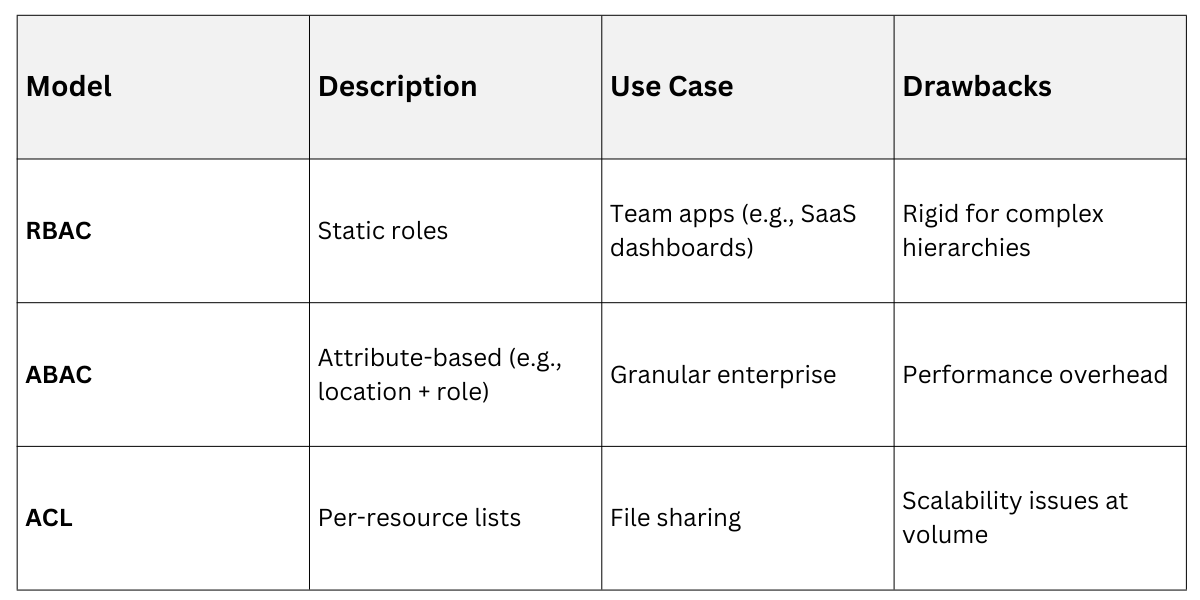
Role-Based Access Control (RBAC)
RBAC enforces "least privilege" per NIST standards. Here's how it integrates with your backend:
1. API Level: Middleware decodes JWT roles before database hits. Example in Django: @permission_classes([IsAdminUser]).
2. Database Level: GRANT privileges like GRANT SELECT ON orders TO viewer_role;.
RBAC Vs. Alternatives
Hands-On: Build a task manager where "editors" update only their tasks: SELECT * FROM tasks WHERE owner_id = auth.uid() AND role >= 'editor';.
Row-Level Security (RLS): Database-Native Protection
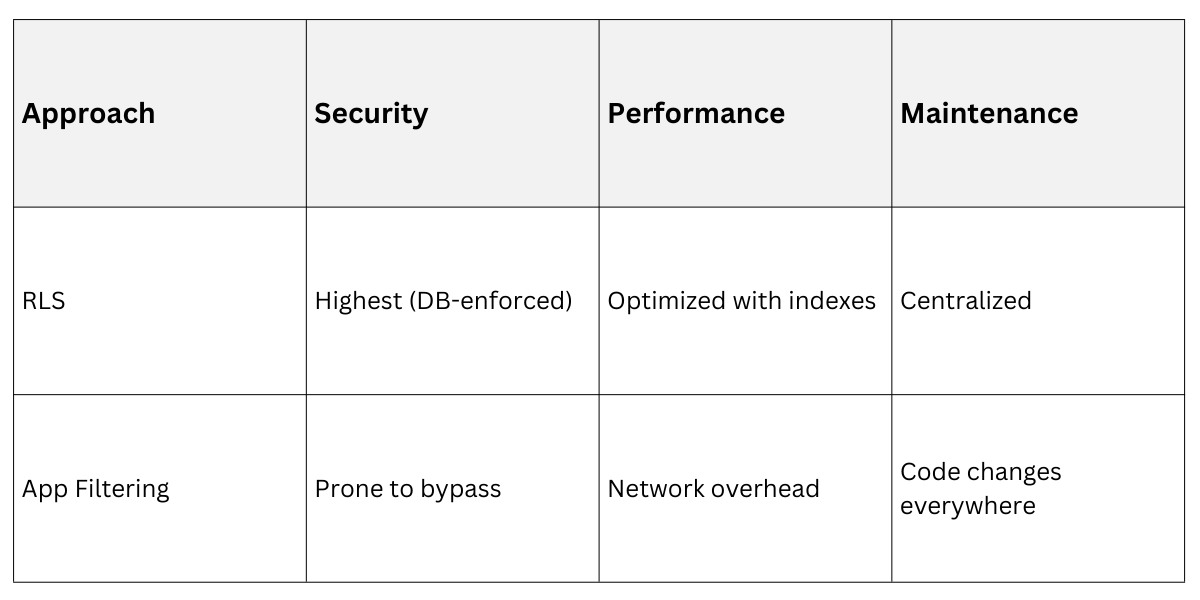
Row-level security (RLS) lets your database enforce authorization at the row level, bypassing app-layer mistakes. It's a game-changer for multi-tenant apps, where users see only their data. PostgreSQL's RLS (stable since v9.5, enhanced in v17 with performance tweaks) is the gold standard—enable it, and queries auto-filter.
Enabling and Configuring RLS
RLS uses policies attached to tables, evaluated per query. No app changes needed post-setup.
Quick Setup Steps:
1. ALTER TABLE: orders ENABLE ROW LEVEL SECURITY;
2. Create policy: CREATE POLICY user_isolation ON orders USING (owner_id = current_setting('app.current_user_id')::int);
3. Set session context: SELECT set_config('app.current_user_id', user_id::text, false) FROM users WHERE jwt_token = $1;
4. Test: Authenticated "user A" sees only their orders; "admin" bypasses via permissive policy.
Policy Types
1. PERMISSIVE (default): Allows if any policy matches.
2. RESTRICTIVE: Blocks unless all match—use for defense-in-depth.
Advanced RLS Patterns and Best Practices
Combine RLS with roles for hybrid control. For a multi-tenant e-commerce backend:
Example Policies
-- User sees own orders

CREATE POLICY own_orders ON orders FOR ALL USING (owner_id = current_user_id());


-- Admin sees all

CREATE POLICY admin_all ON orders FOR ALL TO admin_role USING (true);


-- Time-bound: Editors access recent data

CREATE POLICY recent_edits ON orders FOR UPDATE USING (created_at > now() - interval '30 days');
Performance Tips
1. Index policy expressions (e.g., CREATE INDEX ON orders(owner_id);).
2. Use FORCE RLS for superusers during testing.
3. Audit with pg_stat_activity to monitor policy eval overhead (<1ms typical).
Real-World Scenario: In a healthcare app, RLS ensures doctors query patients only for their clinic: USING (clinic_id = current_setting('app.clinic_id')). This survives app bugs, as the DB rejects invalid rows.
RLS Vs. App-Level Filtering
 Integrating Roles and RLS in a Full Backend Workflow
Tie it together in your Flask/Django app: Auth → Extract roles/JWT claims → Set DB session vars → Query with RLS auto-filtering.
Workflow Diagram (Conceptual)
1. Client logs in → Backend verifies → Issues JWT.
2. Protected request → Decode JWT → SET app.user_id = 123; SET app.roles = '[admin]';.
3. DB query runs → RLS policies filter rows → Response sent.
Common Pitfalls and Fixes
.png)

Class Sessions
Sales Campaign

We have a sales campaign on our promoted courses and products. You can purchase 1 products at a discounted price up to 15% discount.