Data Manipulation Language (DML) refers to SQL commands used to work directly with the data stored in database tables.
In backend development, DML operations allow applications to create, modify, retrieve, and remove records as part of everyday functionality.
Commands such as INSERT, UPDATE, and DELETE manage changes to data, while SELECT is used to query and display information.
INSERT: Adding New Data
The INSERT statement lets you add new rows to a table, populating your database with fresh data. It's the starting point for any data-driven app, from user registrations to seeding initial content.
Basic INSERT Syntax and Single-Row Insertion
Start with the simplest form: inserting one row at a time. This ensures precision when testing or building prototypes.
INSERT INTO table_name (column1, column2, ...) VALUES (value1, value2, ...);Consider a users table with columns id (auto-incremented primary key), name, email, and created_at. Here's a practical example:
INSERT INTO users (name, email, created_at)

VALUES ('Alice Johnson', 'alice@example.com', '2025-12-26');
1. Key Rules: List only non-auto-generated columns; match data types (e.g., dates as 'YYYY-MM-DD'); use single quotes for strings.
2. Best Practice: Always specify columns explicitly to avoid errors if the table schema changes.
This inserts one user seamlessly. In backend code, you'd parameterize this (e.g., via psycopg2 in Python) to prevent SQL injection.
Multi-Row and Bulk INSERT for Efficiency
For performance in production—like bulk-importing CSV data—use multi-row INSERT. It reduces round-trips to the database.
INSERT INTO users (name, email, created_at)

VALUES

    ('Bob Smith', 'bob@example.com', '2025-12-26'),

    ('Carol Lee', 'carol@example.com', '2025-12-26');
Numbered Steps for Safe Bulk Insertion
.png)
UPDATE: Modifying Existing Data
UPDATE alters data in existing rows, essential for dynamic apps like editing profiles or syncing statuses. Always pair it with WHERE to target specifics—omitting it updates every row!
Core UPDATE Syntax with WHERE
The structure targets precise changes without affecting unrelated data.
UPDATE table_name SET column1 = value1, column2 = value2 WHERE condition;Example: Update Alice's email after verification.
UPDATE users SET email = 'alice.verified@example.com'

WHERE id = 1;
1. Pro Tip: Test with SELECT * FROM users WHERE id = 1; first.
2. Common Pitfalls: Forgetting WHERE—use SELECT COUNT(*) previews.
Conditional Updates and Best Practices
Handle multiples with clauses like AND or IN.
UPDATE orders SET status = 'shipped'

WHERE user_id = 1 AND status = 'pending';
Best Practices
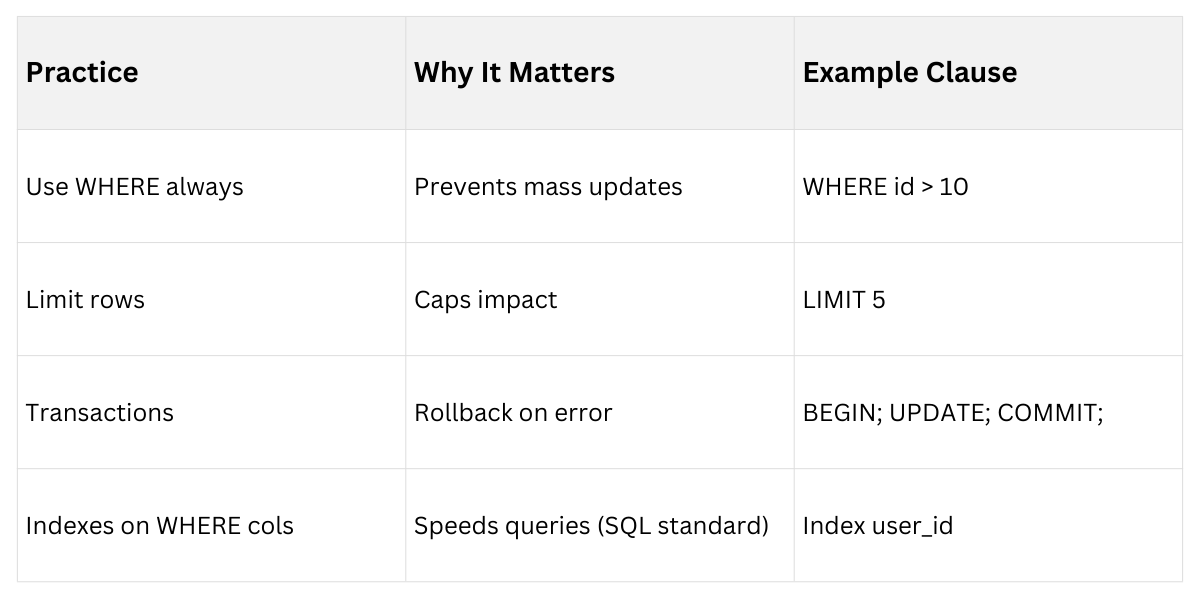
In backend dev, Integrate with ORMs like SQLAlchemy for safer updates.
DELETE: Removing Data Safely
DELETE removes rows permanently—use cautiously, as it's irreversible without backups. Like UPDATE, WHERE is non-negotiable.
Basic DELETE and Safe Removal
Syntax mirrors UPDATE but drops rows entirely.
DELETE FROM table_name WHERE condition;Example: Delete inactive users.
DELETE FROM users WHERE last_login < '2025-01-01';Verification Steps
1. Preview: SELECT * FROM users WHERE last_login < '2025-01-01';.
2. Dry-run: Add AND 1=0 to simulate.
3. Execute: in transaction.
Handling Dependencies and Cascades
For related data (e.g., foreign keys), set ON DELETE CASCADE in schema.
1. Without cascade: Delete child rows first.
2. With cascade: FOREIGN KEY (order_id) REFERENCES orders(id) ON DELETE CASCADE;.
Basic SELECT: Retrieving with Clauses
SELECT fetches data, the most-used operation. Clauses refine results for pagination, sorting, and filtering—vital for API responses.
SELECT with WHERE for Filtering
WHERE applies conditions like equality (=), inequality (>), or LIKE.
SELECT name, email FROM users WHERE created_at > '2025-12-01';1. Operators: =, !=, >, BETWEEN, IN (1,2,3), LIKE '%john%'.
2. Example: SELECT * FROM products WHERE price BETWEEN 10 AND 50;.
ORDER BY, LIMIT for Sorting and Pagination
ORDER BY sorts; LIMIT caps results—key for scalable backends.
SELECT * FROM users

ORDER BY created_at DESC

LIMIT 10 OFFSET 20;  -- Page 3, 10 per page
Pagination Formula: OFFSET = (page-1) * limit.
Clause combo example for a dashboard API:
SELECT id, name, status

FROM orders

WHERE user_id = 1

ORDER BY updated_at DESC

LIMIT 5;
Performance Tips
1. Index filtered/sorted columns.
2. Avoid SELECT *—name columns for lean APIs.
