Data Definition Language (DDL) is a subset of SQL used to define and manage the structure of a database. In backend development, DDL commands are essential for creating and modifying database objects such as tables, indexes, and views.
These commands control how data is organized, stored, and accessed, forming the foundation of a database schema.
Table
Tables store your raw data in rows and columns, much like spreadsheets but with enforced structure and relationships.
Understanding how to create, alter, and drop them is your first step toward building reliable backend data layers.
CREATE TABLE: Building from Scratch
The CREATE TABLE statement defines a new table's structure, including column names, data types, constraints, and primary keys.
It follows SQL standards (ANSI SQL-92 and later) and is supported across RDBMS like PostgreSQL, MySQL, and SQLite. Always specify constraints during creation to prevent invalid data entry from the start.
Here's the basic syntax
CREATE TABLE table_name (

    column1 datatype constraint,

    column2 datatype constraint,

    ...

    PRIMARY KEY (column1)

);
Practical Example: Imagine building a user management system for a Flask API. You'd create a users table like this in SQLite:
CREATE TABLE users (

    id INTEGER PRIMARY KEY AUTOINCREMENT,

    username VARCHAR(50) UNIQUE NOT NULL,

    email VARCHAR(100) UNIQUE NOT NULL,

    created_at TIMESTAMP DEFAULT CURRENT_TIMESTAMP

);
1. INTEGER PRIMARY KEY AUTOINCREMENT: Auto-generates unique IDs, ideal for backend lookups.
2. VARCHAR(n): Stores variable-length strings; choose n based on max expected length.
3. UNIQUE NOT NULL: Enforces data integrity—no duplicates or nulls.
In Python, execute this via sqlite3:
import sqlite3

conn = sqlite3.connect('app.db')

conn.execute('''CREATE TABLE IF NOT EXISTS users (...)''')

conn.commit()
This sets up a table ready for INSERT operations in your API endpoints.
ALTER TABLE: Evolving Your Schema
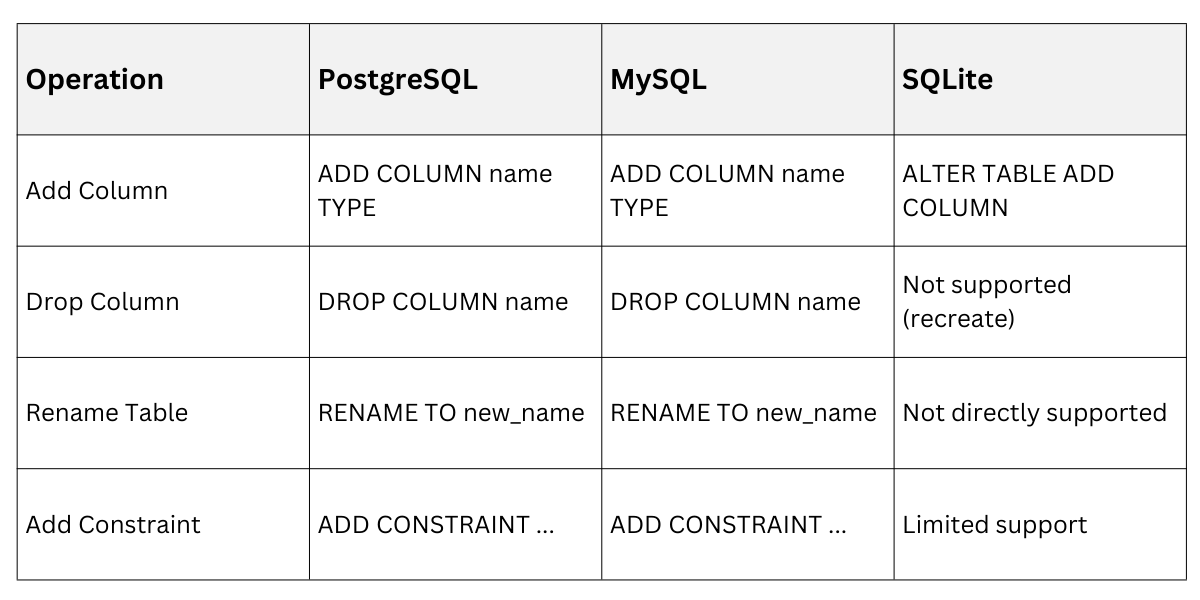
Use ALTER TABLE to modify an existing table without losing data—crucial for iterative backend development. Common operations include adding/dropping columns, renaming, or modifying constraints. Best practice: Test alterations in a staging database to avoid downtime.
Key Operations
1. Add a column: ALTER TABLE users ADD COLUMN age INTEGER;
2. Drop a column: ALTER TABLE users DROP COLUMN age; (Note: Not all DBMS support this directly; PostgreSQL requires ALTER TABLE ... DROP COLUMN.)
3. Modify a column: ALTER TABLE users ALTER COLUMN age SET NOT NULL; (Syntax varies; MySQL uses MODIFY.)
4. Rename a table: ALTER TABLE users RENAME TO user_profiles;
5. Add a constraint: ALTER TABLE users ADD CONSTRAINT chk_age CHECK (age >= 18);
ALTER TABLE Across DBMS
Example: Adding a password_hash to your users table mid-project:
ALTER TABLE users ADD COLUMN password_hash VARCHAR(255) NOT NULL DEFAULT '';This keeps your auth system secure without data loss.
DROP TABLE: Clean Removal
DROP TABLE deletes the entire table and its data—irreversible, so use with caution. Include IF EXISTS for safety in scripts.
Syntax: DROP TABLE IF EXISTS users;
In backend code, wrap in transactions
conn.execute('DROP TABLE IF EXISTS temp_users')

conn.commit()
Pro Tip: Always back up before dropping in production.
Indexes: Strengthen Query Performance
Indexes act like a book's index, speeding up data retrieval by creating pointers to rows. They're vital for large-scale backends handling millions of records.
CREATE INDEX: Accelerating Lookups
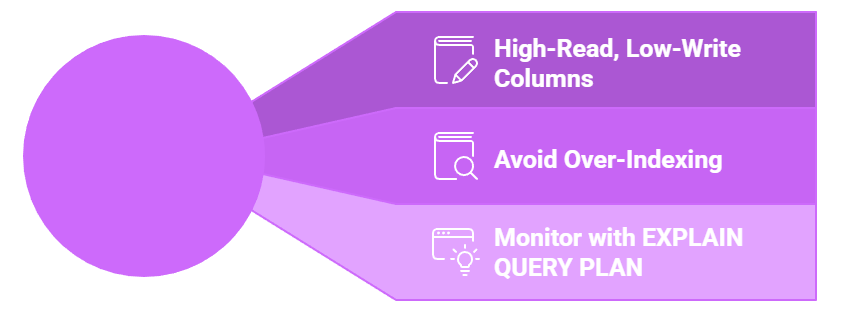
CREATE INDEX builds an index on one or more columns, reducing query times from O(n) to O(log n). Use on frequently queried columns like foreign keys or search fields.
Syntax Variants:
1. Single-column: CREATE INDEX idx_username ON users(username);
2. Multi-column (composite): CREATE INDEX idx_email_date ON users(email, created_at);
3. Unique: CREATE UNIQUE INDEX idx_email ON users(email);
Benefits in Backend Contexts:
1. Faster SELECTs in API routes (e.g., user search).
2. Supports ORDER BY and JOIN optimizations.
Example for a blog app
CREATE INDEX idx_posts_author ON posts(author_id);Python integration
conn.execute('CREATE INDEX IF NOT EXISTS idx_username ON users(username)')ALTER INDEX and DROP INDEX: Maintenance
Few DBMS allow direct ALTER on indexes; recreate if needed. DROP INDEX removes them to reclaim space.
1. Drop: DROP INDEX IF EXISTS idx_username;
2. For changes: Drop and recreate.
When to Index
Views: Virtual Tables for Simplicity
Views are virtual tables based on queries, simplifying complex joins without storing data. Perfect for backend APIs exposing aggregated data securely.
CREATE VIEW: Simplifying Queries
CREATE VIEW defines a reusable query as a "table." They're read-only by default but updatable in some cases (e.g., single-table views).
Syntax: CREATE VIEW view_name AS SELECT ...;
Example: A dashboard view for active users
CREATE VIEW active_users AS

SELECT id, username, email

FROM users

WHERE created_at > date('now', '-30 days');
Query it like a table: SELECT * FROM active_users;
Use Cases
1. Hide sensitive columns (security).
2. Pre-join data for API responses.
ALTER VIEW and DROP VIEW
ALTER VIEW recreates with CREATE OR REPLACE VIEW:
CREATE OR REPLACE VIEW active_users AS

SELECT id, username, email, age

FROM users

WHERE age >= 18 AND created_at > date('now', '-30 days');
Drop: DROP VIEW IF EXISTS active_users;

Class Sessions
Sales Campaign

We have a sales campaign on our promoted courses and products. You can purchase 1 products at a discounted price up to 15% discount.