Stored procedures, functions, and triggers are database objects that allow business logic to be executed directly within the database.
In backend development, they help centralize and reuse logic, reduce repetitive SQL in application code, and improve consistency across operations.
Stored procedures encapsulate a sequence of SQL statements to perform tasks such as data processing or validation, while functions return a value and are often used within queries.
Triggers automatically execute predefined actions in response to database events like INSERT, UPDATE, or DELETE.
Stored Procedures: Encapsulating Complex Operations
Stored procedures are pre-compiled SQL routines stored in the database, executed by name with parameters.
They shine for multi-step operations, offering security and efficiency over ad-hoc queries from your backend.
Think of them as database-hosted functions for tasks like data validation or batch processing. By centralizing logic, they simplify your app code and leverage the database's optimization engine.
Key Benefits and Use Cases
Stored procedures reduce redundancy and enhance security by restricting direct table access.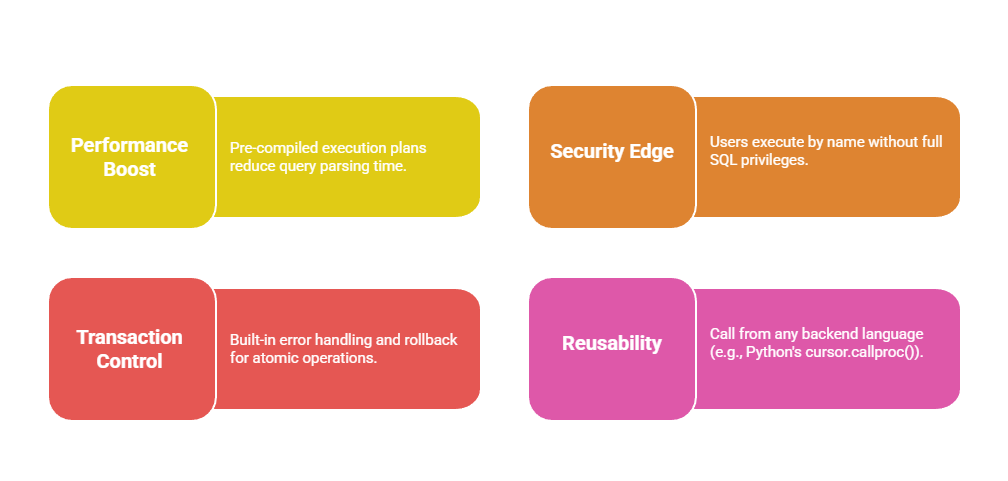 Common use cases include user registration workflows or report generation in data-heavy apps.
Creating and Executing Stored Procedures
Follow these steps to build one— we'll use a simple inventory update example.
1. Define the procedure: Use CREATE PROCEDURE with input/output parameters.
2. Add logic: Include queries, conditionals, and error handling.
3. Execute: Call via SQL or your backend ORM.
Here's a practical example in PostgreSQL (adaptable to MySQL):
CREATE OR REPLACE PROCEDURE UpdateInventory(

    IN product_id INT,

    IN quantity_change INT,

    OUT new_stock INT,

    OUT status VARCHAR(50)

)

LANGUAGE plpgsql

AS $$

BEGIN

    UPDATE products SET stock = stock + quantity_change WHERE id = product_id;

    GET DIAGNOSTICS new_stock = ROW_COUNT;


    IF new_stock > 0 THEN

        status := 'Success';

    ELSE

        status := 'No rows updated';

        RAISE NOTICE 'Product ID % not found', product_id;

    END IF;

END;

$$;
From Python (using psycopg2)
cursor.callproc('UpdateInventory', (123, -5, None, None))

cursor.fetchone()  # Fetches OUT params
This keeps your FastAPI endpoint clean: just call the proc instead of embedding 20-line queries.
User-Defined Functions: Returning Computed Values
Functions return values (scalars or tables) and support reusability like Python helpers, but run server-side for speed.
They're ideal for calculations reused across queries, avoiding code duplication in your backend.
Unlike procedures, functions are callable in SELECT statements, making them versatile for dynamic computations. Best practices (per ANSI SQL standards) emphasize determinism for caching.
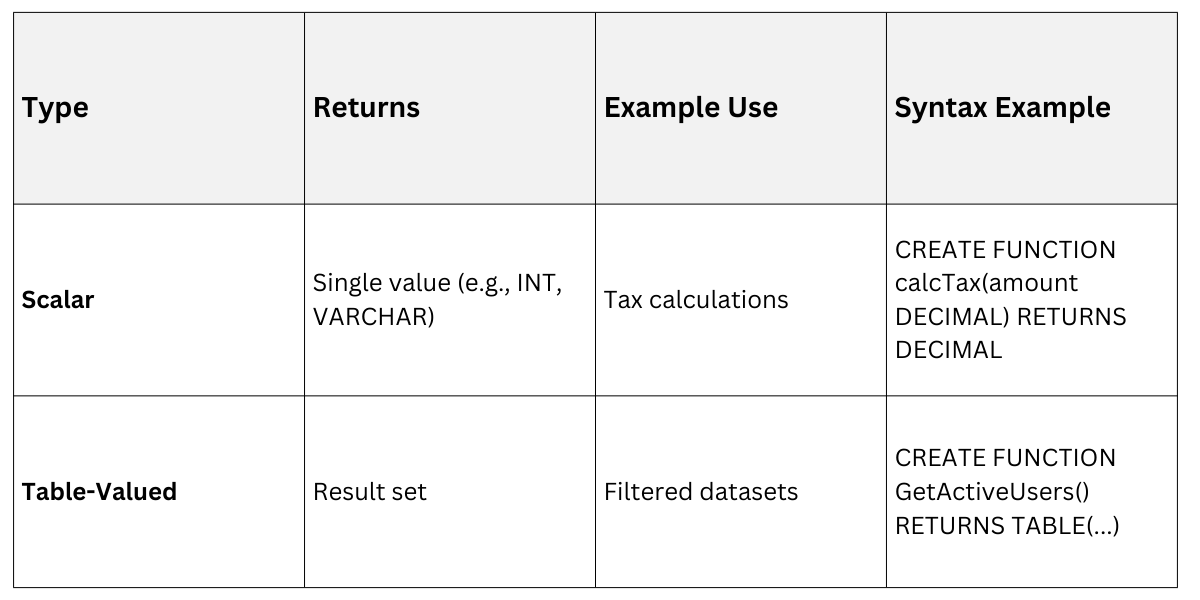
Types of Functions
Databases support scalar (single value) and table-valued functions.
Practical Example: Discount Calculator
For an e-commerce backend, create a scalar function for tiered discounts.
CREATE OR REPLACE FUNCTION CalculateDiscount(

    order_total DECIMAL,

    customer_tier VARCHAR  -- 'gold', 'silver', 'bronze'

)

RETURNS DECIMAL

LANGUAGE plpgsql

IMMUTABLE  -- Key for optimization: always same input = same output

AS $$

BEGIN

    CASE customer_tier

        WHEN 'gold' THEN RETURN order_total * 0.20;

        WHEN 'silver' THEN RETURN order_total * 0.10;

        ELSE RETURN 0;

    END CASE;

END;

$$;
Query it Inline:
SELECT customer_id, order_total, CalculateDiscount(order_total, tier) AS discount

FROM orders WHERE date > CURRENT_DATE - INTERVAL '30 days';
Pro Tip: Mark as IMMUTABLE for query planner optimizations—crucial for ML-driven apps analyzing sales data.
Triggers: Automating Database Events
Triggers fire automatically on events like INSERT, UPDATE, or DELETE, enforcing rules without app intervention.
They're your database's "watchdogs" for auditing, validation, or cascading updates.
In backend dev, triggers ensure data integrity (e.g., auto-updating timestamps) even if multiple services hit the DB. Use them sparingly to avoid performance hits, per industry best practices from PostgreSQL and MySQL docs.
Anatomy of a Trigger
A trigger pairs a trigger function with an event on a table.
1. Create trigger function: Define the logic (e.g., BEFORE/AFTER INSERT).
2. Attach to table: Specify timing and events.
3. Test: Simulate events to verify.
Example: Auto-audit log for a transactions table.
-- Trigger function

CREATE OR REPLACE FUNCTION AuditTransaction()

RETURNS TRIGGER

LANGUAGE plpgsql

AS $$

BEGIN

    INSERT INTO audit_log (table_name, operation, old_data, new_data, timestamp)

    VALUES (TG_TABLE_NAME, TG_OP, row_to_json(OLD), row_to_json(NEW), NOW());

    RETURN NEW;  -- Allows the original operation

END;

$$;


-- Attach trigger

CREATE TRIGGER transaction_audit

    AFTER INSERT OR UPDATE OR DELETE ON transactions

    FOR EACH ROW EXECUTE FUNCTION AuditTransaction();
This logs changes invisibly—perfect for compliance in fintech backends.
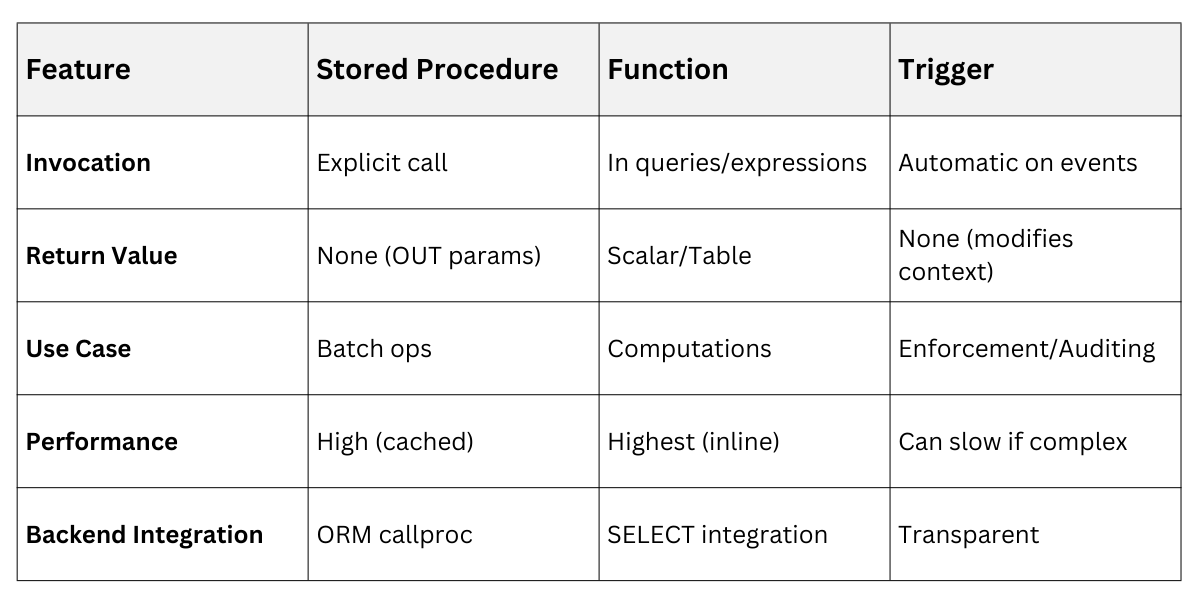
Procedures vs. Functions vs. Triggers
 Best Practices and Common Pitfalls
Adopt these for production-ready code.
1. Modularize: Keep routines under 100 lines; use transactions for procedures.
2. Error Handling: Always include EXCEPTION blocks (PL/pgSQL) or DECLARE EXIT HANDLER (MySQL).
3. Testing: Use tools like pgTap for procedures; mock events for triggers.
4. Avoid Overuse: Triggers can hide logic—document heavily and monitor query plans.
Pitfall Alert: Recursive triggers can infinite-loop; disable with CREATE TRIGGER ... NOT recursable.

Class Sessions
Sales Campaign

We have a sales campaign on our promoted courses and products. You can purchase 1 products at a discounted price up to 15% discount.