Continuous Integration and Continuous Deployment (CI/CD) are modern software development practices that streamline and automate the build, test, and release cycles, allowing teams to deliver applications faster and with higher quality.
AWS Developer Tools provide a fully managed, scalable solution to implement CI/CD pipelines seamlessly.
The core services—AWS CodeCommit, CodeBuild, and CodePipeline—work together to automate code storage, building, testing, and deployment, enabling rapid, reliable software delivery in the cloud.
AWS CodeCommit: Secure Source Control
AWS CodeCommit is a fully managed source control service that hosts secure and scalable Git repositories.
Key Features:
1. Provides private repositories that scale automatically with your projects.
2. Supports secure access with AWS IAM, encryption at rest, and in transit.
3. Integrates easily with other AWS CI/CD services.
4. Enables collaborative development with pull requests, code reviews, and branching.
Use Cases:
1. Storing application source code securely at scale.
2. Managing infrastructure as code repositories.
3. Facilitating team collaboration for software development.
AWS CodeBuild: Build and Test Automation
AWS CodeBuild is a fully managed continuous integration service that compiles source code, runs tests, and produces ready-to-deploy artifacts.
Key Features:
1. No need to manage build servers—scales automatically based on build volume.
2. Supports multiple programming languages, build environments, and custom configurations.
3. Integrates with CodeCommit, GitHub, and other repositories.
4. Offers pay-as-you-go pricing, charging only for build time used.
Use Cases:
1. Automating compilation, unit testing, and packaging.
2. Validating changes through automated tests before deployment.
3. Creating Docker images and pushing them to Amazon ECR.
AWS CodePipeline: Orchestrated Deployment
AWS CodePipeline automates the entire software release process, orchestrating each stage from source retrieval to deployment.
Key Features:
1. Defines sequential pipeline stages such as source, build, test, and deploy as code or via console.
2. Supports integration with AWS services (CodeCommit, CodeBuild, CodeDeploy) and third-party tools (GitHub, Jenkins).
3. Enables manual approval steps for controlled deployment workflows.
4. Supports parallel actions and multiple environments like dev, staging, and prod.
Use Cases:
1. Automating end-to-end deployment pipelines for microservices or monolithic applications.
2. Integrating continuous feedback loops via automated testing and approvals.
3. Enabling safe and fast release processes with rollback capabilities.
How AWS CI/CD Services Work Together 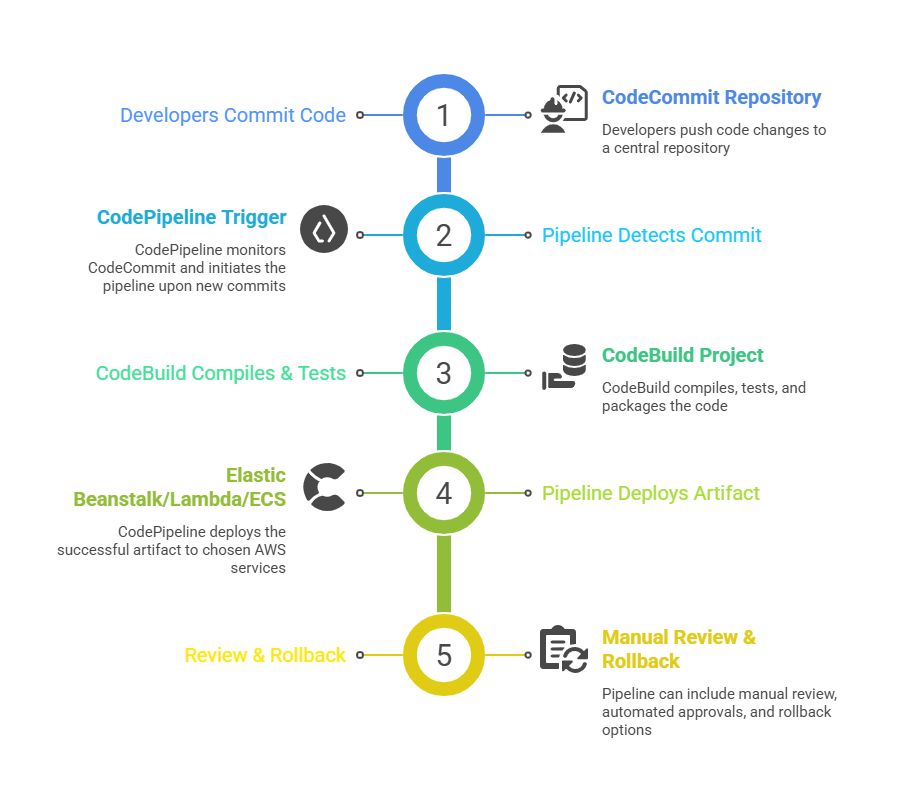

Class Sessions
Sales Campaign

We have a sales campaign on our promoted courses and products. You can purchase 1 products at a discounted price up to 15% discount.