Amazon Virtual Private Cloud (VPC) is a foundational AWS service that allows users to create a logically isolated virtual network within the AWS cloud.
This network provides control over resources, security, and connectivity, closely resembling traditional on-premises networks but with cloud scalability and flexibility.
Understanding VPC components such as subnets, route tables, network access control lists (ACLs), and security groups is crucial for building secure, high-performing, and well-organized cloud architectures.
VPC Components Overview
VPC is a virtual network environment in which AWS resources like EC2 instances, databases, and load balancers operate. Key components include:
1. Subnets
A subnet is a segmented portion of the VPC’s IP address range allocated to a single Availability Zone (AZ). It organizes resources and controls their connectivity.
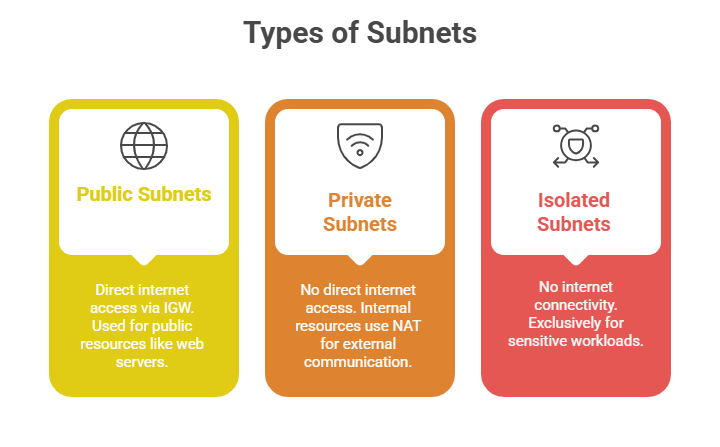
Role: Subnets enhance control, isolation, and fault tolerance by distributing resources across multiple AZs.
2. Route Tables
Contain a set of rules (routes) that determine how traffic flows within the VPC and to external networks. Each subnet is associated with one route table that guides outbound and inbound traffic.
Key Elements:
1. Destination: The IP block for which the routing applies (e.g., 0.0.0.0/0 for all external traffic).
2. Target: The network gateway or device (Internet Gateway, NAT Gateway, peering connection, or VPN).
Usage:
1. Public subnet route tables include a route directing internet traffic to the Internet Gateway.
2. Private subnet route tables usually route internet-bound traffic to a NAT device to access the internet securely.
3. Network Access Control Lists (NACLs)
NACLs act as stateless firewalls applied at the subnet level, controlling inbound and outbound traffic.
Characteristics:
1. Operate by evaluating each packet individually.
2. Require explicit allow or deny rules for both inbound and outbound traffic.
3. Suitable for broad, subnet-level traffic filtering, such as blocking or allowing specific IP ranges.
Default Setup: Each VPC comes with a default NACL allowing all inbound and outbound traffic, which can be customised.
4. Security Groups
Security groups are virtual firewalls associated with individual resources like EC2 instances.
Key Features:
1. Stateful: if inbound traffic is allowed, the response is automatically allowed without explicit outbound rules.
2. Rules permit or block traffic based on protocols, ports, and source/destination IP addresses or security groups.
3. Multiple security groups can be assigned to a resource, and rules can be modified dynamically.
Purpose: Provide fine-grained access control, defining who can communicate with which resource and on which ports.

Class Sessions
Sales Campaign

We have a sales campaign on our promoted courses and products. You can purchase 1 products at a discounted price up to 15% discount.