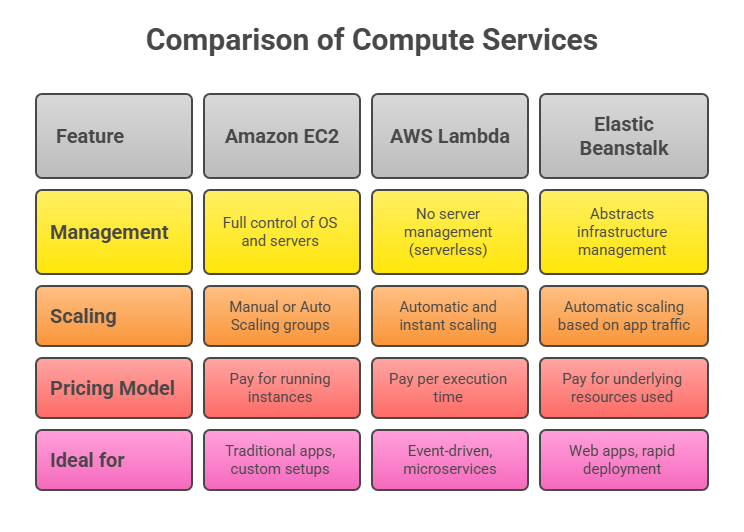
WS provides a robust suite of compute services that enable organizations to deploy applications and manage workloads with flexibility, scalability, and ease. Among the most widely used compute services are Amazon EC2, AWS Lambda, and AWS Elastic Beanstalk.
Each caters to different application needs—from traditional server-based setups to serverless architectures and managed application deployment platforms.
Amazon EC2 (Elastic Compute Cloud)
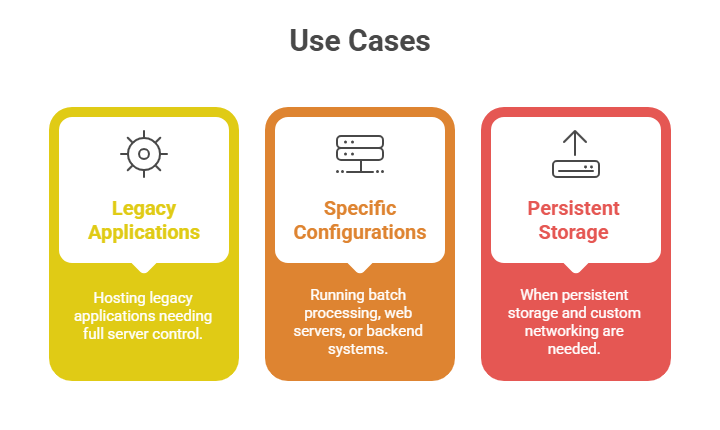
Amazon EC2 offers on-demand, resizable virtual servers ("instances") in the AWS Cloud. It provides the most control and flexibility over the underlying infrastructure.
Key Features:
1. Launch as many virtual servers as needed with various instance types optimized for compute, memory, storage, or GPU.
2. Ability to choose operating systems, software stacks, and custom configurations.
3. Supports scalable storage through Amazon Elastic Block Store (EBS) and ephemeral instance store volumes.
4. Security managed via Security Groups (virtual firewalls), IAM for access policies, and Key Pairs for secure logins.
5. Includes Auto Scaling and Elastic Load Balancing for high availability and dynamic resource management.
 AWS Lambda
AWS Lambda is a serverless compute service that runs your code in response to events and automatically manages the underlying compute resources. You pay only for the compute time your code consumes.
Key Features:
1. No need to provision or manage servers; just upload code functions.
2. Automatically scales to handle from a few requests per day to thousands per second.
3. Integrated with over 150 AWS and SaaS event sources (e.g., S3 uploads, DynamoDB streams, API Gateway requests).
4. Supports multiple programming languages and runtimes.
.png)
AWS Elastic Beanstalk
Elastic Beanstalk simplifies application deployment by abstracting infrastructure management, letting developers focus on writing code. It is a Platform as a Service (PaaS) that automates provisioning, deployment, scaling, and monitoring of applications.
Key Features:
1. Supports applications developed in Java, .NET, PHP, Node.js, Python, Ruby, Go, and Docker.
2. Automatically handles capacity provisioning, load balancing, auto-scaling, and health monitoring.
3. Allows customization of AWS resources (EC2 instance types, database options) under the hood.
4. Integrated with developer tools and managed through console, CLI, or APIs.
Use Cases:
1. Rapid deployment of web applications and services where infrastructure management complexity is a concern.
2. Development teams want simplified application lifecycle management while preserving access to AWS resources.
3. Projects needing scalable web environments with minimal operational overhead.