AWS Identity and Access Management (IAM) is a critical service that enables secure control over access to AWS resources. It allows organizations to manage who can sign in and what privileges they have within an AWS account.
IAM provides fine-grained access management through entities like users, groups, and roles, linked with policies defining specific permissions. Mastering IAM concepts is essential for maintaining cloud security, compliance, and operational governance.
IAM Users
An IAM user represents an individual person or application interacting with AWS resources. Users have long-term credentials, such as a password for AWS Management Console access or access keys for programmatic API usage.
Characteristics:
1. Each user has a unique identity within the AWS account.
2. Permissions are not granted by default; they must be explicitly assigned.
3. Users can belong to multiple groups for inheritance of permissions.
4. Used primarily for human users or applications requiring direct AWS access.
IAM Groups
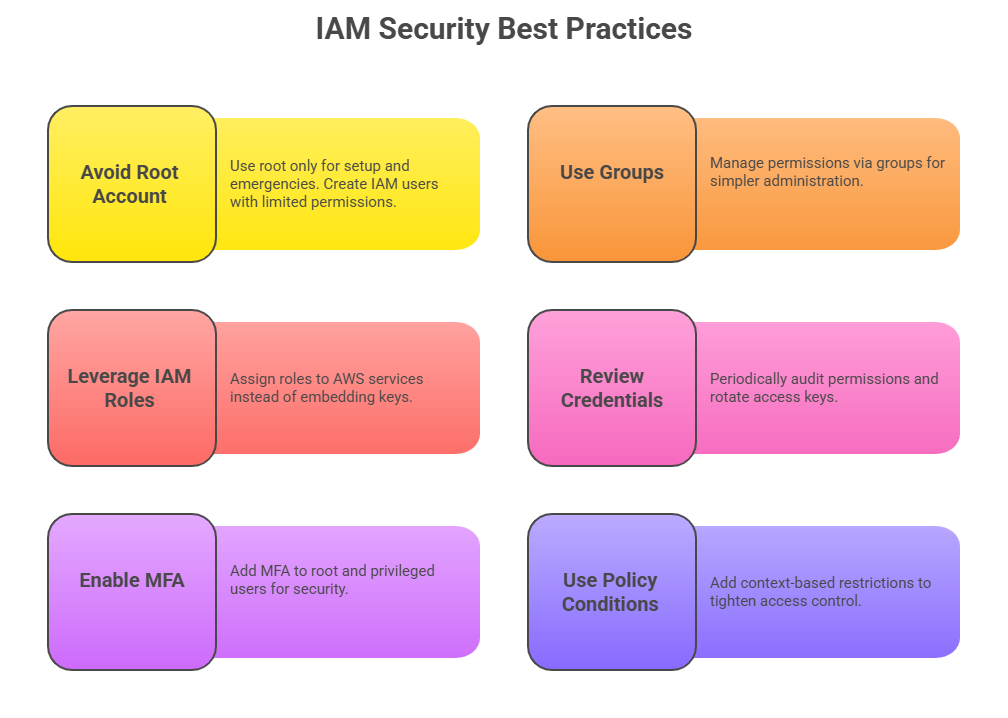
Groups are collections of IAM users simplified for permission management. Instead of attaching policies to individual users, policies attach to groups, and users inherit matched permissions.
Key Points:
1. Groups cannot contain other groups—only users.
2. A user can be part of multiple groups.
3. Useful for managing roles based on job functions (e.g., admins, developers, auditors).
4. Modify group policies to adjust access for all members at once.
IAM Roles
IAM roles are identities with permission policies but without permanently attached credentials. They can be assumed temporarily by trusted entities such as AWS services, applications, or users.
Features:
1. Provide temporary security credentials through role assumption.
2. Do not have passwords or long-lived access keys.
3. Useful for delegating access without sharing long-term credentials.
4. Commonly used for applications running on EC2 instances, Lambda functions, or cross-account access.
IAM Policies
Policies are JSON documents defining permissions and are attached either to users, groups, or roles. They state allowed or denied actions on AWS resources.
Types of Policies:
1. Identity-based policies: Attached to IAM users, groups, or roles, controlling permissions for that identity.
2. Resource-based policies: Attached to AWS resources like S3 buckets, allowing or denying access from principals.
3. Permissions boundaries: Set maximum permissions for users or roles, safeguarding against excessive privilege grants.
Best Practice: Follow the principle of least privilege—grant only permissions necessary for performing job functions.

Class Sessions
Sales Campaign

We have a sales campaign on our promoted courses and products. You can purchase 1 products at a discounted price up to 15% discount.