USD ($)
$
United States Dollar
Euro Member Countries
India Rupee
د.إ
United Arab Emirates dirham
ر.س
Saudi Arabia Riyal

Shared Responsibility Model in AWS

Lesson 3/29 | Study Time: 20 Min

The AWS Shared Responsibility Model is a fundamental framework that clarifies the division of security and compliance duties between AWS and its customers.

This model ensures that while AWS manages the security of the cloud infrastructure, customers are responsible for security in the cloud, specifically related to their data, applications, and configurations.

Understanding this shared responsibility is crucial for organizations to effectively protect their cloud environments and comply with industry standards.

Understanding AWS’s Responsibility: Security of the Cloud

AWS is responsible for safeguarding the infrastructure that runs all AWS services. This includes:
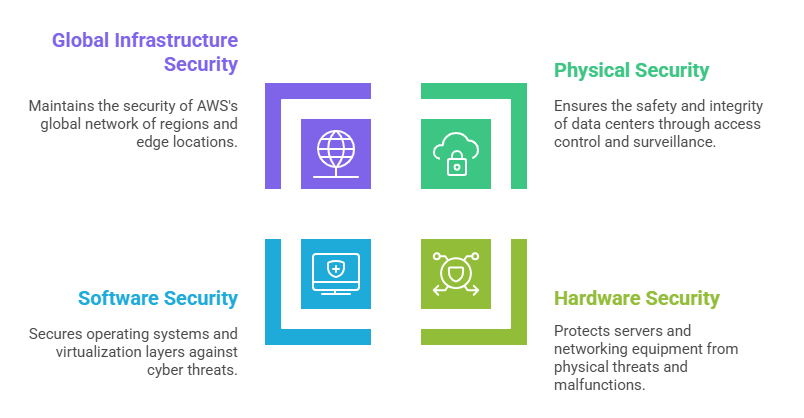

AWS ensures that the foundational services and hardware operate securely, thus relieving customers from managing these complex and critical layers.

Understanding Customer’s Responsibility: Security in the Cloud

Customers control the security requirements related to their use of AWS services, which vary depending on the services they select. Responsibilities generally include:


1. Managing guest operating systems, patches, and updates on services like Amazon EC2 (Infrastructure as a Service - IaaS)

2. Configuring firewalls, security groups, and network access controls

3. Securing data by using encryption, managing permissions, and identity and access management (IAM)

4. Application-level security and maintaining compliance with relevant laws and regulations


For more abstracted services, such as Amazon S3 or DynamoDB, AWS manages more of the infrastructure stack, but customers remain accountable for their data security and access configurations.

Shared Responsibility Across Service Models

The shared responsibility balance shifts based on the cloud service model:


AspectInfrastructure as a Service (IaaS)Platform as a Service (PaaS)Software as a Service (SaaS)
AWS ResponsibilityPhysical infrastructure, foundational layersPhysical infrastructure, OS, middlewareThe entire infrastructure and software
Customer ResponsibilityOS, applications, data, network configsApplications, data, and user accessData, user access


Nate Parker

Nate Parker

Product Designer
Profile

Class Sessions

1- Overview of Cloud Computing and AWS Cloud 2- AWS Global Infrastructure: Regions, Availability Zones, and Edge Locations 3- Shared Responsibility Model in AWS 4- Key Benefits of AWS Cloud: Scalability, Elasticity, and Cost Optimization 5- Compute Services: Amazon EC2, Lambda, and Elastic Beanstalk Basics 6- Storage Services: Amazon S3, EBS, and Glacier Overview and Use Cases 7- Database Services: Amazon RDS, DynamoDB, and Aurora Fundamentals 8- Monitoring and Management: AWS CloudWatch and CloudTrail Essentials 9- Designing Scalability and High Availability: Auto Scaling and Elastic Load Balancing 10- Virtual Private Cloud (VPC): Components, Subnets, Route Tables, Network ACLs, and Security Groups 11- VPN vs. Direct Connect: Connectivity Options Explained 12- AWS Identity and Access Management (IAM): users, groups, roles, policies, and best practices 13- Data Protection: Encryption Options (SSE, KMS) and SSL/TLS Basics 14- AWS Security Best Practices and Compliance Considerations 15- Designing for Fault Tolerance Using Multi-AZ and Multi-Region Deployments 16- Load Balancing Strategies with Elastic Load Balancers: Application, Network, Classic 17- Backup and Recovery Strategies with AWS Backup, Snapshots, and Lifecycle Policies 18- Disaster Recovery Fundamentals and AWS Architecture Approaches: Pilot Light, Warm Standby, Multi-Site 19- AWS Pricing Models: On-Demand, Reserved Instances, and Spot Instances 20- Cost Management Tools: AWS Cost Explorer, Budgets, Pricing Calculator Basics 21- Architectural Best Practices for Cost-Efficient Solutions in AWS 22- Rightsizing and Resource Optimization Techniques in AWS 23- Infrastructure as Code (IaC) Basics: AWS CloudFormation Introduction. 24- Deploying Applications Using AWS Elastic Beanstalk and AWS Lambda Serverless Computing 25- Continuous Integration and Continuous Deployment (CI/CD) Overview with AWS Developer Tools: CodeCommit, CodePipeline, CodeBuild 26- Monitoring application health and performance in production environments 27- Exam Overview, Format, and Registration Process for AWS Certification 28- Tips for Answering Scenario-Based Questions in AWS Exams 29- Practice Questions and Explanations for AWS Solutions Architect – Associate Exam

Sales Campaign

Sales Campaign

We have a sales campaign on our promoted courses and products. You can purchase 1 products at a discounted price up to 15% discount.