Data protection is a cornerstone of secure cloud computing, ensuring sensitive information remains confidential and tamper-proof both at rest and in transit.
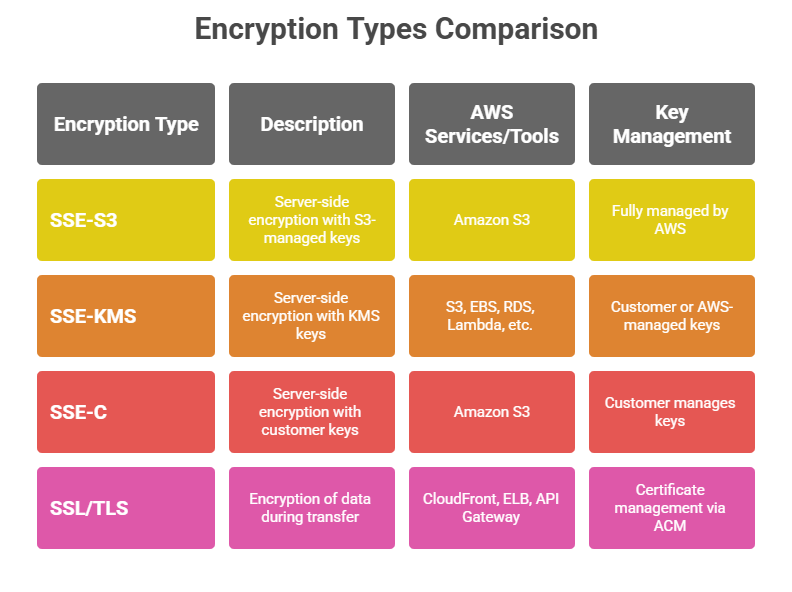
AWS offers robust encryption mechanisms such as Server-Side Encryption (SSE) with options like SSE-S3, SSE-KMS, and client-provided keys, all managed through AWS Key Management Service (KMS) or hosted internally.
Additionally, SSL/TLS protocols secure data as it moves across networks, preventing unauthorized interception. Together, these protocols and technologies enable comprehensive security tailored for modern cloud environments.
Server-Side Encryption (SSE) in AWS
Server-Side Encryption protects data at rest by encrypting data as it is written to storage and decrypting it during retrieval, transparently to the user.
1. SSE-S3 (Amazon S3 Managed Keys)
Encrypts data using 256-bit Advanced Encryption Standard (AES-256).
AWS manages all encryption keys, automatically rotating them without user involvement.
Ensures high durability and availability, encrypting each object uniquely on disk.
No additional cost; used by default for S3 buckets with encryption enabled.
2. SSE-KMS (AWS Key Management Service keys)
Combines encryption with customer control over encryption keys. Customers can create, rotate, disable, and audit keys.
Allows granular access control policies on keys, enforced via IAM.
Supports audit logging of key usage through AWS CloudTrail.
Slightly higher cost than SSE-S3 due to KMS usage fees.
3. SSE-C (Customer-Provided Keys)
Customers supply their own encryption keys for AWS to encrypt and decrypt objects.
AWS does not store keys; the client must securely manage and provide keys with each request.
Provides encryption but adds operational overhead on key management.
AWS Key Management Service (KMS)
AWS KMS is a managed service simplifying encryption key creation, storage, and lifecycle management, integrating with services such as S3, EBS, RDS, and more.
Features:
1. Centralized key management with policies to restrict key use.
2. Integration with AWS services for seamless encryption at rest.
3. Support for both customer-managed and AWS-managed keys.
4. Key rotation, import of external keys, and detailed usage audits.
SSL/TLS Basics: Encryption in Transit
Secure Sockets Layer (SSL) and its successor Transport Layer Security (TLS) provide encryption for data traveling over networks, preventing eavesdropping and data tampering.
How SSL/TLS Works:
1. Encrypts data before transmission using asymmetric cryptography during the handshake, establishing a secure session key.
2. Uses symmetric encryption for the session to efficiently secure data.
3. Ensures data integrity and authenticates communicating parties through certificates.
AWS Usage:
1. AWS services like CloudFront, Elastic Load Balancing, and API Gateway support SSL/TLS for secure client-server communication.
2. AWS Certificate Manager (ACM) automates certificate provisioning and renewal for SSL/TLS.
3. Essential for securing data in transit between client browsers, APIs, and backend systems.

Class Sessions
Sales Campaign

We have a sales campaign on our promoted courses and products. You can purchase 1 products at a discounted price up to 15% discount.