Kubernetes manages applications through a well-defined set of objects, and each serving a specific purpose in the lifecycle of a containerized application.
Among all these objects, three stand out as the most fundamental and the most frequently used: Pods, Deployments, and Services.
These three concepts work together as a team, Pods provide the runtime environment for containers, Deployments manage how Pods are run and updated, and Services provide the stable network access that makes Pods reachable.
Pods — The Smallest Unit of Deployment
A Pod is the smallest and most basic deployable unit in Kubernetes. It is important to understand that Kubernetes does not run containers directly — it runs Pods, and Pods contain containers.
A Pod wraps one or more containers and provides them with a shared execution environment.
Every Pod has:
1. A unique IP address within the cluster.
2. Shared network namespace — all containers in a Pod share the same IP and communicate via localhost.
3. Shared storage — containers in a Pod can access the same mounted volumes.
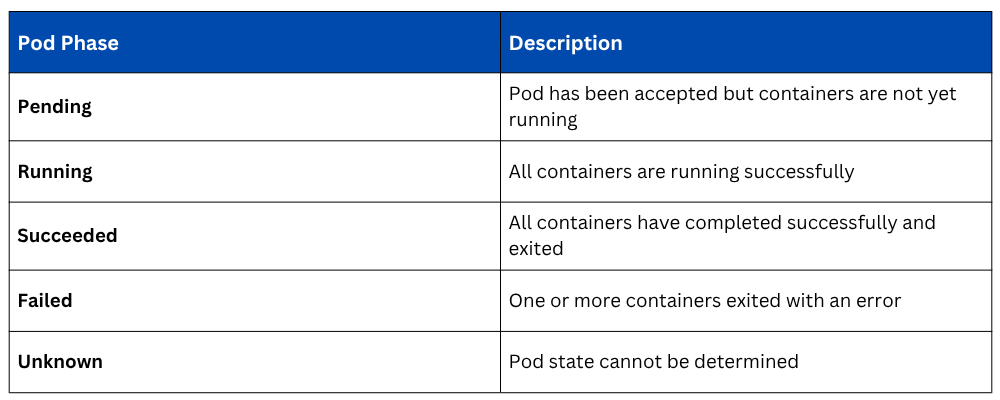
4. A defined lifecycle — created, running, and eventually terminated.
In practice, the vast majority of Pods contain a single container. Multi-container Pods are used for specific patterns, such as a sidecar container that handles logging, monitoring, or proxying alongside the main application container.
Pod Lifecycle
Pods are deliberately ephemeral, they are not designed to be permanent. When a Pod fails, it is not repaired; it is replaced with a new one.
This is a fundamental design principle in Kubernetes, workloads are treated as disposable and replaceable, not as precious, long-lived entities.
Defining a Pod in YAML
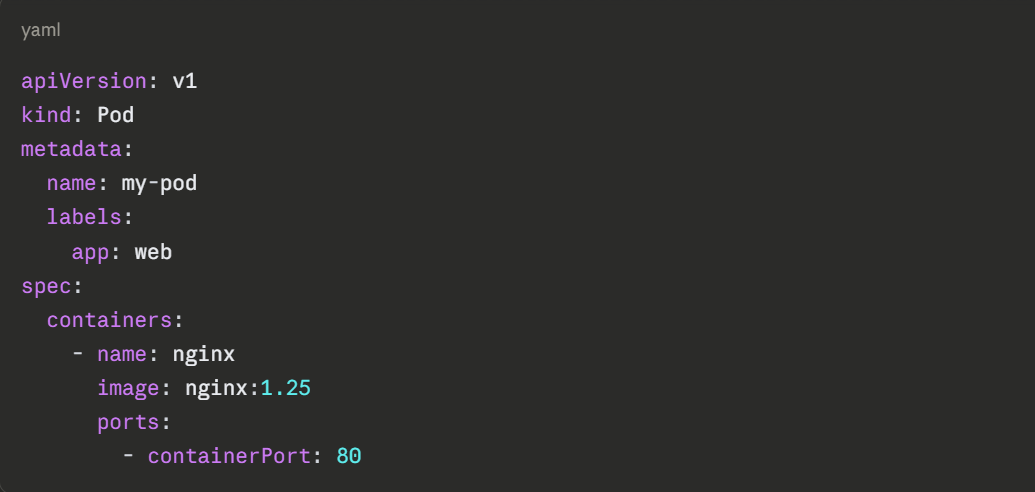
A basic Pod manifest that runs an Nginx container:
Applying this manifest to the cluster:

Viewing the running pod:

Viewing detailed information about the pod:

Why Pods are Not Used Alone in Production
While it is possible to create individual Pods directly, this approach is almost never used in production.
A standalone Pod has no mechanism to restart itself if it crashes, no way to run multiple replicas for redundancy, and no way to perform rolling updates. These capabilities are provided by the next object, the Deployment.
Deployments — Managing Pods at Scale
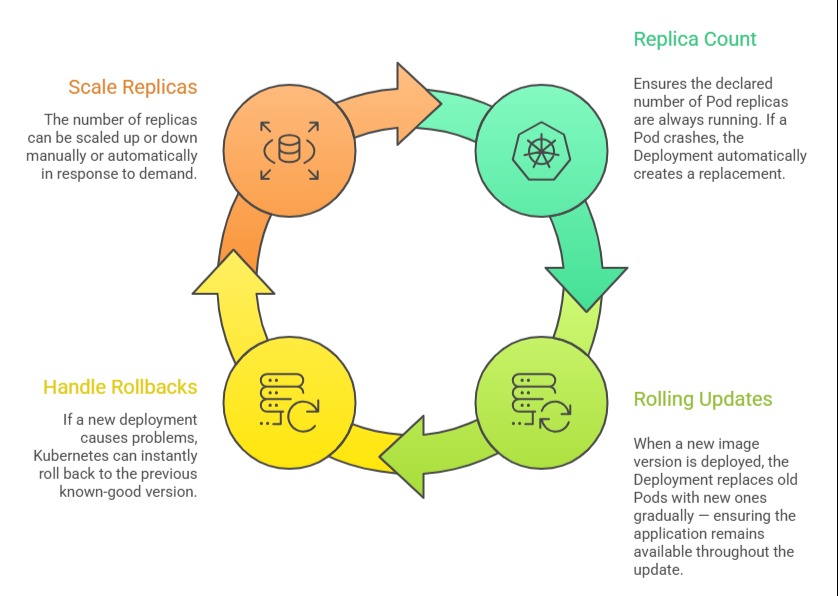
A Deployment is the primary object used to run applications on Kubernetes in a production-ready, managed way. It sits above Pods in the hierarchy and provides all the capabilities that raw Pods lack; replica management, self-healing, rolling updates, and rollbacks.
When a Deployment is created, Kubernetes automatically creates a ReplicaSet — an intermediate object that maintains the specified number of identical Pod replicas at all times.
Engineers rarely interact with ReplicaSets directly; the Deployment manages them automatically.
What a Deployment Manages
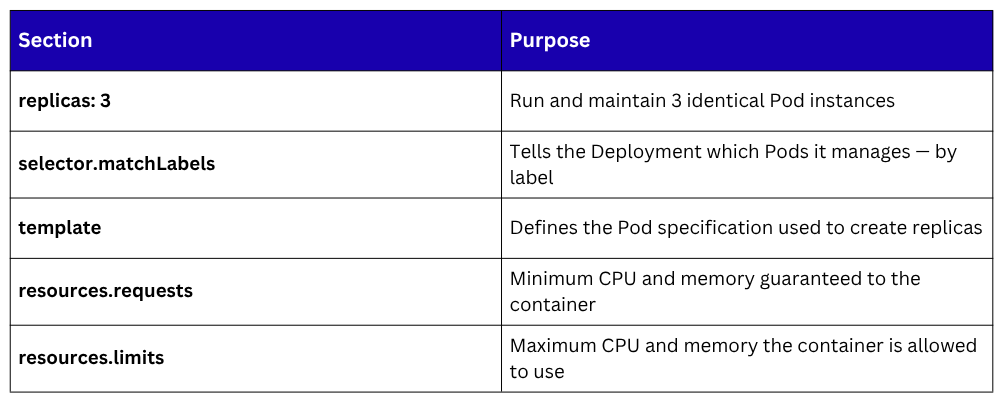
 Defining a Deployment in YAML
yaml
apiVersion: apps/v1
kind: Deployment
metadata:
name: web-app
labels:
app: web-app
spec:
replicas: 3
selector:
matchLabels:
app: web-app
template:
metadata:
labels:
app: web-app
spec:
containers:
- name: web-app
image: nginx:1.25
ports:
- containerPort: 80
resources:
requests:
memory: "64Mi"
cpu: "250m"
limits:
memory: "128Mi"
cpu: "500m"
Applying the deployment:

Viewing the deployment status:

Viewing the pods created by the deployment:

Scaling a Deployment
The number of replicas can be changed at any time, either by editing the YAML and reapplying, or directly via kubectl:

Kubernetes immediately starts new Pods to reach the target count, scheduling them across available nodes.
Rolling Updates and Rollbacks
When the application image is updated, the Deployment handles the transition gracefully. Updating the container image:

Kubernetes replaces old Pods with new ones gradually, by default, ensuring that some Pods are always running during the transition. If something goes wrong, rolling back to the previous version is a single command:

Checking the status of a rollout in progress:

Viewing the rollout history:

The Deployment — Pod Relationship
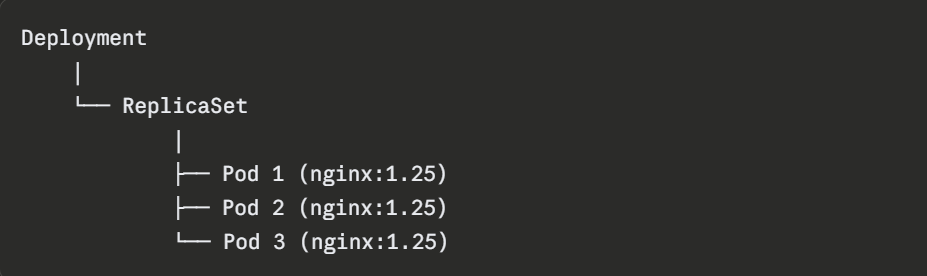
The Deployment manages the ReplicaSet. The ReplicaSet manages the Pods. When the Deployment is updated, a new ReplicaSet is created for the new version while the old one is scaled down, enabling zero-downtime deployments.
Services — Stable Network Access to Pods
Pods are ephemeral, they are created and destroyed regularly, and every new Pod gets a new IP address.
This creates an obvious problem: how does one part of an application reliably communicate with another if its address keeps changing? How do external users reach an application running across multiple Pod replicas?
The answer is a Service.
A Kubernetes Service provides a stable, permanent network endpoint — a fixed IP address and DNS name that routes traffic to the appropriate Pods, regardless of how many times those Pods have been replaced or how their IPs have changed.
Services use label selectors to identify which Pods they should route traffic to the same labels defined in the Deployment's Pod template.
Types of Services
Kubernetes provides four types of Services, each suited to different access patterns:
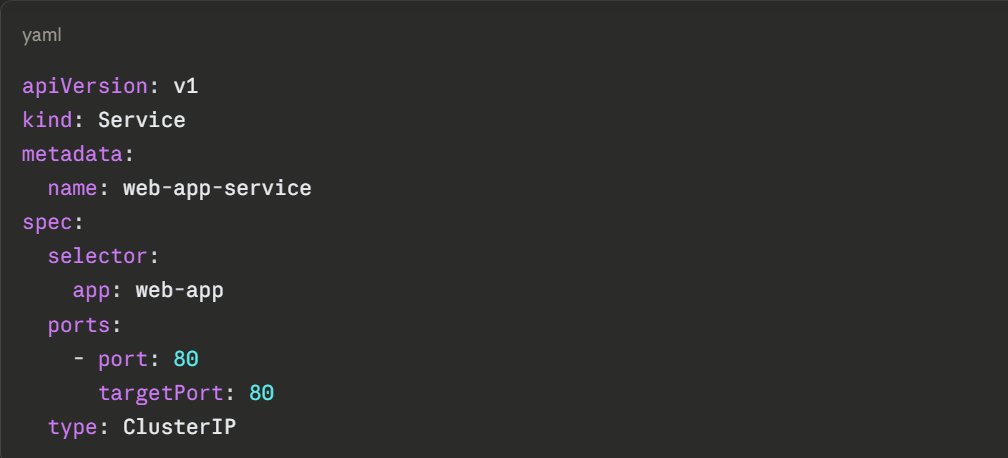
1. ClusterIP (Default): Exposes the Service on an internal IP address within the cluster. The Service is only reachable from within the cluster — not from the outside. This is the default type and is used for internal communication between application components.
2. NodePort: Exposes the Service on a static port on every node in the cluster. External traffic can reach the Service by hitting any node's IP address at the specified port. Suitable for development and testing, but not recommended for production external access.
3. LoadBalancer: Provisions an external load balancer through the cloud provider (AWS, GCP, Azure) and assigns a publicly accessible IP address to the Service. This is the standard way to expose applications to the internet in cloud-hosted Kubernetes clusters.
4. ExternalName: Maps the Service to an external DNS name, allowing Pods inside the cluster to reach an external service using a Kubernetes-internal name. Useful for integrating with services outside the cluster.
Defining a Service in YAML
A ClusterIP Service for internal access to the web-app Deployment:
A LoadBalancer Service for external internet access:
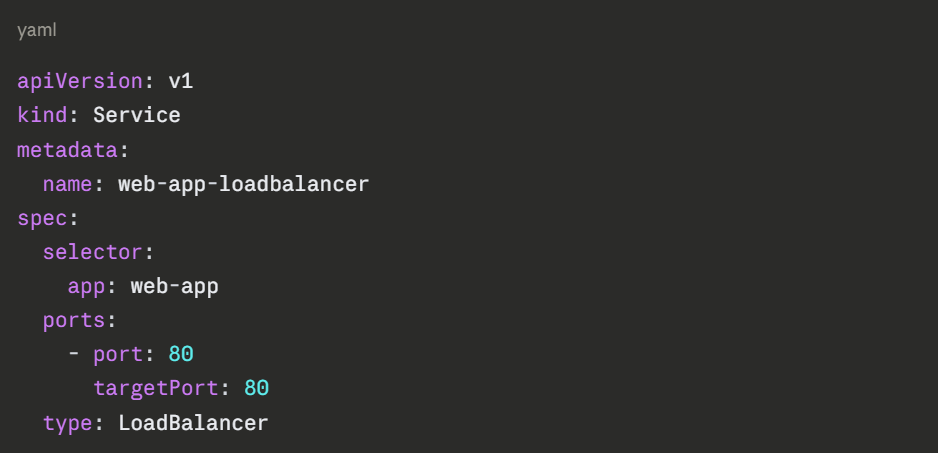
The selector: app: web-app field is what connects the Service to the Pods — it routes traffic to any Pod carrying the label app: web-app, which matches the label defined in the Deployment template.
Applying the service:

Viewing all services:

How Pods, Deployments, and Services Work Together
The relationship between these three objects forms the complete, production-ready application deployment pattern in Kubernetes:
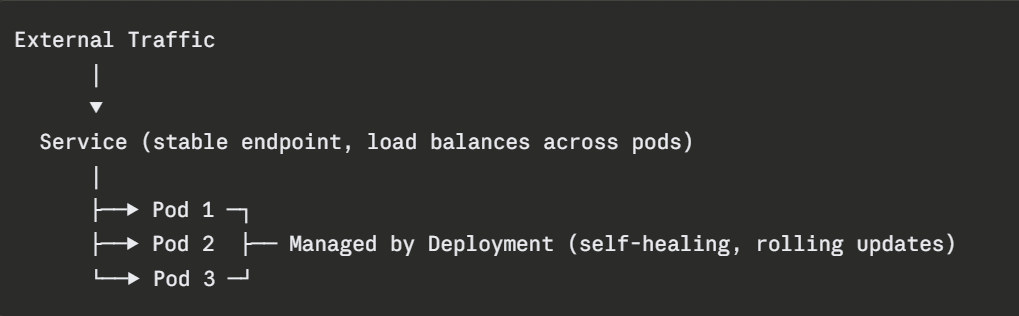
1. The Deployment ensures three healthy Pod replicas are always running.
2. The Service provides a single, stable entry point that distributes traffic across all three Pods.
3. When a Pod is replaced due to failure or a rolling update the Service automatically routes traffic only to healthy Pods.
4. The engineer interacts primarily with the Deployment and Service, the Pods themselves are managed automatically.