Once the need for container orchestration is clear, the next question is naturally, which platform does the industry actually use?
The answer is Kubernetes. Originally developed by Google, drawing from over a decade of internal experience running containers at massive scale — Kubernetes was open-sourced in 2014 and donated to the Cloud Native Computing Foundation (CNCF) in 2016.
Today it is the undisputed industry standard for container orchestration, supported by every major cloud provider, adopted by organizations of every size, and backed by one of the largest and most active open-source communities in the world.
What is Kubernetes?
Kubernetes (often abbreviated as K8s — the 8 representing the eight letters between K and s) is an open-source platform for automating the deployment, scaling, and management of containerized applications across a cluster of machines.
At its core, Kubernetes does the following:
1. Runs containerized applications across a group of servers called a cluster.
2. Automatically decides which server runs which container based on available resources.
3. Keeps applications running by detecting and recovering from failures automatically.
4. Scales applications up or down based on demand.
5. Manages how containers communicate with each other and with the outside world.
6. Handles configuration, secrets, and storage for containerized workloads.
Kubernetes does not build container images, that is Docker's job. Kubernetes takes those images and manages how they run across an entire infrastructure.
Kubernetes Architecture
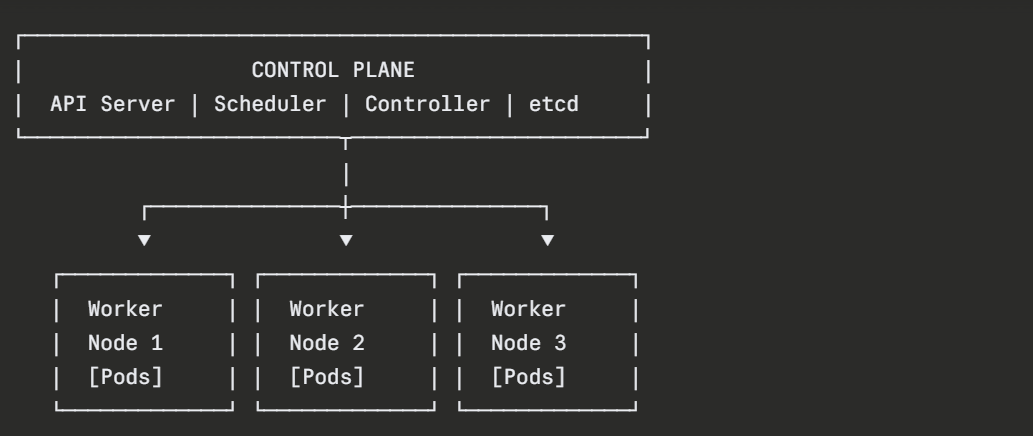
A Kubernetes deployment is called a cluster, a group of machines (physical or virtual) that work together under Kubernetes' management. Every cluster has two types of components: the Control Plane and the Worker Nodes.
The Control Plane
The control plane is the brain of the Kubernetes cluster. It makes all the decisions, where to run containers, how many should run, what to do when something fails. Key control plane components include:
1. API Server: The front door to Kubernetes. Every interaction with the cluster — from engineers running commands to internal components communicating goes through the API server.
2. Scheduler: Watches for new workloads and decides which worker node should run them, based on available CPU, memory, and other constraints.
3. Controller Manager: Runs background processes that ensure the cluster's actual state matches the desired state — restarting failed containers, maintaining the correct number of replicas, and more.
4. etcd: A distributed key-value store that holds the entire cluster's configuration and state. It is the single source of truth for Kubernetes.
Worker Nodes
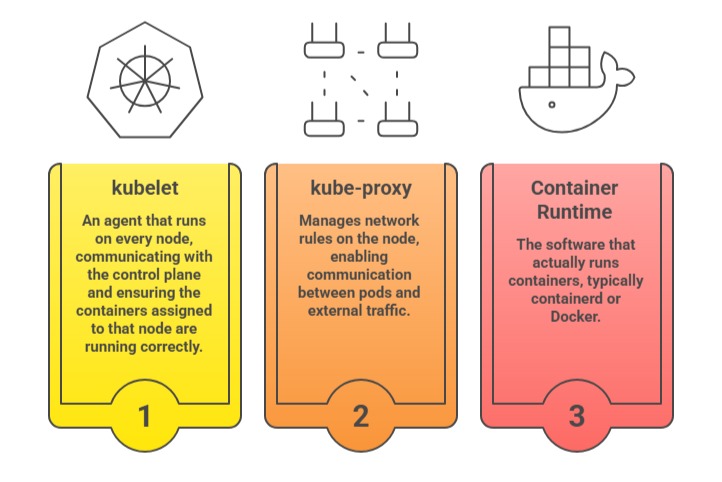
Worker nodes are the machines where application containers actually run. Each worker node contains:
Core Kubernetes Concepts
Kubernetes manages applications through a set of well-defined objects. Understanding these objects is the foundation of working with Kubernetes effectively.
1. Pod
A Pod is the smallest deployable unit in Kubernetes, not a container directly, but a wrapper around one or more containers that share the same network namespace and storage. In practice, most pods contain a single container.
Pods are ephemeral — they are created, destroyed, and replaced regularly. They are never manually repaired; when a pod fails, Kubernetes replaces it with a new one.
2. Node
A Node is a worker machine in the cluster — physical or virtual — on which pods are scheduled and run. Each node is managed by the control plane and runs the kubelet agent.
3. Deployment
A Deployment is the standard way to run and manage a set of identical pods. It allows you to declare how many replicas of a pod should run, what container image to use, and how updates should be applied.
The deployment controller continuously ensures the desired number of replicas are running — automatically replacing failed pods.
4. Service
A Service provides a stable network endpoint for accessing a set of pods.
Since pods are ephemeral and their IP addresses change when they are replaced, a Service provides a consistent DNS name and IP address that other applications use to communicate — regardless of which specific pods are currently running behind it.
5. Namespace
A Namespace provides a logical partition within a cluster, allowing multiple teams or applications to share the same cluster while keeping their resources isolated. Different namespaces can have different access controls and resource limits.
6. ConfigMap and Secret
ConfigMaps store non-sensitive configuration data, such as environment variables and configuration files — separately from container images. Secrets store sensitive data such as passwords, tokens, and certificates in an encoded form. Both are injected into pods at runtime.
7. Ingress
An Ingress manages external HTTP and HTTPS access to services within the cluster, routing incoming traffic to the appropriate service based on URL paths or hostnames. It acts as the entry point from the outside world into the cluster's applications.
How Kubernetes Works
Kubernetes operates on a desired state model, engineers declare what they want the infrastructure to look like, and Kubernetes continuously works to make reality match that declaration.
This works through a control loop:
1. An engineer submits a configuration file declaring the desired state. For example, "run 3 replicas of this application".
2. Kubernetes stores this desired state in etcd.
3. The controller manager continuously compares the desired state to the actual state of the cluster.
4. When a difference is detected, such as one of the three replicas having crashed — Kubernetes automatically takes corrective action, in this case, starting a new pod to replace the failed one.
This is self-healing in action, and it runs continuously, automatically, without any human involvement.
Interacting with Kubernetes — kubectl
kubectl is the official command-line tool for interacting with a Kubernetes cluster. It communicates with the cluster's API server to create, inspect, update, and delete Kubernetes objects.
Checking the status of all nodes in the cluster:

Viewing all running pods in the default namespace:

Viewing pods across all namespaces:

Applying a configuration file to create or update resources:

Viewing detailed information about a specific pod:

Viewing logs from a running pod:

Opening an interactive shell inside a running pod:

Deleting a resource:

A Basic Kubernetes Deployment
Kubernetes resources are defined in YAML manifest files, the same desired-state approach used throughout the DevOps ecosystem.
Here is a simple deployment manifest for a web application:
yaml
apiVersion: apps/v1
kind: Deployment
metadata:
name: web-app
spec:
replicas: 3
selector:
matchLabels:
app: web-app
template:
metadata:
labels:
app: web-app
spec:
containers:
- name: web-app
image: nginx:1.25
ports:
- containerPort: 80
This manifest instructs Kubernetes to run 3 replicas of an Nginx container. If any replica fails, Kubernetes automatically replaces it. The deployment is applied to the cluster with:

To expose this deployment to network traffic, a Service is created alongside it:
yaml
apiVersion: v1
kind: Service
metadata:
name: web-app-service
spec:
selector:
app: web-app
ports:
- port: 80
targetPort: 80
type: LoadBalancer
Kubernetes in the DevOps Ecosystem
Kubernetes does not operate in isolation, it is the deployment target at the end of a modern CI/CD pipeline:
1. Application code is written and committed to Git.
2. A CI/CD pipeline builds the Docker image and pushes it to a container registry.
3. The pipeline updates the Kubernetes deployment manifest with the new image tag.
4. kubectl apply deploys the updated application to the cluster.
5. Kubernetes performs a rolling update, replacing old pods with new ones gradually, with zero downtime.
6. Monitoring tools like Prometheus and Grafana observe the cluster and application health post-deployment.
Kubernetes also integrates with Terraform for cluster provisioning, Helm for packaging and deploying complex applications, and service meshes like Istio for advanced traffic management and security between services.

Class Sessions
Sales Campaign

We have a sales campaign on our promoted courses and products. You can purchase 1 products at a discounted price up to 15% discount.